Kind로 Kubernetes Cluster 배포하기 [Cilium Study 5주차]
Kind로 Kubernetes Cluster 배포하기 [Cilium Study 5주차]
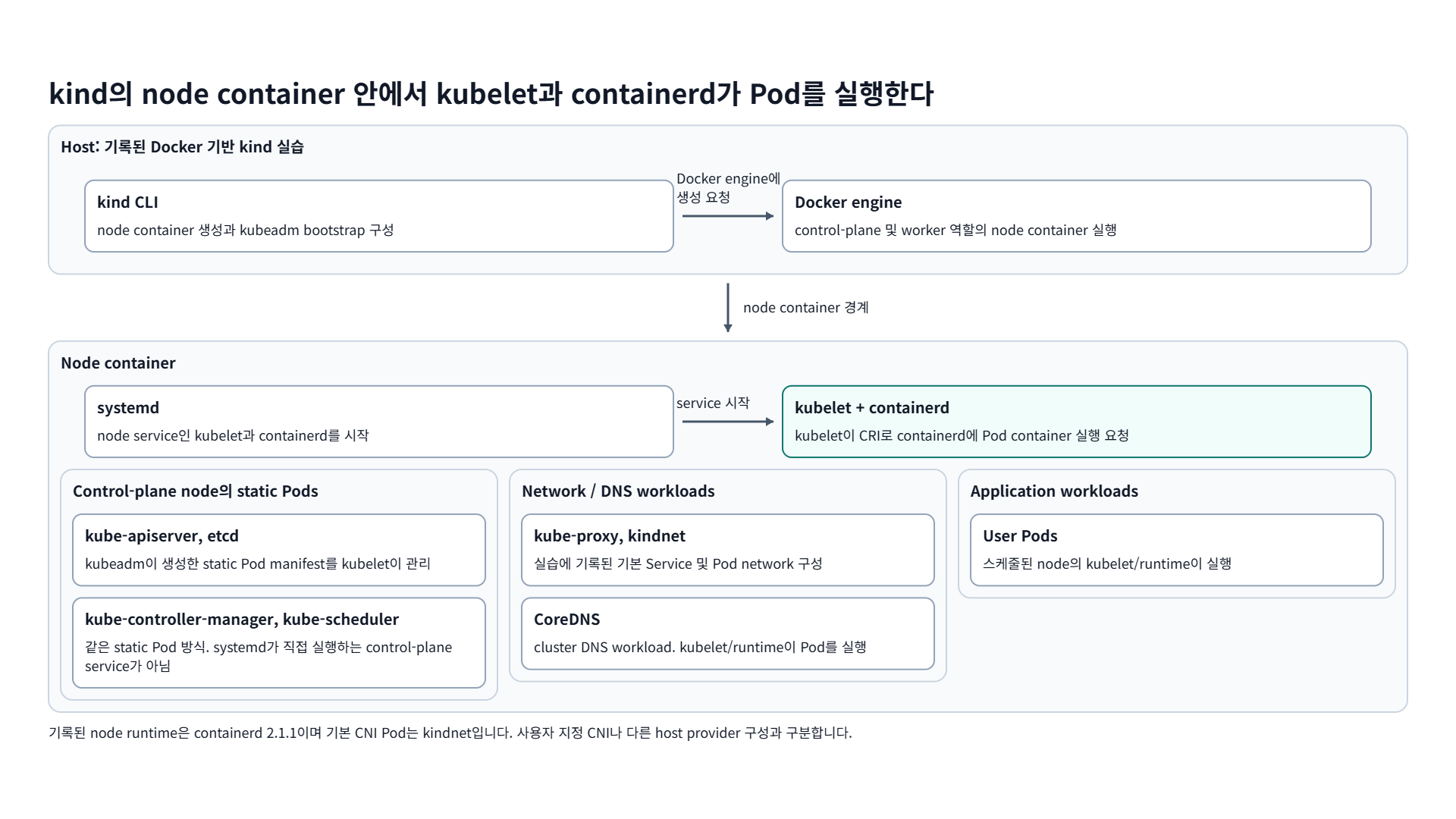
Host: 기록된 Docker 기반 kind 실습
kind CLInode container 생성과 kubeadm bootstrap 구성
Docker engine에 생성 요청
Docker enginecontrol-plane 및 worker 역할의 node container 실행
node container 경계
Node container
systemdnode service인 kubelet과 containerd를 시작
service 시작
kubelet + containerdkubelet이 CRI로 containerd에 Pod container 실행 요청
Control-plane node의 static Pods
kube-apiserver, etcdkubeadm이 생성한 static Pod manifest를 kubelet이 관리
kube-controller-manager, kube-scheduler같은 static Pod 방식. systemd가 직접 실행하는 control-plane service가 아님
Network / DNS workloads
kube-proxy, kindnet실습에 기록된 기본 Service 및 Pod network 구성
CoreDNScluster DNS workload. kubelet/runtime이 Pod를 실행
Application workloads
User Pods스케줄된 node의 kubelet/runtime이 실행
기록된 node runtime은 containerd 2.1.1이며 기본 CNI Pod는 kindnet입니다. 사용자 지정 CNI나 다른 host provider 구성과 구분합니다.
Kind는 Kubernetes in Docker의 줄임말로, Docker 컨테이너를 노드로 사용해 로컬에서 Kubernetes Cluster를 실행하기 위한 도구입니다. Kubernetes Cluster를 테스트하기 위해 설계되었지만, 로컬 개발이나 CI 과정에서도 사용될 수 있습니다.
이번 포스트에서는 Kind에 대해 알아보고, Kind를 사용해 Cluster를 생성해보도록 하겠습니다.
TL;DR
- Kind는 Docker 컨테이너를 노드로 삼아 Kubernetes 클러스터를 띄우므로, VM 없이 멀티 노드 클러스터를 빠르게 만들 수 있습니다.
- 필요한 것은 go 1.17 이상과 docker, podman, nerdctl 중 하나, 그리고 kubectl입니다.
- 설치 시
uname -m결과에 따라 amd64와 arm64 바이너리를 구분해 받아야 합니다.
1. 사전 조건
2. Kind 설치
1
2
3
4
5
6
# For AMD64 / x86_64
[ $(uname -m) = x86_64 ] && curl -Lo ./kind https://kind.sigs.k8s.io/dl/v0.29.0/kind-linux-amd64
# For ARM64
[ $(uname -m) = aarch64 ] && curl -Lo ./kind https://kind.sigs.k8s.io/dl/v0.29.0/kind-linux-arm64
chmod +x ./kind
sudo mv ./kind /usr/local/bin/kind
3. Kind로 Kubernetes Cluster 배포
Default 세팅으로 Kubernetes Cluster를 배포해보도록 하겠습니다. kind로 배포한 Cluster의 Kubeconfig Context는 자동으로 kind 명령을 날린 호스트의 Kubeconfig에 merge됩니다.
1
2
3
4
5
6
7
8
9
10
11
12
13
14
15
16
17
18
19
20
21
22
23
24
25
26
27
28
29
################################
# Cluster 배포 전 컨테이너 확인
################################
docker ps
# CONTAINER ID   IMAGE     COMMAND   CREATED   STATUS    PORTS     NAMES

################################
# Cluster 생성
################################
kind create cluster
# Creating cluster "kind" ...
#  ✓ Ensuring node image (kindest/node:v1.33.1) 🖼
#  ✓ Preparing nodes 📦
#  ✓ Writing configuration 📜
#  ✓ Starting control-plane 🕹️
#  ✓ Installing CNI 🔌
#  ✓ Installing StorageClass 💾
# Set kubectl context to "kind-kind"
# You can now use your cluster with:

# kubectl cluster-info --context kind-kind

# Have a question, bug, or feature request? Let us know! https://kind.sigs.k8s.io/#community 🙂

################################
# Kind Cluster 확인
################################
kind get clusters
# kind
4. Kubernetes Cluster 배포 확인
1
2
3
4
5
6
7
8
9
10
11
12
13
14
15
16
17
18
19
20
21
22
23
24
25
26
27
28
29
30
31
32
33
34
35
36
37
38
39
40
41
42
43
44
45
46
47
48
49
50
51
52
53
54
55
56
57
58
59
60
61
62
63
64
65
66
67
68
69
70
71
72
73
74
75
76
77
78
79
80
81
82
83
84
85
86
87
88
89
90
91
92
93
94
95
################################
# kubectl context 확인
################################
kubectl config get-contexts
CURRENT   NAME        CLUSTER          AUTHINFO           NAMESPACE
*         kind-kind   kind-kind        kind-kind

################################
# Node 정보 확인
################################
kubectl get node -o wide
# NAME                 STATUS     ROLES           AGE   VERSION   INTERNAL-IP   EXTERNAL-IP   OS-IMAGE                         KERNEL-VERSION                     CONTAINER-RUNTIME
# kind-control-plane   NotReady   control-plane   20s   v1.33.1   172.18.0.2    <none>        Debian GNU/Linux 12 (bookworm)   6.6.87.2-microsoft-standard-WSL2   containerd://2.1.1

################################
# Pod 정보 확인
################################
kubectl get pod -A -o wide
# NAMESPACE            NAME                                         READY   STATUS    RESTARTS   AGE   IP           NODE                 NOMINATED NODE   READINESS GATES
# kube-system          coredns-674b8bbfcf-cxjzl                     1/1     Running   0          31s   10.244.0.2   kind-control-plane   <none>           <none>
# kube-system          coredns-674b8bbfcf-gwrcg                     1/1     Running   0          31s   10.244.0.3   kind-control-plane   <none>           <none>
# kube-system          etcd-kind-control-plane                      1/1     Running   0          37s   172.18.0.2   kind-control-plane   <none>           <none>
# kube-system          kindnet-ljlj2                                1/1     Running   0          31s   172.18.0.2   kind-control-plane   <none>           <none>
# kube-system          kube-apiserver-kind-control-plane            1/1     Running   0          37s   172.18.0.2   kind-control-plane   <none>           <none>
# kube-system          kube-controller-manager-kind-control-plane   1/1     Running   0          37s   172.18.0.2   kind-control-plane   <none>           <none>
# kube-system          kube-proxy-pvrxh                             1/1     Running   0          31s   172.18.0.2   kind-control-plane   <none>           <none>
# kube-system          kube-scheduler-kind-control-plane            1/1     Running   0          37s   172.18.0.2   kind-control-plane   <none>           <none>
# local-path-storage   local-path-provisioner-7dc846544d-sp94l      1/1     Running   0          31s   10.244.0.4   kind-control-plane   <none>           <none>

################################
# Component Status 확인
################################
kubectl get --raw '/healthz?verbose' | sed 's/; /\n/g'

# [+]ping ok
# [+]log ok
# [+]etcd ok
# [+]poststarthook/start-apiserver-admission-initializer ok
# [+]poststarthook/generic-apiserver-start-informers ok
# [+]poststarthook/priority-and-fairness-config-consumer ok
# [+]poststarthook/priority-and-fairness-filter ok
# [+]poststarthook/storage-object-count-tracker-hook ok
# [+]poststarthook/start-apiextensions-informers ok
# [+]poststarthook/start-apiextensions-controllers ok
# [+]poststarthook/crd-informer-synced ok
# [+]poststarthook/start-system-namespaces-controller ok
# [+]poststarthook/start-cluster-authentication-info-controller ok
# [+]poststarthook/start-kube-apiserver-identity-lease-controller ok
# [+]poststarthook/start-kube-apiserver-identity-lease-garbage-collector ok
# [+]poststarthook/start-legacy-token-tracking-controller ok
# [+]poststarthook/start-service-ip-repair-controllers ok
# [+]poststarthook/rbac/bootstrap-roles ok
# [+]poststarthook/scheduling/bootstrap-system-priority-classes ok
# [+]poststarthook/priority-and-fairness-config-producer ok
# [+]poststarthook/bootstrap-controller ok
# [+]poststarthook/start-kubernetes-service-cidr-controller ok
# [+]poststarthook/aggregator-reload-proxy-client-cert ok
# [+]poststarthook/start-kube-aggregator-informers ok
# [+]poststarthook/apiservice-status-local-available-controller ok
# [+]poststarthook/apiservice-status-remote-available-controller ok
# [+]poststarthook/apiservice-registration-controller ok
# [+]poststarthook/apiservice-discovery-controller ok
# [+]poststarthook/kube-apiserver-autoregistration ok
# [+]autoregister-completion ok
# [+]poststarthook/apiservice-openapi-controller ok
# [+]poststarthook/apiservice-openapiv3-controller ok
# healthz check passed

################################
# Docker Container 확인
################################
docker ps
# CONTAINER ID   IMAGE                  COMMAND                  CREATED         STATUS         PORTS                       NAMES
# 72fe47021619   kindest/node:v1.33.1   "/usr/local/bin/entr…"   3 minutes ago   Up 3 minutes   127.0.0.1:39917->6443/tcp   kind-control-plane

################################
# Docker Network 확인
################################
docker inspect kind | jq '.[0].IPAM.Config'
[
  {
    "Subnet": "172.18.0.0/16",
    "Gateway": "172.18.0.1"
  },
  {
    "Subnet": "fc00:f853:ccd:e793::/64",
    "Gateway": "fc00:f853:ccd:e793::1"
  }
]

################################
# Control Plane Container에서 포트 바인딩 확인
################################
docker exec -it kind-control-plane ss -tnlp | grep 6443
LISTEN 0      4096               *:6443             *:*    users:(("kube-apiserver",pid=554,fd=3))
5. Pod 생성 및 통신 확인
Kind의 Default Setting으로 Control Plane Node 만 존재할 경우, Control Plane Node에 Pod가 스케줄될 수 있도록 NoSchedule taint가 제거되어 있습니다.
1
2
3
4
5
6
7
8
9
10
11
12
13
14
15
16
17
18
19
20
21
22
23
24
25
26
27
28
29
30
31
32
33
34
35
36
37
38
39
40
41
42
43
44
45
46
47
48
49
50
51
52
53
54
55
56
57
58
59
60
61
62
63
64
65
66
67
68
69
70
71
72
73
74
75
76
77
78
79
80
81
82
83
84
85
86
87
88
89
90
91
92
93
94
95
96
97
98
99
100
101
102
103
104
################################
# Node Taint 확인
################################
kubectl describe node | grep -i Taints
# Taints:             <none>

################################
# Sample Application 배포 (webpod Deployment + Service)
################################
cat << EOF | kubectl apply -f -
apiVersion: apps/v1
kind: Deployment
metadata:
  name: webpod
spec:
  replicas: 1
  selector:
    matchLabels:
      app: webpod
  template:
    metadata:
      labels:
        app: webpod
    spec:
      affinity:
        podAntiAffinity:
          requiredDuringSchedulingIgnoredDuringExecution:
          - labelSelector:
              matchExpressions:
              - key: app
                operator: In
                values: ["webpod"]
            topologyKey: "kubernetes.io/hostname"
      containers:
      - name: webpod
        image: traefik/whoami
        ports:
        - containerPort: 80
---
apiVersion: v1
kind: Service
metadata:
  name: webpod
  labels:
    app: webpod
spec:
  selector:
    app: webpod
  ports:
  - protocol: TCP
    port: 80
    targetPort: 80
  type: ClusterIP
EOF

###############################################
# curl-pod 배포 (k8s-ctr에 고정)
###############################################
cat <<EOF | kubectl apply -f -
apiVersion: v1
kind: Pod
metadata:
  name: curl-pod
  labels:
    app: curl
spec:
  containers:
  - name: curl
    image: nicolaka/netshoot
    command: ["tail"]
    args: ["-f", "/dev/null"]
  terminationGracePeriodSeconds: 0
EOF

###############################################
# Pod Status 확인
###############################################
kubectl get deploy,po,svc -o wide
# NAME                     READY   UP-TO-DATE   AVAILABLE   AGE     CONTAINERS   IMAGES           SELECTOR
# deployment.apps/webpod   1/1     1            1           2m43s   webpod       traefik/whoami   app=webpod

# NAME                          READY   STATUS    RESTARTS   AGE     IP           NODE                 NOMINATED NODE   READINESS GATES
# pod/curl-pod                  1/1     Running   0          2m43s   10.244.0.7   kind-control-plane   <none>           <none>
# pod/webpod-74f6f7bd86-s72mc   1/1     Running   0          2m43s   10.244.0.6   kind-control-plane   <none>           <none>

# NAME                 TYPE        CLUSTER-IP     EXTERNAL-IP   PORT(S)   AGE     SELECTOR
# service/kubernetes   ClusterIP   10.96.0.1      <none>        443/TCP   15m     <none>
# service/webpod       ClusterIP   10.96.187.29   <none>        80/TCP    2m43s   app=webpod

###############################################
# 통신 확인
###############################################
kubectl exec -it curl-pod -- curl -s http://webpod.default.svc.cluster.local

# Hostname: webpod-74f6f7bd86-s72mc
# IP: 127.0.0.1
# IP: ::1
# IP: 10.244.0.6
# IP: fe80::9004:12ff:fee7:117e
# RemoteAddr: 10.244.0.7:47124
# GET / HTTP/1.1
# Host: webpod.default.svc.cluster.local
# User-Agent: curl/8.14.1
# Accept: */*
6. Cluster 삭제 및 Context 확인
1
2
3
4
5
6
7
8
9
10
11
12
13
14
15
16
17
18
19
20
21
22
23
24
25
26
################################
# 클러스터 확인
################################
kind get clusters
# kind

################################
# 클러스터 삭제
################################
# Default Cluster의 경우 이름을 따로 지정해주지 않아도 됨
kind delete cluster --name kind
# Deleting cluster "kind" ...
# Deleted nodes: ["kind-control-plane"]

################################
# Docker Container 확인
################################
docker ps
# CONTAINER ID   IMAGE     COMMAND   CREATED   STATUS    PORTS     NAMES

################################
# Kind Cluster의 Context 확인 (삭제됨)
################################
kubectl config get-contexts
# CURRENT   NAME     CLUSTER          AUTHINFO           NAMESPACE
7. Reference
궁금하신 점이나 추가해야 할 부분은 댓글이나 아래의 링크를 통해 문의해주세요.
Written with KKamJi
This post is licensed under CC BY 4.0 by the author.