Istio Request Routing

서비스 메시의 핵심 가치는 트래픽 제어를 애플리케이션 밖에서 일관되게 수행하는 데 있습니다. Istio의 Request Routing 기능을 활용하면 동일 서비스의 버전별 트래픽 분산, 사용자 그룹별 라우팅, 점진적 배포를 손쉽게 구현할 수 있습니다.
이번 글에서는 Bookinfo 데모 애플리케이션을 대상으로 DestinationRule과 VirtualService를 적용해 헤더 기반 라우팅을 구현하고, Envoy 로그와 Kiali로 동작을 검증합니다.
1. Request Routing이 필요한 이유
- 트래픽 분산: 버전별 트래픽 비율 제어
- A/B 테스트: 사용자 그룹별 다른 버전 노출
- 카나리 배포: 점진적 전환으로 배포 안정성 확보
2. 사전 준비
- Bookinfo 애플리케이션이 배포되어 있어야 합니다.
default네임스페이스에 Sidecar 자동 주입이 활성화되어 있어야 합니다.
2.1. 실습 코드 받기
1
2
git clone https://github.com/KKamJi98/kkamji-lab.git
cd kkamji-lab/study/istio-study/02-request-routing/
1
2
kubectl get pods -n default
kubectl get ns default --show-labels
3. DestinationRule & VirtualService 적용
1
2
kubectl apply -f https://raw.githubusercontent.com/KKamJi98/kkamji-lab/main/study/istio-study/02-request-routing/bookstore-app/destination-rule.yaml
kubectl apply -f https://raw.githubusercontent.com/KKamJi98/kkamji-lab/main/study/istio-study/02-request-routing/bookstore-app/virtual-service.yaml
위 명령은 reviews 서비스에 대한 DestinationRule(v1/v2 subset 정의)과 VirtualService(헤더 기반 라우팅 규칙)를 생성합니다.
설정 요약
end-user: admin→ reviews:v2로 라우팅- 그 외 사용자 → reviews:v1로 라우팅
아래는 적용된 리소스의 핵심 구조 예시입니다.
1
2
3
4
5
6
7
8
9
10
11
12
13
14
15
16
17
18
19
20
21
22
23
24
25
26
27
28
29
30
31
32
33
34
apiVersion: networking.istio.io/v1beta1
kind: DestinationRule
metadata:
  name: reviews
spec:
  host: reviews
  subsets:
  - name: v1
    labels:
      version: v1
  - name: v2
    labels:
      version: v2
---
apiVersion: networking.istio.io/v1beta1
kind: VirtualService
metadata:
  name: reviews
spec:
  hosts:
  - reviews
  http:
  - match:
    - headers:
        end-user:
          exact: admin
    route:
    - destination:
        host: reviews
        subset: v2
  - route:
    - destination:
        host: reviews
        subset: v1
4. 라우팅 동작 검증
위에서 DestinationRule과 VirtualService를 적용했으므로, 실제로 헤더 기반 라우팅이 동작하는지 UI에서 확인해보겠습니다.
1
2
kubectl get nodes -o wide
open http://<EXTERNAL-IP>:30010/productpage
검증 시나리오
Sign in클릭- Username에
admin입력 (Password는 임의 입력) - 새로고침 시 별점(Star Ratings)이 보이면
reviews:v2가 호출된 상태입니다.
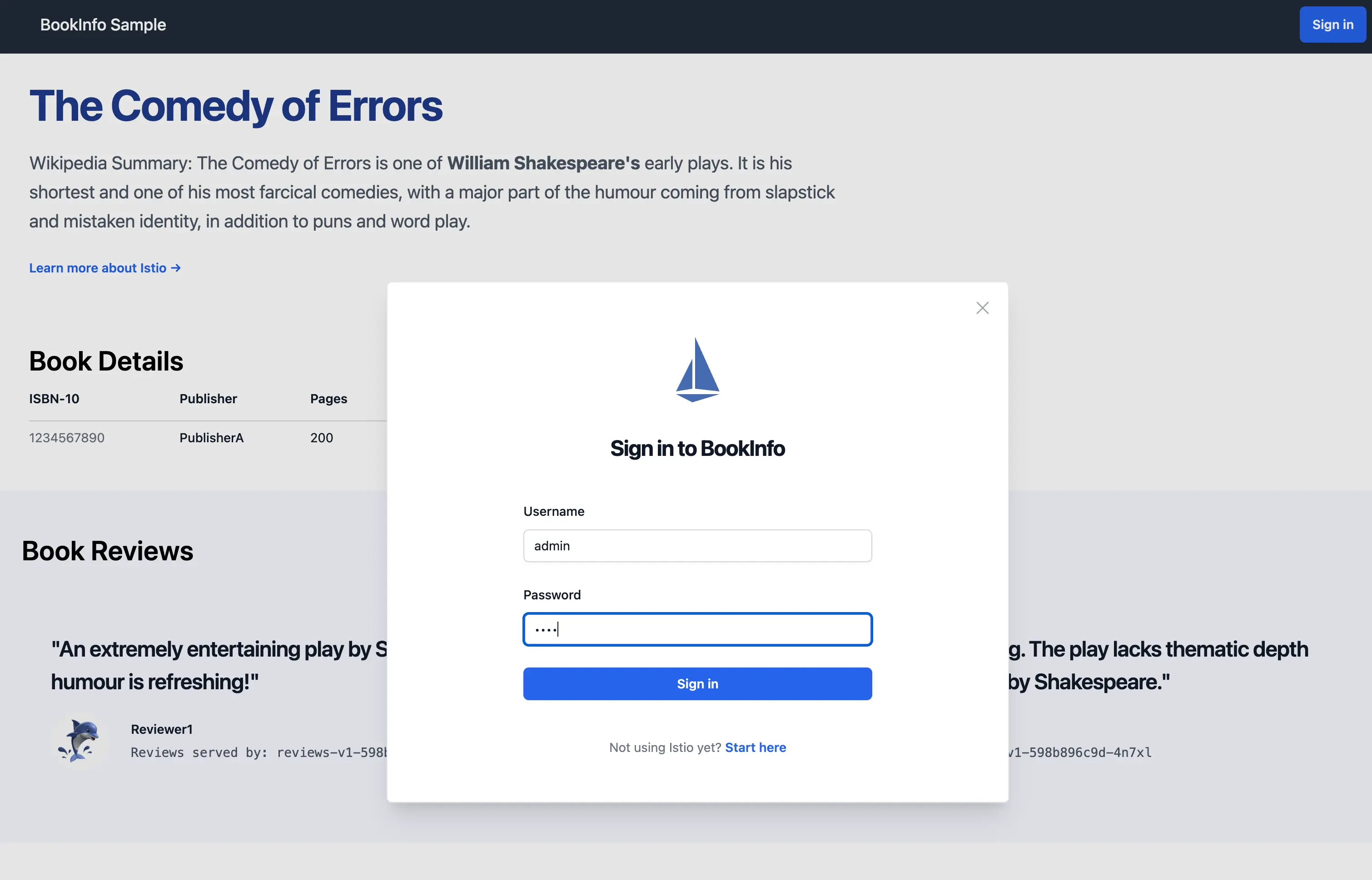
Bookinfo productpage에서 로그인 버튼을 눌러 end-user 헤더를 주입하는 화면입니다.
이를 통해 admin 사용자 요청이 reviews:v2로 라우팅되는지 시각적으로 확인할 수 있습니다.
5. Envoy 액세스 로그로 요청 경로 확인
UI 결과만으로는 라우팅 경로를 확정하기 어려우므로, Envoy access log로 실제 upstream을 확인합니다.
Envoy access log를 활성화하면 라우팅 결과를 정밀하게 확인할 수 있습니다.
1
2
3
4
5
6
7
8
9
10
11
12
13
14
15
16
17
18
19
20
21
22
23
24
25
26
27
28
29
30
cat <<EOF > istio-cni.yaml
apiVersion: install.istio.io/v1alpha1
kind: IstioOperator
spec:
  components:
    cni:
      namespace: istio-system
      enabled: true
    pilot:
      k8s:
        resources:
          requests:
            cpu: 200m
            memory: 512Mi
  meshConfig:
    accessLogFile: /dev/stdout
    accessLogEncoding: JSON
    accessLogFormat: |
      {
        "req_method": "%REQ(:METHOD)%",
        "req_path": "%REQ(X-ENVOY-ORIGINAL-PATH?:PATH)%",
        "res_code": "%RESPONSE_CODE%",
        "upstream_info": "%UPSTREAM_CLUSTER_RAW%",
        "req_headers_end-user": "%REQ(end-user)%"
      }
EOF

istioctl install -f istio-cni.yaml -y

kubectl logs deployments/productpage-v1 -c istio-proxy
로그 해석 포인트
req_headers_end-user: 헤더 기반 라우팅 여부 확인upstream_info: 실제 라우팅된 서비스 버전 확인res_code: 응답 코드 확인
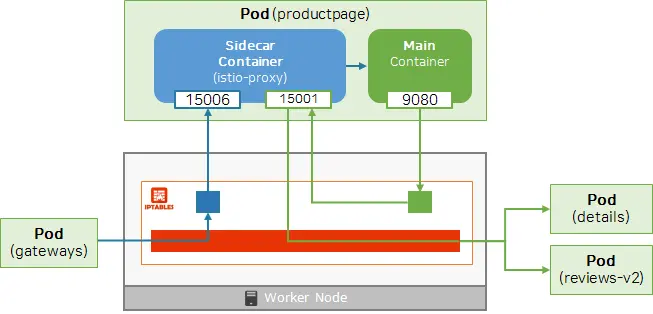
productpage Pod 상세 화면에서 istio-proxy 컨테이너 로그를 확인하는 위치를 보여줍니다.
이 로그를 통해 실제 라우팅된 버전과 요청 헤더를 정확히 검증할 수 있습니다.
6. Kiali로 트래픽 시각화
1
istioctl dashboard kiali
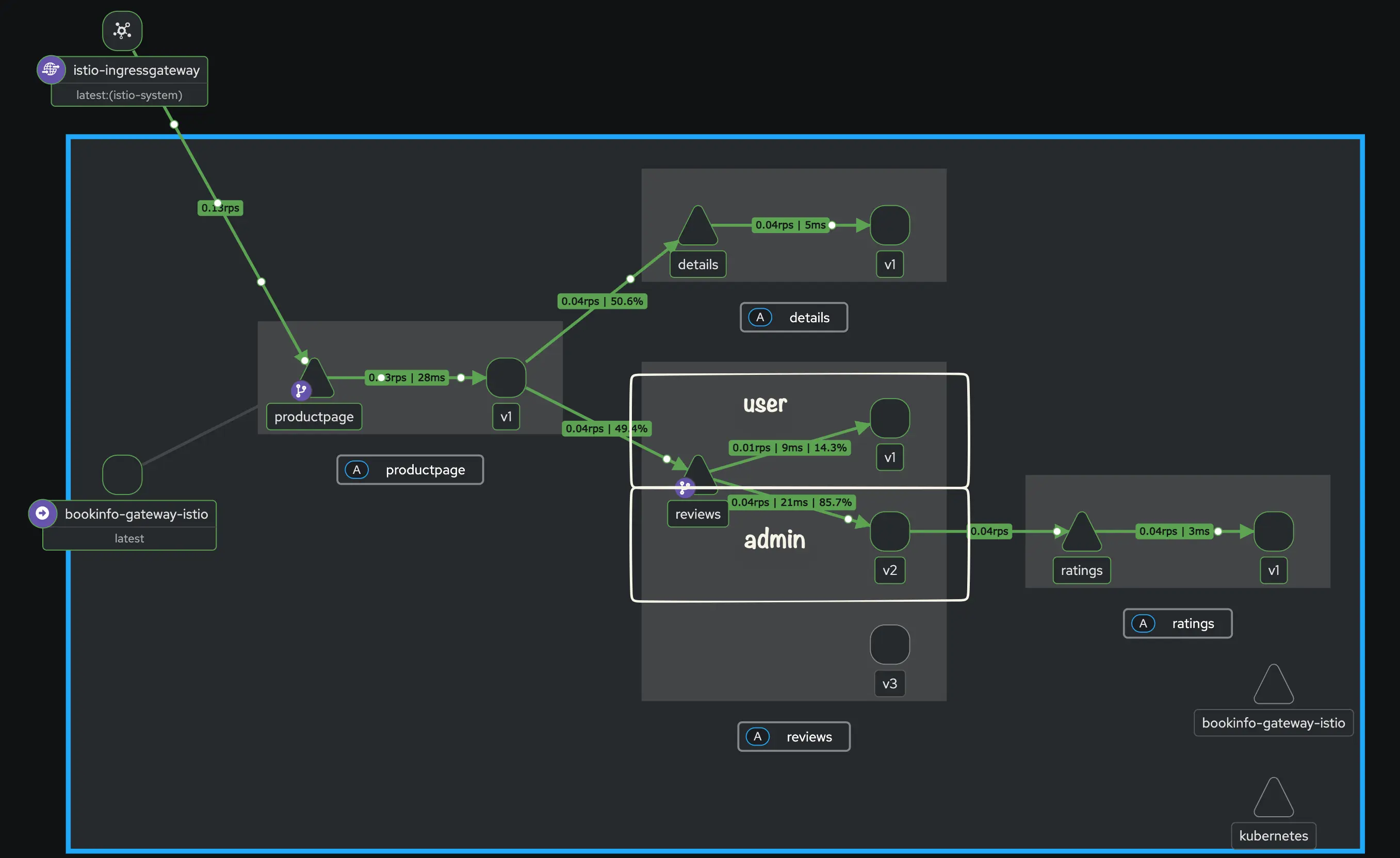
Kiali에서 productpage↔reviews 트래픽 흐름과 버전 분산을 시각화한 화면입니다.
Kiali에서는 서비스 간 트래픽 흐름, 응답 시간, 버전별 분산 비율을 한눈에 확인할 수 있습니다.
6.1. 주요 메트릭 설명
| 메트릭 | 의미 |
|---|---|
| Response Time | 요청-응답 소요 시간 |
| Throughput | 단위 시간당 처리량 |
| Traffic Distribution | 버전별 트래픽 비율 |
| Traffic Rate | 초당 요청 수 |
6.2. Response Time 상세 지표
| 지표 | 의미 | 설명 |
|---|---|---|
| Average | 평균 | 시스템의 일반적인 처리 시간 |
| Median | 중앙값 | 사용자가 체감하는 보편적인 응답 시간 |
| P95 | 95 백분위수 | 하위 95% 요청이 이 시간 이내에 완료됨 (성능 척도) |
| P99 | 99 백분위수 | 하위 99% 요청이 이 시간 이내에 완료됨 (극단값 제외) |
P95 이해하기: 100개의 요청 중 95번째로 느린 요청의 응답 시간이
260ms라면, P95는260ms입니다. 즉, 95%의 사용자는 260ms 이내의 응답 속도를 경험합니다.
이 지표들을 통해 버전별 트래픽 분산과 응답 성능을 함께 확인할 수 있습니다.
7. Gateway API로 동일한 라우팅 구성 (옵션)
Istio API 리소스를 제거하고 Gateway API(HTTPRoute)로 동일한 라우팅을 구현할 수 있습니다.
1
2
3
4
5
6
7
8
kubectl delete -f https://raw.githubusercontent.com/KKamJi98/kkamji-lab/main/study/istio-study/02-request-routing/istio-api/destination-rule.yaml
kubectl delete -f https://raw.githubusercontent.com/KKamJi98/kkamji-lab/main/study/istio-study/02-request-routing/istio-api/virtual-service.yaml

kubectl apply -f https://raw.githubusercontent.com/KKamJi98/kkamji-lab/main/study/istio-study/02-request-routing/gateway-api/http-route.yaml
kubectl apply -f https://raw.githubusercontent.com/KKamJi98/kkamji-lab/main/study/istio-study/02-request-routing/gateway-api/service.yaml

kubectl get httproutes reviews -o yaml
kubectl get service
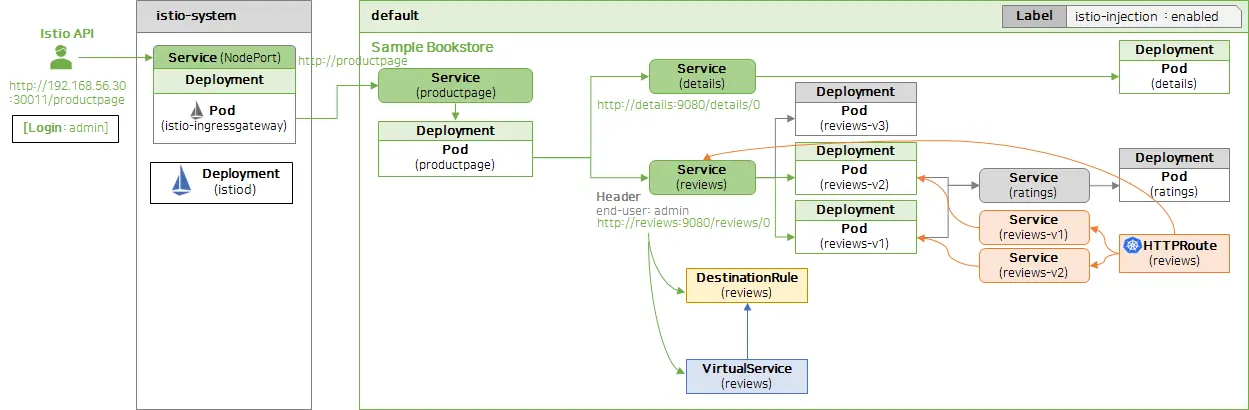
Gateway API 구성 이후 productpage의 라우팅이 정상 동작하는 화면입니다.
위 delete는 기존 DestinationRule/VirtualService 리소스를 제거합니다.
apply는 HTTPRoute와 reviews-v1, reviews-v2 Service를 생성/갱신하여 동일 라우팅을 Gateway API로 구현합니다.
이를 통해 Istio API 없이도 동일한 라우팅 정책을 적용할 수 있음을 확인했습니다.
8. 리소스 정리
1
2
3
4
kubectl delete httproutes reviews
kubectl delete service reviews-v1 reviews-v2
kubectl delete gateways bookinfo-gateway
kubectl delete httproutes bookinfo
위 명령은 Gateway API 관련 HTTPRoute/Service/Gateway 리소스를 정리합니다.
9. Reference
- KubeOPS - 아는 만큼 힘이 되는 트래픽 관리
- Istio Docs - Envoy Access Logs
- GitHub - k8s-1pro/kubernetes-anotherclass-sprint5
궁금하신 점이나 추가해야 할 부분은 댓글이나 아래의 링크를 통해 문의해주세요.
Written with KKamJi