Nginx Ingress Controller 구축하기
Nginx Ingress Controller 구축하기
Client HTTP request
NGINX proxy에 직접 요청
NGINX controller
NGINX proxy host와 path rule을 적용해 backend endpoint로 전달
Ingress resource controller가 watch하는 host/path 설정. 요청 hop 아님
Service / EndpointSlice backend 선택과 endpoint discovery를 위한 API 정보
기본 endpoint forwarding: Pod IP와 port로 proxy
Pod HTTP request 처리
Service ClusterIP를 upstream으로 쓰는 설정도 있습니다. Ingress object만 만들고 controller를 실행하지 않으면 proxy는 동작하지 않습니다.
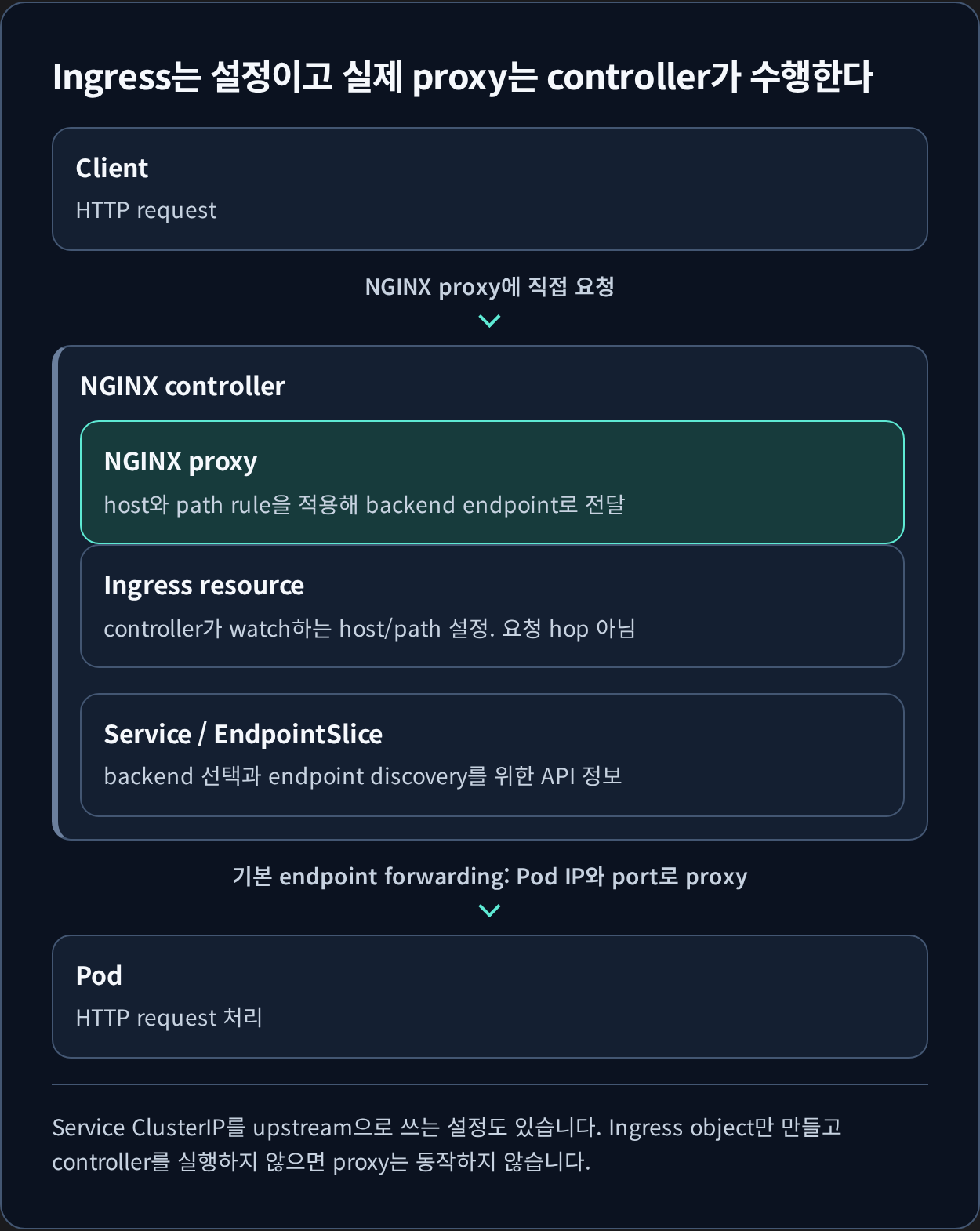
Ingress 리소스를 만들어 두어도 트래픽은 흐르지 않습니다. Ingress는 라우팅 규칙을 적은 선언일 뿐이고, 그것을 읽어 실제 프록시 설정으로 바꾸는 컨트롤러가 클러스터에 있어야 합니다. NGINX Ingress Controller가 그 역할을 맡으며, Helm으로 설치하는 과정을 정리합니다.
TL;DR
- Helm으로 NGINX Ingress Controller를 설치하고 Ingress 리소스로 외부 트래픽을 Service까지 라우팅하는 과정입니다.
- 설치 직후 확인할 지점은 controller Pod의 기동 여부와 LoadBalancer Service에 외부 주소가 할당됐는지입니다.
1. Nginx Ingress Controller 설치
1.1. Helm Repository 추가
1
2
❯ helm repo add ingress-nginx https://kubernetes.github.io/ingress-nginx
❯ helm repo update
1.2. Helm을 사용해 Nginx Ingress Controller 설치
1
2
helm install nginx-ingress ingress-nginx/ingress-nginx \
    --namespace ingress-nginx --create-namespace
2. 설치 확인
1
2
3
4
5
6
7
8
❯ kubectl get svc -n ingress-nginx
NAME                                               TYPE           CLUSTER-IP      EXTERNAL-IP   PORT(S)                      AGE
nginx-ingress-ingress-nginx-controller             LoadBalancer   10.111.215.81   10.0.0.240    80:32251/TCP,443:31300/TCP   3m
nginx-ingress-ingress-nginx-controller-admission   ClusterIP      10.97.125.60    <none>        443/TCP                      3m

❯ k get ingressclass
NAME    CONTROLLER             PARAMETERS   AGE
nginx   k8s.io/ingress-nginx   <none>       52m
3. 테스트
3.1. 테스트용 어플리케이션 배포
1
2
3
4
5
6
❯ kubectl create deployment nginx-test --image=nginx --port=80

deployment.apps/nginx-test created
❯ kubectl expose deployment nginx-test --port=80 --target-port=80 --name=nginx-test-service

service/nginx-test-service exposed
3.2. 테스트용 Ingress 리소스 설정
기존에 사용하고 있는 kkamji.net 도메인을 사용하였습니다.
1
2
3
4
5
6
7
8
9
10
11
12
13
14
15
16
17
18
19
20
21
22
23
apiVersion: networking.k8s.io/v1
kind: Ingress
metadata:
  name: nginx-test-ingress
  namespace: default
  annotations:
    nginx.ingress.kubernetes.io/rewrite-target: /
spec:
  ingressClassName: nginx
  rules:
  - host: test.kkamji.net
    http:
      paths:
      - path: /
        pathType: Prefix
        backend:
          service:
            name: nginx-test-service
            port:
              number: 80

❯ k apply -f nginx-test-ingress.yaml
ingress.networking.k8s.io/nginx-test-ingress created
3.3. ingress 확인
1
2
3
❯ k get ingress
NAME                 CLASS   HOSTS             ADDRESS   PORTS   AGE
nginx-test-ingress   nginx   test.kkamji.net             80      4m53s
3.4. test.kkamji.net으로 접속 확인
1
2
3
4
5
6
7
8
9
10
11
12
13
14
15
16
17
18
19
20
21
22
23
24
❯ curl test.kkamji.net
<!DOCTYPE html>
<html>
<head>
<title>Welcome to nginx!</title>
<style>
html { color-scheme: light dark; }
body { width: 35em; margin: 0 auto;
font-family: Tahoma, Verdana, Arial, sans-serif; }
</style>
</head>
<body>
<h1>Welcome to nginx!</h1>
<p>If you see this page, the nginx web server is successfully installed and
working. Further configuration is required.</p>

<p>For online documentation and support please refer to
<a href="http://nginx.org/">nginx.org</a>.<br/>
Commercial support is available at
<a href="http://nginx.com/">nginx.com</a>.</p>

<p><em>Thank you for using nginx.</em></p>
</body>
</html>
4. Reference
궁금하신 점이나 추가해야 할 부분은 댓글이나 아래의 링크를 통해 문의해주세요.
Written with KKamJi
This post is licensed under CC BY 4.0 by the author.