Istio Fault Injection

스테이징 환경에서 장애 상황을 그대로 재현하기는 어렵습니다. 운영에서만 발생하는 타임아웃, 지연, 오류 응답은 테스트 환경에서 재현이 힘들고, 이를 코드로 직접 만들기에도 비용이 큽니다.
Istio의 Fault Injection 기능을 사용하면 네트워크 지연이나 오류 응답을 의도적으로 발생시켜, 애플리케이션의 복원력과 에러 처리 로직을 사전에 검증할 수 있습니다.
1. Fault Injection 개요
| 유형 | 설명 | 사용 사례 |
|---|---|---|
| Delay | 요청에 지연 시간을 추가 | Timeout 설정 검증, 느린 서비스 시뮬레이션 |
| Abort | 특정 HTTP 상태 코드로 요청 중단 | 에러 핸들링 로직 검증, 장애 상황 시뮬레이션 |
2. 실습 환경
Bookinfo 애플리케이션을 기준으로 아래 흐름에서 테스트합니다.
1
2
3
4
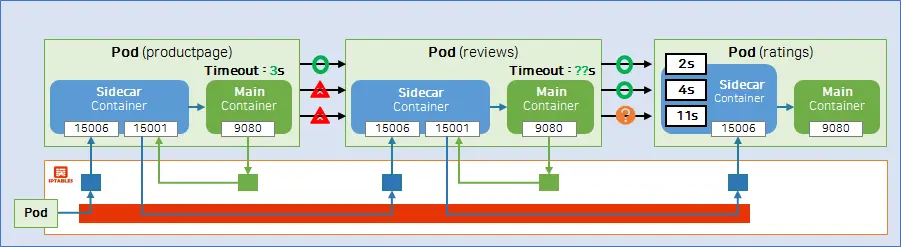
Productpage (timeout: 3s)
  ├─ Details
  └─ Reviews (timeout: 2.5s)
       └─ Ratings
Productpage의 타임아웃(3초)보다 큰 지연을 주입하면, 별점(★) 영역에서 오류가 발생하는 것을 확인할 수 있습니다.
2.1. 실습 코드 받기
1
2
git clone https://github.com/KKamJi98/kkamji-lab.git
cd kkamji-lab/study/istio-study/03-fault-injection/
3. 사전 설정 (Request Routing 리소스 적용)
1
2
kubectl apply -f https://raw.githubusercontent.com/KKamJi98/kkamji-lab/main/study/istio-study/02-request-routing/istio-api/destination-rule.yaml
kubectl apply -f https://raw.githubusercontent.com/KKamJi98/kkamji-lab/main/study/istio-study/02-request-routing/istio-api/virtual-service.yaml
위 명령은 reviews 서비스에 대한 DestinationRule/VirtualService를 생성하여 기본 라우팅 규칙을 준비합니다.
4. Delay Fault Injection
1
2
kubectl apply -f https://raw.githubusercontent.com/KKamJi98/kkamji-lab/main/study/istio-study/03-fault-injection/istio-api/destination-rule-ratings.yaml
kubectl apply -f https://raw.githubusercontent.com/KKamJi98/kkamji-lab/main/study/istio-study/03-fault-injection/istio-api/virtual-service-ratings-delay.yaml
위 명령은 ratings 서비스에 대한 DestinationRule과 VirtualService(Delay 주입)을 생성합니다.
1
open http://<EXTERNAL-IP>:30010/productpage
⚠️ 결과: admin으로 로그인하면 ratings 서비스에 지연이 발생하여 별점(★)이 표시되지 않습니다.
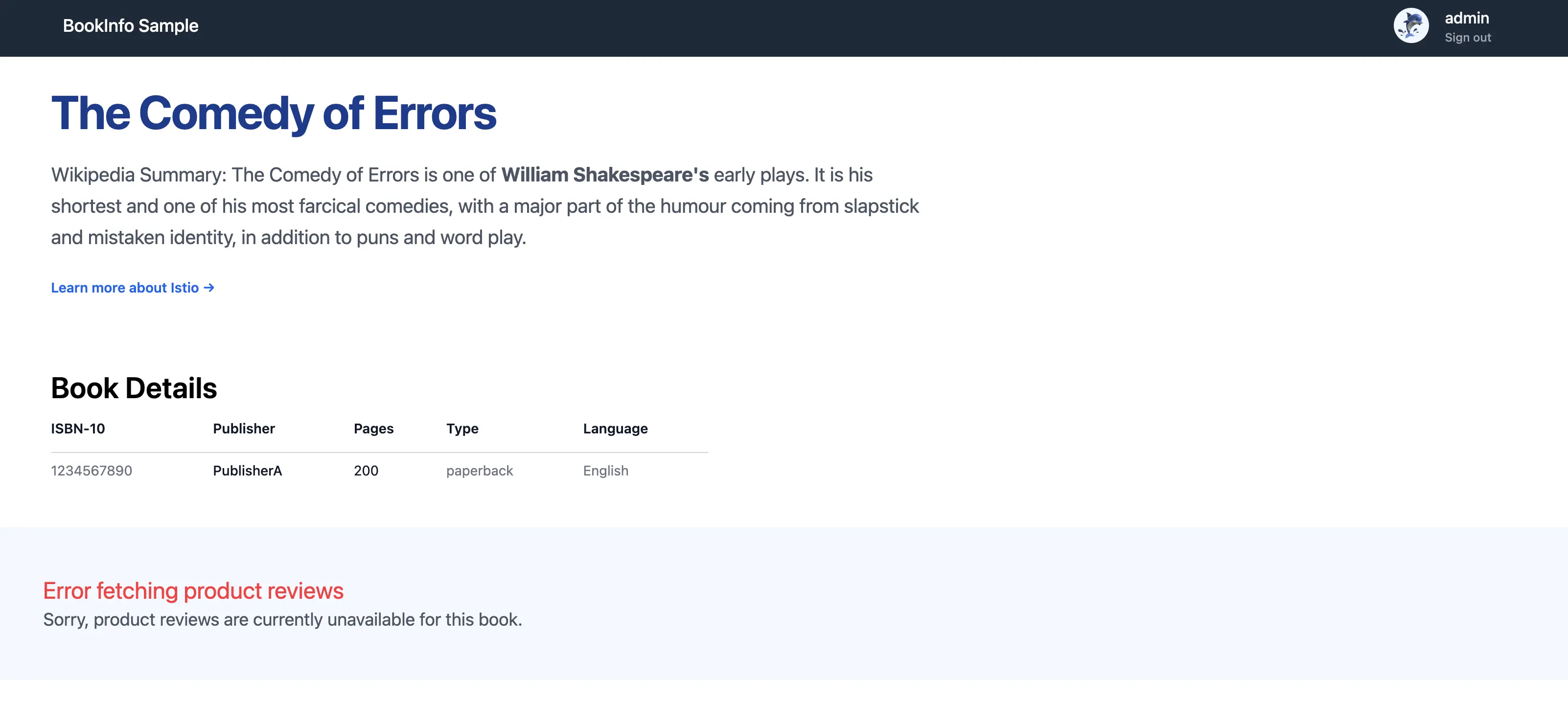
4초 지연 주입 후 productpage에서 별점 영역에 오류가 표시된 화면입니다.
4.1. 지연 시간 변경 (4s → 2s)
위에서 4초 지연 주입으로 별점이 표시되지 않는 것을 확인했습니다. 이제 지연 시간을 2초로 낮춰 reviews의 timeout(2.5초) 내에 응답이 도착하는지 확인해보겠습니다.
VirtualService의 fixedDelay 값을 4초에서 2초로 변경한 설정 파일입니다.
지연 시간을 2초로 변경한 뒤 별점(★)이 정상 표시되는 화면입니다.
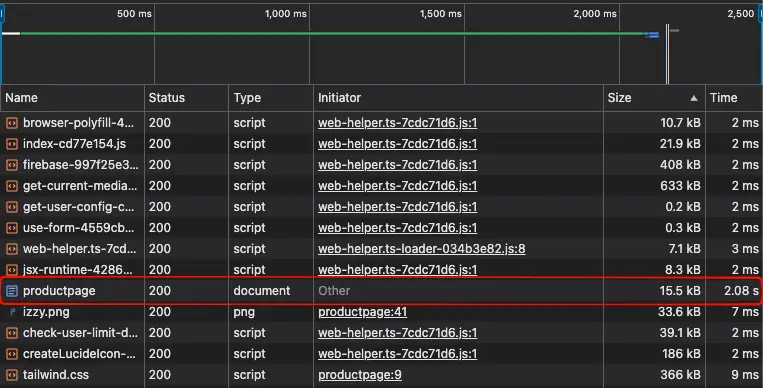
Envoy 로그에서 지연 시간이 약 2000ms로 기록된 것을 확인한 화면입니다.
이를 통해 2초 지연에서는 timeout 없이 정상 응답이 완료됨을 확인할 수 있습니다.
4.2. 지연 시간 증가 (11s) 및 재시도
2초 지연에서는 정상 동작을 확인했으므로, 이번에는 11초 지연을 주입해 재시도 동작을 로그로 확인해보겠습니다.
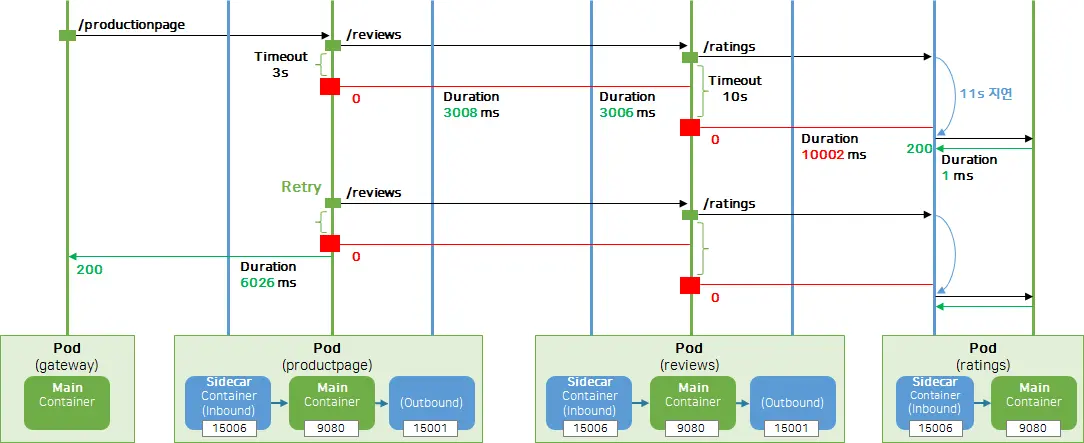
지연을 11초로 늘린 뒤 productpage가 재시도를 수행하는 로그를 보여줍니다.
5. 애플리케이션 로그만으로는 원인 파악이 어려움
1
2
3
kubectl logs -n default --tail 10 deploy/productpage-v1
kubectl logs -n default --tail 10 deploy/reviews-v2
kubectl logs -n default --tail 10 deploy/ratings-v1
애플리케이션 로그는 보통 성능 최적화를 위해 최소 정보만 남기기 때문에, 지연이나 타임아웃 원인을 찾기 어렵습니다.
6. Envoy 액세스 로그로 원인 파악
1
kubectl logs -n default --tail 10 deploy/productpage-v1 -c istio-proxy
예시 로그(핵심 필드만 발췌):
1
{"req_headers_end-user":"admin","req_method":"GET","req_path":"/reviews/0","res_code":0,"upstream_info":"outbound|9080||reviews-v2.default.svc.cluster.local"}
res_code: 0은 upstream 연결 실패 또는 타임아웃을 의미합니다.upstream_info를 통해 문제가 발생한 서비스 경로를 추적할 수 있습니다.
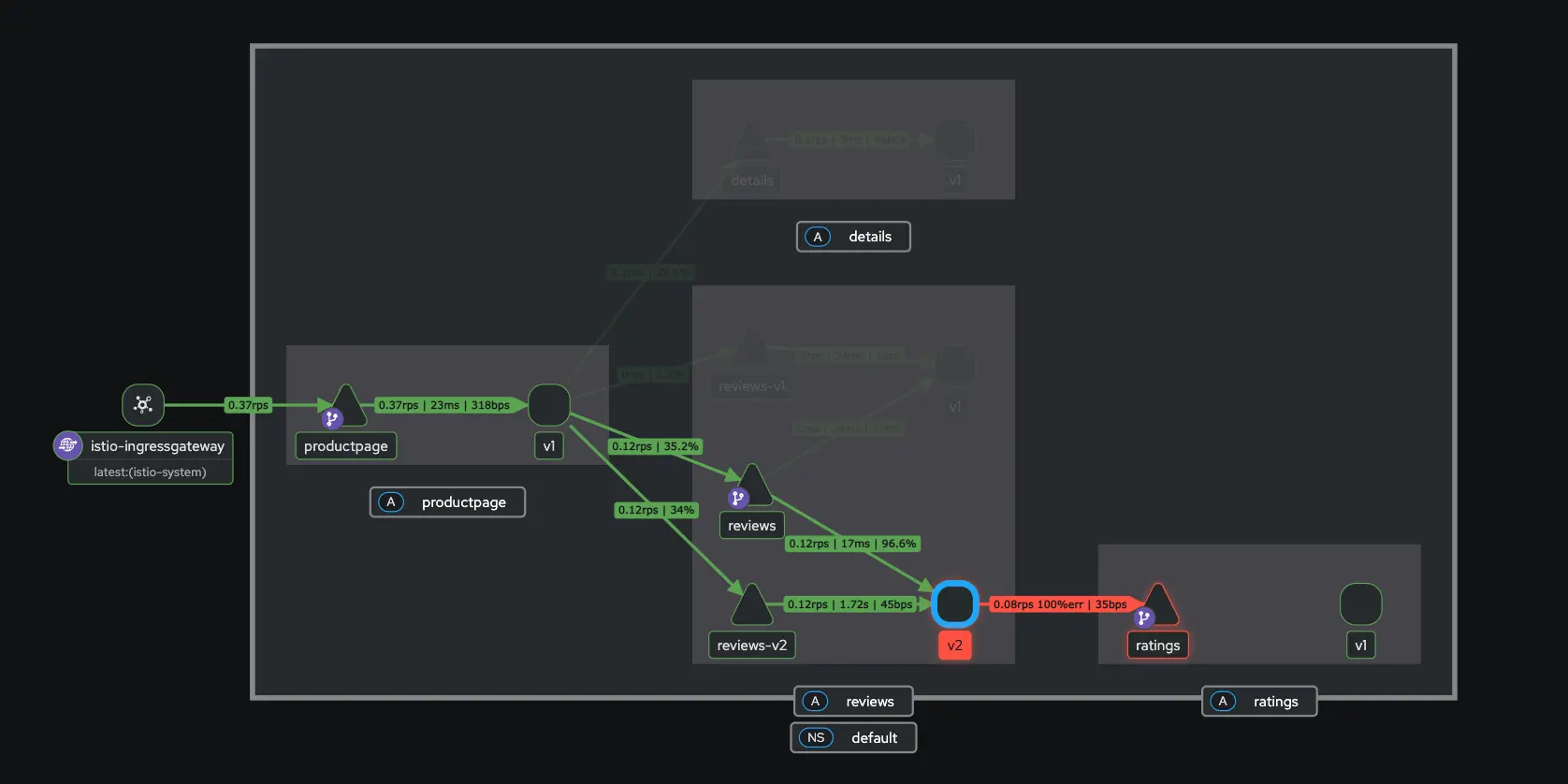
Kiali에서도 오류 트레이싱 흐름을 확인할 수 있습니다.
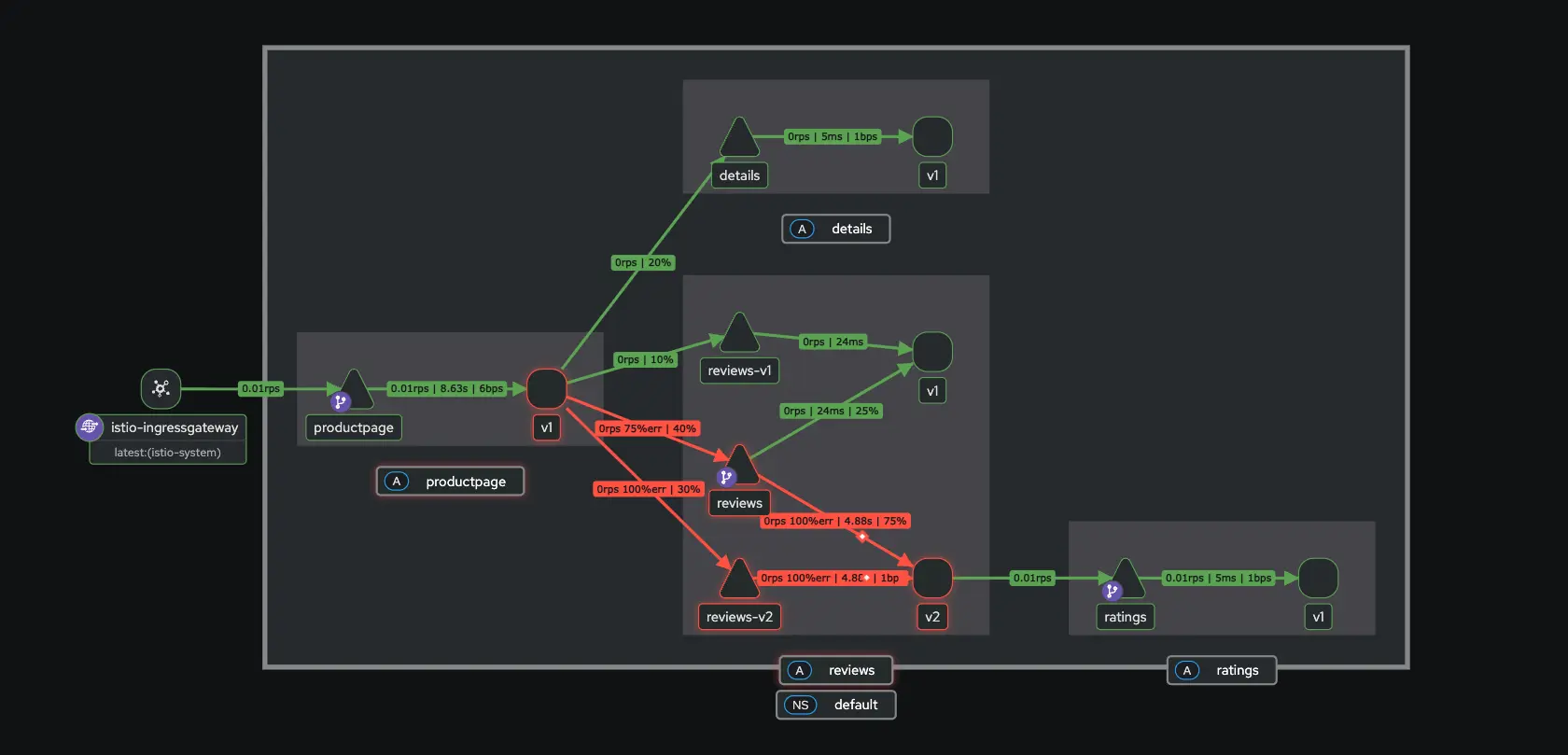
Kiali에서 오류가 발생한 경로와 지연 구간을 시각적으로 확인한 화면입니다.
이를 통해 어느 구간에서 타임아웃이 발생했는지 빠르게 파악할 수 있습니다.
7. Duration 포함 로그 포맷으로 심화 분석
기본 로그에는 요청 소요 시간이 포함되지 않습니다. 다음과 같이 %DURATION% 필드를 추가하면 지연 시간을 구체적으로 확인할 수 있습니다.
1
2
3
4
5
6
7
8
9
10
11
12
13
14
15
16
17
18
19
20
21
22
23
24
25
26
27
28
29
cat <<EOF > istio-cni.yaml
apiVersion: install.istio.io/v1alpha1
kind: IstioOperator
spec:
  components:
    cni:
      namespace: istio-system
      enabled: true
    pilot:
      k8s:
        resources:
          requests:
            cpu: 200m
            memory: 512Mi
  meshConfig:
    accessLogFile: /dev/stdout
    accessLogEncoding: JSON
    accessLogFormat: |
      {
        "duration": "%DURATION%",
        "req_method": "%REQ(:METHOD)%",
        "req_path": "%REQ(X-ENVOY-ORIGINAL-PATH?:PATH)%",
        "res_code": "%RESPONSE_CODE%",
        "upstream_info": "%UPSTREAM_CLUSTER_RAW%",
        "req_headers_end-user": "%REQ(end-user)%"
      }
EOF

istioctl install -f istio-cni.yaml -y
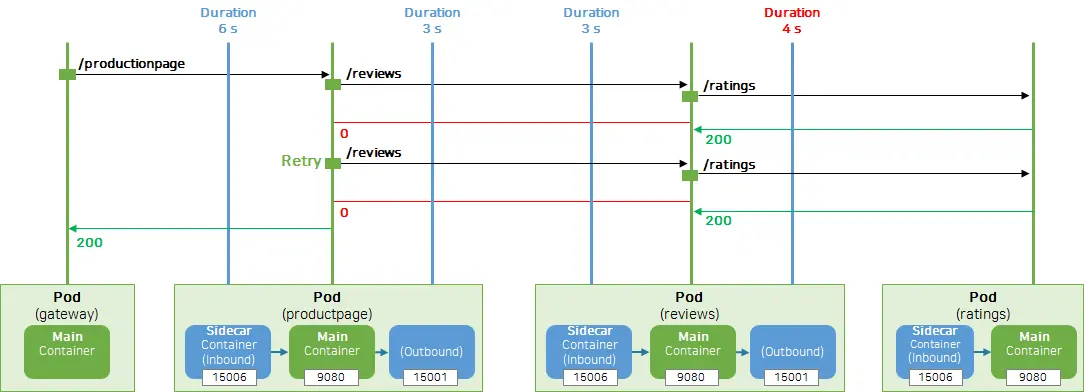
Envoy access log에 duration 필드가 포함된 결과 예시 화면입니다.
7.1. App Timeout 참고
서비스별 timeout 설정을 참고할 때 유용한 화면입니다.
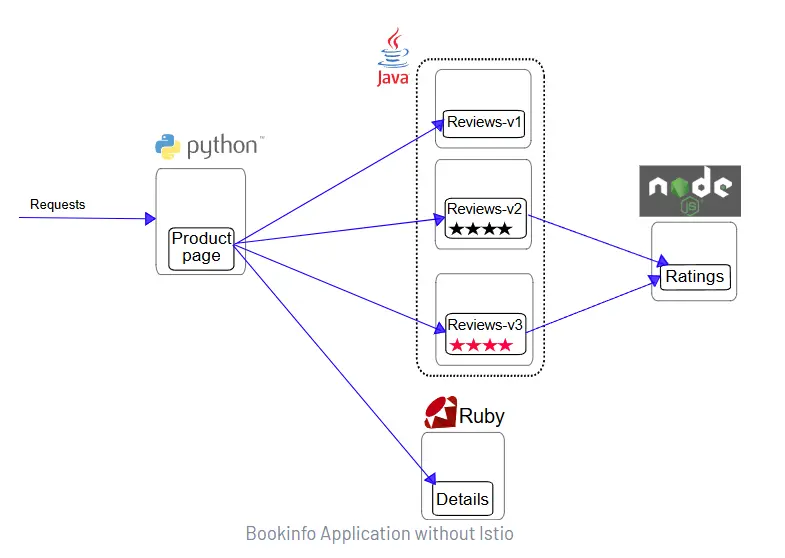
Bookinfo 애플리케이션에서 서비스별 timeout 값을 확인하는 코드 화면입니다.
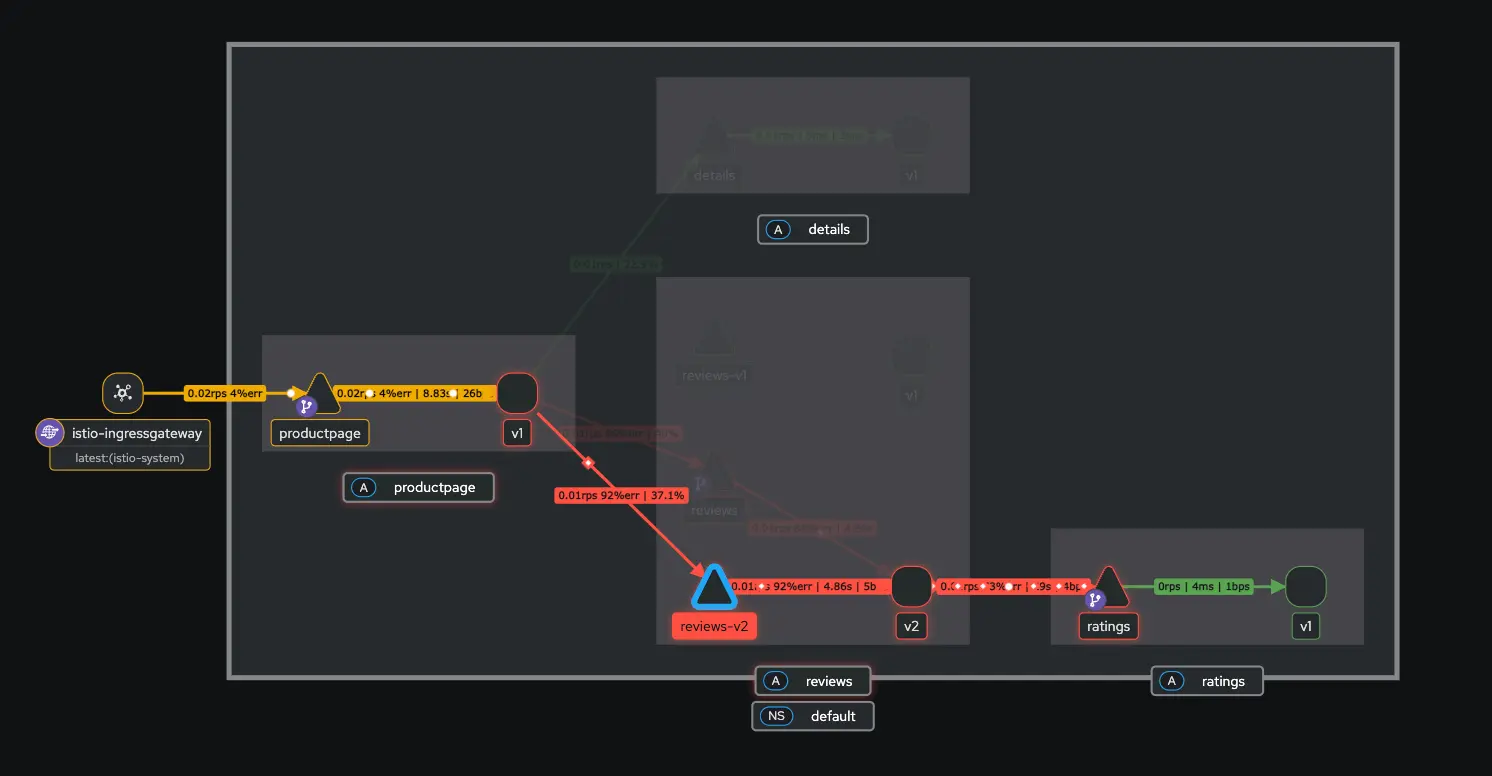
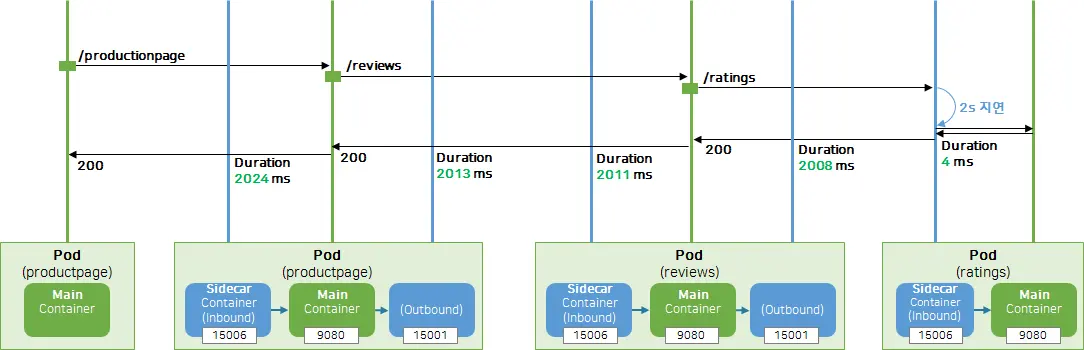
Kiali 트래픽 그래프에서 요청 흐름과 지연 구간을 확인하는 화면입니다.
duration 필드와 timeout 설정을 비교해 지연/타임아웃 관계를 정량적으로 확인할 수 있습니다.
8. Abort 테스트
1
2
3
4
5
6
7
8
# Delay VirtualService 삭제
kubectl delete virtualservice -n default ratings-delay

# Abort VirtualService 적용
kubectl apply -f https://raw.githubusercontent.com/KKamJi98/kkamji-lab/main/study/istio-study/03-fault-injection/istio-api/virtual-service-ratings-abort.yaml

# 확인
kubectl get virtualservice -n default ratings-abort -o yaml
위 delete는 Delay VirtualService를 제거하고, apply는 Abort VirtualService를 생성해 오류 응답을 주입합니다.
Abort는 특정 HTTP 상태 코드로 요청을 즉시 실패시킵니다. 예시 YAML은 admin 요청에 대해 100% 확률로 HTTP 500을 반환하도록 설정합니다.
1
2
3
4
5
6
7
8
9
10
11
12
13
14
15
16
17
18
19
20
21
22
23
24
25
26
apiVersion: networking.istio.io/v1
kind: VirtualService
metadata:
  name: ratings-abort
  namespace: default
spec:
  hosts:
  - ratings
  http:
  - fault:
      abort:
        httpStatus: 500
        percentage:
          value: 100
    match:
    - headers:
        end-user:
          exact: admin
    route:
    - destination:
        host: ratings
        subset: v1
  - route:
    - destination:
        host: ratings
        subset: v1
1
open http://<EXTERNAL-IP>:30010/productpage
Abort 주입 후 productpage에서 HTTP 500 오류가 표시된 화면입니다.
9. 리소스 정리
1
2
kubectl delete virtualservice -n default ratings-abort reviews
kubectl delete destinationrule -n default ratings reviews
위 명령은 Fault Injection에 사용한 VirtualService/DestinationRule을 정리합니다.
10. Reference
- Istio Docs - Fault Injection
- Istio Docs - HTTPFaultInjection
- KubeOPS - Fault Injection
- Istio Bookinfo - productpage.py
- Istio Bookinfo - LibertyRestEndpoint.java
- Istio Bookinfo - ratings.js
- GitHub - k8s-1pro/kubernetes-anotherclass-sprint5
궁금하신 점이나 추가해야 할 부분은 댓글이나 아래의 링크를 통해 문의해주세요.
Written with KKamJi