Hubble Exporter와 Dynamic Exporter Configuration [Cilium Study 2주차]

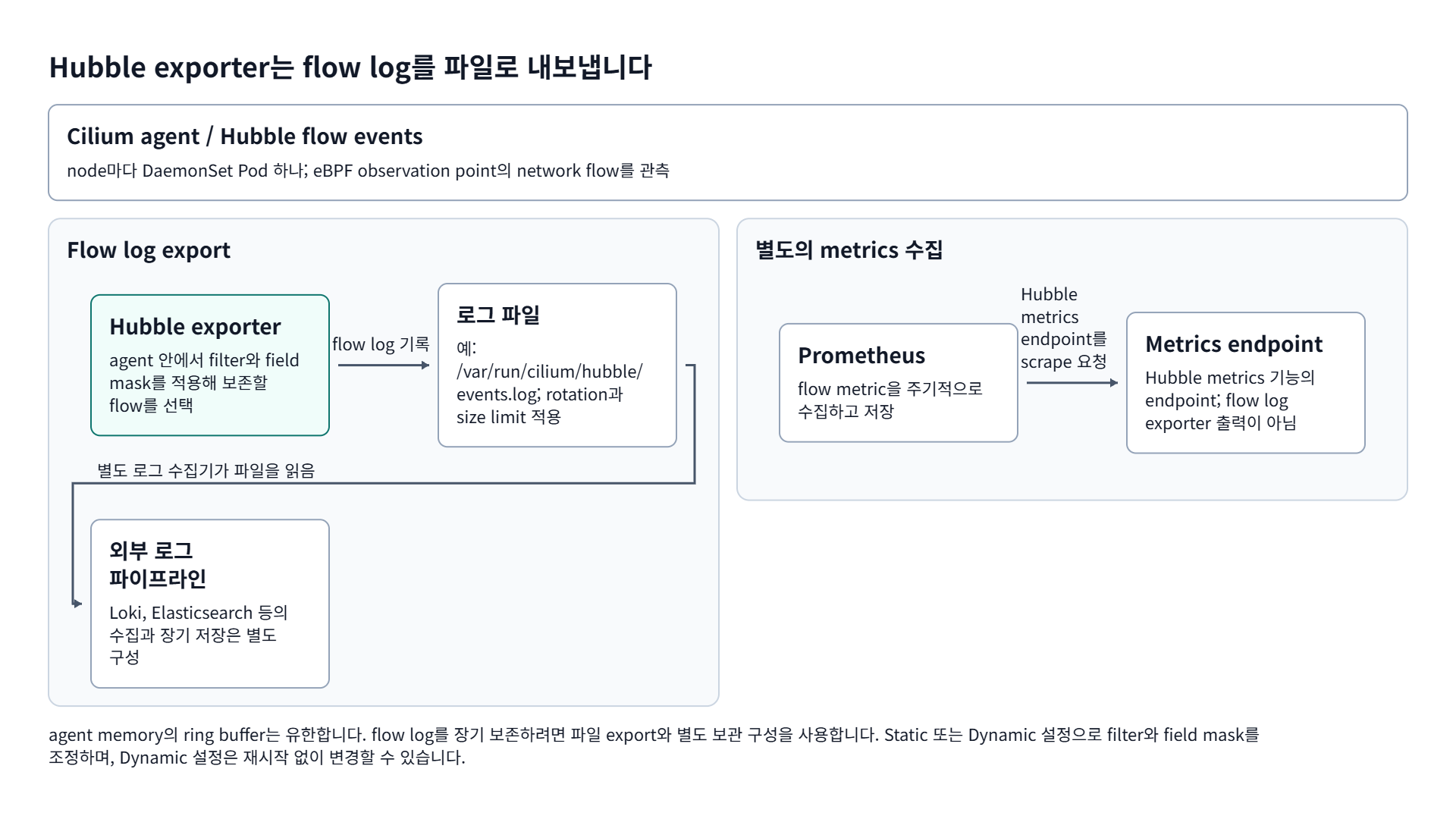
agent memory의 ring buffer는 유한합니다. flow log를 장기 보존하려면 파일 export와 별도 보관 구성을 사용합니다. Static 또는 Dynamic 설정으로 filter와 field mask를 조정하며, Dynamic 설정은 재시작 없이 변경할 수 있습니다.
이번 글에서는 Hubble Exporter에 대해 알아보도록 하겠습니다.
TL;DR
- Hubble Exporter는 cilium-agent가 network flow를 노드의 로그 파일로 내보내는 기능이며, file rotation과 size limit, filter, field mask를 지원합니다.
- 쓰임새는 감사와 규제용 장기 보관, Loki나 Elasticsearch 같은 외부 파이프라인 연계, latency나 TCP flag처럼 특정 필드만 추려 성능 분석하는 경우입니다.
- Static 방식은 Helm 값으로 고정 설정을 넣고, Dynamic 방식은 재시작 없이 설정을 바꿀 수 있습니다.
1. Hubble Exporter란?
Hubble Exporter는 Network Flow를 로그 파일에 저장할 수 있는 Cilium-Agent의 기능이고, file rotation, size limits, filters, field masks를 지원합니다.
Hubble Exporter는 다음과 같은 상황에서 사용할 수 있습니다.
- 장기 보관용 로그(규제, 감사)
- 외부 로그/데이터 파이프라인(Loki, Elasticsearch, S3, Kafka 등)으로의 연계
- 성능 분석을 위한 특정 필드(ex: latency, TCP flags)만 골라서 저장
Exporter는 각 노드의 cilium-agent 컨테이너 안에서 동작하며, filter/field-mask를 적용해 원하는 이벤트만 추출할 수도 있습니다.
2. Hubble Exporter Basic Configuration
Hubble Exporter를 설정하는 방식은 크게 Static Export 방식과 Dynamic Export 방식으로 나뉩니다. 두 방식의 차이는 아래와 같습니다.
| 항목 | Static Export(정적) | Dynamic Export(동적) |
|---|---|---|
| 정의/위치 | Helm values, cilium-config ConfigMap | CiliumNetworkPolicy / CiliumClusterwideNetworkPolicy 의 spec.hubbleExport |
| 적용,변경 방법 | Helm upgrade 또는 ConfigMap 수정 -> Cilium Agent 재시작 | kubectl apply/delete 즉시 반영, Cilium Agent 재시작 불필요 |
| 주요 목적 | 기본 상시 수집 규칙 유지 | 사고 대응, 일시적,세밀한 추적, 특정 엔드포인트 캡처 |
| 장점 | 단순하고 예측 가능, 변경 빈도 낮은 구성에 적합 | 빠른 조정, 무중단, 조건/필드별 세밀 제어 |
| 대표 설정 키 | hubble.export.static.* | spec.hubbleExport.* |
2.1. Basic Configuration (Helm)
Hubble Exporter는 Helm Value hubble.export.static.filePath에 로그 파일 경로를 지정해야 활성화되며, 지정하지 않으면 기본적으로 꺼져 있습니다.
1
2
3
4
5
6
7
8
9
10
11
12
13
14
15
16
17
18
19
20
21
22
23
24
25
26
27
28
29
30
31
32
33
34
35
36
37
38
39
## 최초 설치
❯ helm install cilium cilium/cilium -n kube-system --version 1.17.6 \
  --set hubble.enabled=true \
  --set hubble.export.static.enabled=true \
  --set hubble.export.static.filePath=/var/run/cilium/hubble/events.log

## 업데이트 (# 기존 설정은 유지하고 필요한 값만 Overwrite) -> Rollout Restart 필요
❯ helm upgrade cilium cilium/cilium -n kube-system --version 1.17.6 --reuse-values \
  --set hubble.enabled=true \
  --set hubble.export.static.enabled=true \
  --set hubble.export.static.filePath=/var/run/cilium/hubble/events.log

## 재시작
❯ kubectl -n kube-system rollout restart ds/cilium

## Rollout 확인
❯ kubectl -n kube-system rollout status ds/cilium
daemonset.apps/cilium restarted
Waiting for daemon set "cilium" rollout to finish: 0 out of 3 new pods have been updated...
Waiting for daemon set "cilium" rollout to finish: 0 out of 3 new pods have been updated...
Waiting for daemon set "cilium" rollout to finish: 2 out of 3 new pods have been updated...
Waiting for daemon set "cilium" rollout to finish: 2 out of 3 new pods have been updated...
Waiting for daemon set "cilium" rollout to finish: 2 out of 3 new pods have been updated...
Waiting for daemon set "cilium" rollout to finish: 2 of 3 updated pods are available...
daemon set "cilium" successfully rolled out

## Cilium Config에서 Export 관련 키 확인
❯ cilium config view | grep -i hubble-export
hubble-export-allowlist
hubble-export-denylist
hubble-export-fieldmask
hubble-export-file-max-backups                    5
hubble-export-file-max-size-mb                    10
hubble-export-file-path                           /var/run/cilium/hubble/events.log

## 로그 파일이 실제로 생성되고 로그가 적재되는지 확인
POD=$(kubectl -n kube-system get pod -l k8s-app=cilium -o jsonpath='{.items[0].metadata.name}')
kubectl -n kube-system exec $POD -- tail -f /var/run/cilium/hubble/events.log
kubectl -n kube-system exec $POD -- sh -c 'tail -f /var/run/cilium/hubble/events.log' | jq
3. Static Export 방식 예시 (Helm)
1
2
3
4
5
6
7
8
9
10
11
12
13
14
15
16
17
18
19
20
21
22
23
24
25
26
27
28
29
30
31
32
33
34
35
## value 파일 생성
❯ cat <<EOT > hubble-exporter-values.yaml
hubble:
  export:
    static:
      allowList:
        - '{"verdict":["DROPPED","ERROR"]}'
      denyList:
        - '{"source_pod":["kube-system/"]}'
        - '{"destination_pod":["kube-system/"]}'
      fieldMask:
        - time
        - source.namespace
        - source.pod_name
        - destination.namespace
        - destination.pod_name
        - l4
        - IP
        - node_name
        - is_reply
        - verdict
        - drop_reason_desc
EOT

## 적용
❯ helm upgrade cilium cilium/cilium --namespace kube-system --version 1.17.6 --reuse-values -f hubble-exporter-values.yaml

## 확인
❯ cilium config view | grep hubble-export
hubble-export-allowlist                           {"verdict":["DROPPED","ERROR"]}
hubble-export-denylist                            {"source_pod":["kube-system/"]} {"destination_pod":["kube-system/"]}
hubble-export-fieldmask                           time source.namespace source.pod_name destination.namespace destination.pod_name l4 IP node_name is_reply verdict drop_reason_desc
hubble-export-file-max-backups                    5
hubble-export-file-max-size-mb                    10
hubble-export-file-path                           /var/run/cilium/hubble/events.log
3.1. 핵심 Parameter 정리
| Key | 설명 | 예시 |
|---|---|---|
hubble.export.static.enabled | Export 기능 활성화 여부 | true |
hubble.export.static.filePath | 출력 파일 경로 | /var/run/cilium/hubble/events.log |
hubble.export.static.allowList | 포함할 플로우 조건(JSON FlowFilters) | {"verdict":["DROPPED","ERROR"]} |
hubble.export.static.denyList | 제외할 플로우 조건(JSON FlowFilters) | {"source_pod":["kube-system"]} |
hubble.export.static.fieldMask | 기록할 필드 목록 | time source.namespace source.pod_name ... http.method http.url |
hubble.export.static.rotate.* | 파일 로테이션 옵션 | enabled=true, maxSize=100, maxBackups=10 |
3.2. Tip: Filter 손쉽게 만들기
allowList 혹은 denyList에 들어갈 Filter 조건을 아래와 같이 CLI로 먼저 필터를 만들고 JSON을 추출해 그대로 쓰면 손쉽게 만들 수 있습니다.
1
2
3
4
5
6
7
8
9
10
## 거부되었거나 오류된 Flow Filter
❯ hubble observe --verdict DROPPED --verdict ERROR --print-raw-filters
allowlist:
    - '{"verdict":["DROPPED","ERROR"]}'

## kube-system 네임스페이스 트래픽 Filter
❯ hubble observe --namespace kube-system --print-raw-filters
allowlist:
    - '{"source_pod":["kube-system/"]}'
    - '{"destination_pod":["kube-system/"]}'
4. Dynamic Export 방식 예시
Dynamic 방식은 Pod 재시작 없이 정책 리소스를 적용/삭제하여 즉시 반영할 수 있습니다. Dynamic Export 기능은 아래와 같이 Helm Value를 수정해 활성화할 수 있습니다.
4.1. Dynamic Export 활성화
1
2
3
4
5
6
7
8
9
10
11
12
13
14
15
16
17
18
19
20
21
22
23
24
25
26
27
28
29
30
31
32
33
34
35
36
37
38
39
40
41
42
43
44
45
46
47
48
49
50
51
52
53
54
55
56
57
58
59
60
61
62
63
64
65
❯ helm upgrade cilium cilium/cilium -n kube-system --version 1.17.6 --reuse-values \
  --set hubble.enabled=true \
  --set hubble.export.dynamic.enabled=true

## 재시작
❯ kubectl -n kube-system rollout restart ds/cilium

## Rollout 확인
❯ kubectl -n kube-system rollout status ds/cilium
daemonset.apps/cilium restarted
Waiting for daemon set "cilium" rollout to finish: 0 out of 3 new pods have been updated...
Waiting for daemon set "cilium" rollout to finish: 0 out of 3 new pods have been updated...
Waiting for daemon set "cilium" rollout to finish: 2 out of 3 new pods have been updated...
Waiting for daemon set "cilium" rollout to finish: 2 out of 3 new pods have been updated...
Waiting for daemon set "cilium" rollout to finish: 2 out of 3 new pods have been updated...
Waiting for daemon set "cilium" rollout to finish: 2 of 3 updated pods are available...
daemon set "cilium" successfully rolled out

## Values 생성 hubble-dynamic-exporter-values.yaml
cat <<'EOT' > hubble-dynamic-exporter-values.yaml
hubble:
  export:
    dynamic:
      enabled: true
      config:
        enabled: true
        content:
          - name: all-forwarded
            filePath: /var/run/cilium/hubble/all-forwarded.log
            includeFilters:
              - verdict: ["FORWARDED"]
            fieldMask:
              - time
              - verdict
              - source.namespace
              - source.pod_name
              - destination.namespace
              - destination.pod_name
              - l4
              - is_reply
              - node_name
EOT

## 적용
❯ helm upgrade cilium cilium/cilium -n kube-system --reuse-values -f hubble-dynamic-exporter-values.yaml

## 재시작을 하지 않고, 파일이 새로 생겼는지, 로그가 적재되고 있는지 확인
❯ POD=$(kubectl -n kube-system get pod -l k8s-app=cilium -o jsonpath='{.items[0].metadata.name}')

❯ kubectl -n kube-system exec $POD -c cilium-agent -- ls -l /var/run/cilium/hubble/
total 54464
-rw-r--r-- 1 root root  2916263 Jul 26 18:46 all-forwarded.log ## 생성됨
-rw-r--r-- 1 root root 10485334 Jul 26 17:35 events-2025-07-26T17-35-12.598.log
-rw-r--r-- 1 root root 10485456 Jul 26 17:36 events-2025-07-26T17-36-05.078.log
-rw-r--r-- 1 root root 10484838 Jul 26 17:37 events-2025-07-26T17-37-04.972.log
-rw-r--r-- 1 root root 10484467 Jul 26 17:37 events-2025-07-26T17-37-57.936.log
-rw-r--r-- 1 root root 10485036 Jul 26 17:38 events-2025-07-26T17-38-48.914.log
-rw-r--r-- 1 root root   422659 Jul 26 18:46 events.log

❯ kubectl -n kube-system exec "$POD" -c cilium-agent -- tail -n 5 /var/run/cilium/hubble/all-forwarded.log
{"flow":{"time":"2025-07-26T18:46:58.596069996Z","verdict":"FORWARDED","l4":{"TCP":{"source_port":60482,"destination_port":9153,"flags":{"ACK":true}}},"source":{"namespace":"monitoring","pod_name":"prometheus-kube-prometheus-stack-prometheus-0"},"destination":{"namespace":"kube-system","pod_name":"coredns-675485d6df-xkf24"},"node_name":"k8s-w2","is_reply":false},"node_name":"k8s-w2","time":"2025-07-26T18:46:58.596069996Z"}
{"flow":{"time":"2025-07-26T18:46:58.642173573Z","verdict":"FORWARDED","l4":{"TCP":{"source_port":6443,"destination_port":53020,"flags":{"PSH":true,"ACK":true}}},"source":{},"destination":{"namespace":"monitoring","pod_name":"kube-prometheus-stack-kube-state-metrics-86ddbf5c57-gwk4w"},"node_name":"k8s-w2","is_reply":true},"node_name":"k8s-w2","time":"2025-07-26T18:46:58.642173573Z"}
{"flow":{"time":"2025-07-26T18:46:58.642185272Z","verdict":"FORWARDED","l4":{"TCP":{"source_port":53020,"destination_port":6443,"flags":{"ACK":true}}},"source":{"namespace":"monitoring","pod_name":"kube-prometheus-stack-kube-state-metrics-86ddbf5c57-gwk4w"},"destination":{},"node_name":"k8s-w2","is_reply":false},"node_name":"k8s-w2","time":"2025-07-26T18:46:58.642185272Z"}
{"flow":{"time":"2025-07-26T18:46:58.762529972Z","verdict":"FORWARDED","l4":{"TCP":{"source_port":45168,"destination_port":10250,"flags":{"ACK":true}}},"source":{"namespace":"monitoring","pod_name":"prometheus-kube-prometheus-stack-prometheus-0"},"destination":{},"node_name":"k8s-w2","is_reply":false},"node_name":"k8s-w2","time":"2025-07-26T18:46:58.762529972Z"}
{"flow":{"time":"2025-07-26T18:46:58.762540831Z","verdict":"FORWARDED","l4":{"TCP":{"source_port":10250,"destination_port":45168,"flags":{"ACK":true}}},"source":{},"destination":{"namespace":"monitoring","pod_name":"prometheus-kube-prometheus-stack-prometheus-0"},"node_name":"k8s-w2","is_reply":true},"node_name":"k8s-w2","time":"2025-07-26T18:46:58.762540831Z"}
5. Performance tuning tip
- 필터로 이벤트 수를 먼저 줄이고(allow/deny), 그다음 필드 수를 줄입니다(fieldMask 사용).
- DROP/ERROR부터 우선 수집합니다. 정상 트래픽은 양이 많으므로 필요할 때만 별도 정책으로 분리합니다.
- fieldMask A/B 테스트를 수행합니다. 파일 크기, CPU 사용률 변화를 직접 측정해 최적 조합을 찾습니다.
- 파일 로테이션과 압축 정책을 둡니다. rotate.* 옵션 또는 사이드카/Fluent Bit로 외부 전송 후 삭제를 고려합니다.
- Exporter 리소스를 모니터링합니다. cilium-agent 컨테이너 CPU/메모리를 지켜보고, 규칙이 많으면 병목이 생길 수 있습니다.
6. Reference
궁금하신 점이나 추가해야 할 부분은 댓글이나 아래의 링크를 통해 문의해주세요.
Written with KKamJi