failed to create fsnotify watcher: too many open files

Loki를 통해 Kubernetes Cluster 로그를 확인하던 중 다음과 같은 에러를 확인했습니다.
1
failed to create fsnotify watcher: too many open files
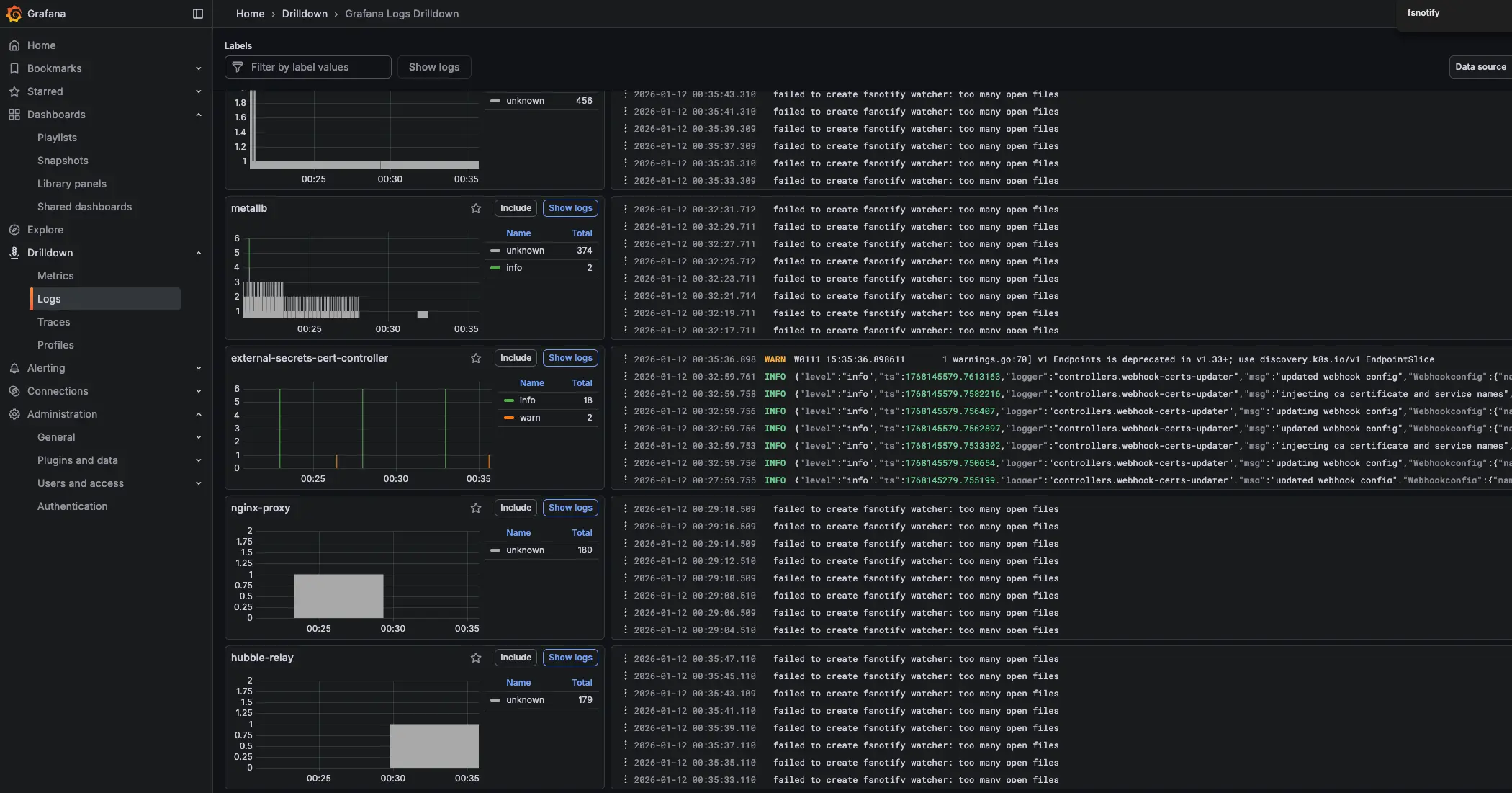
해당 에러로 인해 Loki가 새로운 로그 파일을 감시하지 못하고 기존 로그 파일의 변경 사항도 수집하지 못하는 상황이 발생했습니다.
1. 개념 설명
1.1. fsnotify 개요
fsnotify는 Go에서 파일/디렉터리 변경 사항을 감지하는 라이브러리입니다. Loki/Promtail 같은 로그 수집 도구는 이를 활용해 로그 파일 변경을 실시간으로 추적합니다.
1.2. 동작 흐름 (간단)
- 애플리케이션이 watcher를 생성합니다.
- 감시할 경로(파일 또는 디렉터리)를 등록합니다.
- 커널 이벤트 큐에 쌓인 변경 이벤트가 애플리케이션으로 전달됩니다.
- 애플리케이션은 이벤트를 해석해 필요한 처리를 수행합니다(재시도, 재스캔 등).
1.3. 이벤트 특성 및 주의사항
- 이벤트는 짧은 시간에 많이 발생하면 합쳐지거나 중복될 수 있습니다.
- 이벤트 누락 가능성을 고려해 주기적 재스캔이나 오프셋 기반 처리를 함께 설계하는 것이 안전합니다.
- 로그 로테이션처럼 파일이 교체되는 시나리오에서는 감시 대상 재등록이 필요할 수 있습니다.
1.4. 에러 발생 원인
Linux 시스템에서는 프로세스가 열 수 있는 파일 수에 제한이 있습니다. too many open files 에러는 다음 두 가지 제한과 관련이 있습니다.
| 제한 종류 | 설명 | 확인 명령어 |
|---|---|---|
fs.inotify.max_user_watches | 사용자당 inotify watch 최대 개수 | cat /proc/sys/fs/inotify/max_user_watches |
fs.inotify.max_user_instances | 사용자당 inotify 인스턴스 최대 개수 | cat /proc/sys/fs/inotify/max_user_instances |
Loki가 많은 수의 로그 파일이나 디렉터리를 감시해야 할 때, 이 제한을 초과하면 위 에러가 발생합니다.
1.5. 현재 설정 확인
1
2
3
4
5
6
7
8
9
10
11
# inotify watch 제한 확인
❯ cat /proc/sys/fs/inotify/max_user_watches
61348

# inotify 인스턴스 제한 확인
❯ cat /proc/sys/fs/inotify/max_user_instances
128

# 현재 노드에서 열려있는 inotify handle 개수 확인
❯ find /proc/*/fd -lname anon_inode:inotify 2>/dev/null | wc -l
141
2. 주요 개념/구성 요소
| 구성 요소 | 설명 | 운영 시 체크 포인트 |
|---|---|---|
| Watcher | 변경 이벤트를 수신하는 감시 객체 | watcher/FD 사용량, 오류 로그 |
| Watch Target | 감시 대상 경로(파일/디렉터리) | 대상 수 증가 시 한도 초과 위험 |
| Event | 변경이 감지되었음을 나타내는 이벤트 | 중복/누락 가능성 고려 |
| Event Queue | 이벤트가 버퍼링되는 큐 | 이벤트 폭주 시 처리 지연 |
fsnotify는 “변경 감지 트리거” 역할에 강하며, 실제 처리 기준은 파일의 현재 상태를 재확인하는 방식이 안정적입니다.
3. 해결 방법
3.1. 임시 해결 (재부팅 시 초기화)
1
2
3
# 예시 값이며 환경에 맞게 조정하세요.
sudo sysctl fs.inotify.max_user_watches=524288
sudo sysctl fs.inotify.max_user_instances=1024
3.2. 영구 해결 (권장)
/etc/sysctl.conf 또는 /etc/sysctl.d/ 디렉터리에 설정 파일을 추가합니다.
1
2
# 설정 파일 생성
sudo vi /etc/sysctl.d/99-inotify.conf
1
2
3
4
# filepath: /etc/sysctl.d/99-inotify.conf
# Increase inotify limits for Loki/Promtail
fs.inotify.max_user_watches = 524288
fs.inotify.max_user_instances = 1024
1
2
3
4
5
# 설정 적용
sudo sysctl --system

# 적용 확인
cat /proc/sys/fs/inotify/max_user_watches
4. 일괄 적용 (Ansible 예시)
- Ansible Inventory 파일 (
/etc/ansible/hosts) hosts 그룹 (k8s_nodes)
4.1. Ansible Playbook 생성
1
2
3
4
5
6
7
8
9
10
11
12
13
14
15
16
17
18
19
20
21
22
23
24
25
26
27
28
29
30
31
32
33
34
35
36
37
38
39
40
41
42
43
44
45
46
47
48
49
50
51
52
53
54
55
56
57
## apply-inotify.yml
---
- name: Apply /etc/sysctl.d/99-inotify.conf to k8s_nodes
  hosts: k8s_nodes
  become: true
  gather_facts: false

  vars:
    inotify_conf_path: /etc/sysctl.d/99-inotify.conf
    inotify_settings:
      fs.inotify.max_user_watches: "524288"
      fs.inotify.max_user_instances: "1024"

  tasks:
    - name: Install 99-inotify.conf (persistent)
      ansible.builtin.copy:
        dest: ""
        owner: root
        group: root
        mode: "0644"
        content: |
          # Managed by Ansible: Increase inotify limits for Loki/Promtail
          fs.inotify.max_user_watches =
          fs.inotify.max_user_instances =
      register: inotify_conf

    - name: Apply sysctl values immediately (only the keys we manage)
      ansible.builtin.command: "sysctl -w ="
      loop: ""
      register: sysctl_apply
      changed_when: false

    - name: Read back max_user_watches
      ansible.builtin.command: "sysctl -n fs.inotify.max_user_watches"
      register: watches_value
      changed_when: false

    - name: Read back max_user_instances
      ansible.builtin.command: "sysctl -n fs.inotify.max_user_instances"
      register: instances_value
      changed_when: false

    - name: Assert inotify settings are applied
      ansible.builtin.assert:
        that:
          - watches_value.stdout == inotify_settings['fs.inotify.max_user_watches']
          - instances_value.stdout == inotify_settings['fs.inotify.max_user_instances']
        fail_msg: "Inotify sysctl values did not apply correctly."

    - name: Count inotify fds on node (observability)
      ansible.builtin.shell: "find /proc/*/fd -lname 'anon_inode:inotify' 2>/dev/null | wc -l"
      register: inotify_fd_count
      changed_when: false

    - name: Show inotify fd count
      ansible.builtin.debug:
        msg: "inotify_fds= (host=)"
4.2. Ansible Playbook 실행
1
2
3
4
5
6
7
8
9
10
11
12
13
14
15
16
17
18
19
20
21
❯ ansible-playbook -i /etc/ansible/hosts apply-inotify.yml
###
PLAY [Apply /etc/sysctl.d/99-inotify.conf to k8s_nodes] ************************************************************

TASK [Install 99-inotify.conf (persistent)] ************************************************************************
changed: [k8s-w2]
changed: [k8s-m1]
changed: [k8s-w1]

TASK [Apply sysctl values immediately (only the keys we manage)] ***************************************************
ok: [k8s-w1] => (item={'key': 'fs.inotify.max_user_watches', 'value': '524288'})
ok: [k8s-w2] => (item={'key': 'fs.inotify.max_user_watches', 'value': '524288'})
ok: [k8s-m1] => (item={'key': 'fs.inotify.max_user_watches', 'value': '524288'})
ok: [k8s-w2] => (item={'key': 'fs.inotify.max_user_instances', 'value': '1024'})
ok: [k8s-w1] => (item={'key': 'fs.inotify.max_user_instances', 'value': '1024'})
ok: [k8s-m1] => (item={'key': 'fs.inotify.max_user_instances', 'value': '1024'})
...
PLAY RECAP *********************************************************************************************************
k8s-m1                     : ok=7    changed=1    unreachable=0    failed=0    skipped=0    rescued=0    ignored=0
k8s-w1                     : ok=7    changed=1    unreachable=0    failed=0    skipped=0    rescued=0    ignored=0
k8s-w2                     : ok=7    changed=1    unreachable=0    failed=0    skipped=0    rescued=0    ignored=0
4.3. 적용 확인
1
2
3
4
5
6
7
8
9
10
11
12
13
14
15
16
17
18
❯ ansible k8s_nodes -i /etc/ansible/hosts -b -m shell -a '
echo "host=$(hostname)";
echo -n "max_user_watches="; cat /proc/sys/fs/inotify/max_user_watches;
echo -n "max_user_instances="; cat /proc/sys/fs/inotify/max_user_instances;
'
###
k8s-w1 | CHANGED | rc=0 >>
host=k8s-w1
max_user_watches=524288
max_user_instances=1024
k8s-m1 | CHANGED | rc=0 >>
host=k8s-m1
max_user_watches=524288
max_user_instances=1024
k8s-w2 | CHANGED | rc=0 >>
host=k8s-w2
max_user_watches=524288
max_user_instances=1024
5. 운영/설정 가이드
- 감시 대상(디렉터리/파일) 수를 먼저 파악합니다.
- 로그 로테이션, 동적 디렉터리 생성 등 “감시 대상 증가 요인”을 고려해 여유를 확보합니다.
- 오류 로그와 이벤트 처리 지연을 모니터링해 한도/성능 문제를 조기에 감지합니다.
max_user_watches값을 지나치게 높이면 커널 메모리 사용량이 증가할 수 있습니다.
6. 요약
failed to create fsnotify watcher: too many open files 에러는 Linux의 inotify 제한으로 인해 발생합니다. fsnotify의 동작 특성과 이벤트 특성을 이해하고, 커널 한도 및 파일 디스크립터 한도를 적절히 조정하면 재발을 줄일 수 있습니다.
7. Reference
궁금하신 점이나 추가해야 할 부분은 댓글이나 아래의 링크를 통해 문의해주세요.
Written with KKamJi