GCP Workload Identity Federation으로 외부 워크로드에 키 없이 권한 부여하기
GitHub Actions 같은 외부 CI에서 Google Cloud에 배포해야 할 때, Service Account key JSON을 secret에 넣는 방식은 시작은 쉽지만 끝이 어렵습니다. key가 오래 살아남고, 누가 어떤 실행에서 썼는지 분리하기 어렵고, 회전과 폐기까지 운영해야 합니다. 실행마다 외부 OIDC token을 받아 짧은 Google credential으로 교환하면 이 장기 key를 없앨 수 있습니다.
Workload Identity Federation(WIF) 은 외부 workload의 credential을 Google Cloud IAM principal로 연결하는 기능입니다. 이 글은 GitHub Actions처럼 OIDC token을 발급하는 외부 CI를 예시로, token이 권한이 되기까지의 경계와 최소 권한 binding을 정리합니다. 실제 Project ID, repository, Service Account email은 모두 placeholder입니다.
1. 이름이 비슷한 세 기능은 다른 문제를 풉니다
Google Cloud의 identity 기능은 이름이 비슷해도 대상이 다릅니다.
| 기능 | 인증 주체 | 주 사용처 |
|---|---|---|
| Workload Identity Federation | Google Cloud 밖의 workload | CI/CD, AWS 또는 Azure workload, 외부 OIDC workload |
| Workforce Identity Federation | 외부 사용자와 그룹 | 회사 SSO로 Google Cloud console 또는 API 접근 |
| GKE Workload Identity | GKE Pod | Kubernetes ServiceAccount와 Google Service Account 연결 |
외부 CI가 Google Cloud에 접근하는 문제는 첫 번째 WIF입니다. GKE Pod에 Google 권한을 주려는 문제나 사람이 사내 IdP로 console에 로그인하는 문제와 같은 설정으로 취급하면 principal과 IAM binding이 어긋납니다.
2. 외부 OIDC token은 곧바로 Google 권한이 아닙니다
WIF에서 외부 token은 provider가 검증한 뒤 Security Token Service(STS)에서 short-lived federated token으로 교환됩니다. 그 token으로 resource에 직접 접근하거나, 특정 Google Service Account를 impersonate해 다른 short-lived credential을 받을 수 있습니다.
google.subject와 repository attribute mappingroles/iam.workloadIdentityUser를 부여하고 단기 Service Account credential 발급장기 Service Account key 없이 사용합니다. 조직 ID와 repository ID 같은 좁은 claim을 condition과 IAM binding에 함께 사용합니다.
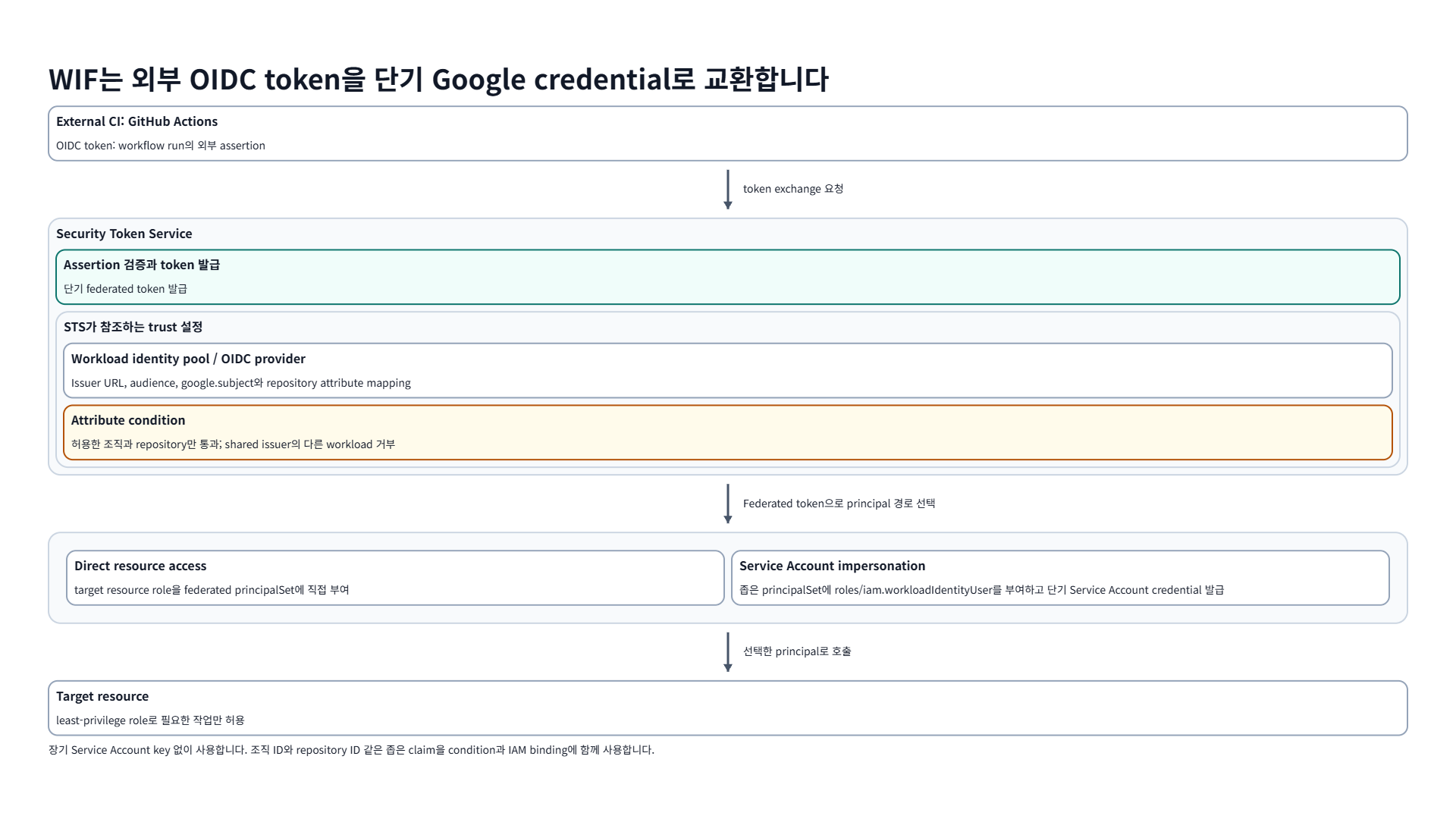
외부 OIDC token은 provider 검증과 attribute 조건을 통과한 뒤 STS에서 교환되고, 직접 resource 접근 또는 Service Account impersonation으로 이어집니다.
구성 요소의 역할을 먼저 분리하면 policy를 읽기 쉽습니다.
| 구성 요소 | 책임 |
|---|---|
| Workload identity pool | 신뢰할 외부 workload identity의 경계 |
| Provider | OIDC issuer, audience, attribute mapping과 condition 검증 |
| Attribute mapping | 외부 assertion claim을 Google principal attribute로 변환 |
| Attribute condition | mapping된 assertion attribute와 target attribute를 확인해 provider가 받아들일 workload를 제한 |
| IAM binding | pool의 principal 또는 principalSet이 사용할 Google 권한 정의 |
google.subject는 필수 mapping이며, provider 안에서 안정적으로 한 workload를 식별해야 합니다. 사람이 읽기 좋은 email이나 display name이 바뀔 수 있다면 authorization key로 쓰지 않는 편이 안전합니다. GitHub Actions에서는 재사용될 수 있는 이름 대신 repository ID, organization ID, ref 또는 environment처럼 실제 배포 경계를 표현하는 claim을 mapping하고 condition과 IAM binding을 함께 좁힙니다.
3. attribute mapping과 condition은 서로 대체되지 않습니다
mapping은 claim을 IAM에서 쓸 attribute로 바꾸고, condition은 provider가 assertion을 신뢰할지 결정합니다. 둘 중 하나만으로 multi-tenant issuer를 안전하게 제한했다고 볼 수 없습니다.
다음은 GitHub Actions OIDC provider를 설명하기 위한 일반화한 명령입니다. PROJECT_ID, numeric organization ID, numeric repository ID, project number는 배포 대상에 맞게 바꿔야 하며, production Project에 그대로 실행하면 pool과 provider를 생성합니다. 생성 명령은 active gcloud project에 의존하지 않도록 --project=PROJECT_ID를 명시합니다.
1
2
3
4
5
6
7
8
9
10
11
12
13
# 변경 명령입니다. disposable Project에서만 실행합니다.
gcloud iam workload-identity-pools create github \
  --project=PROJECT_ID \
  --location=global \
  --display-name="GitHub Actions"

gcloud iam workload-identity-pools providers create-oidc github-oidc \
  --project=PROJECT_ID \
  --location=global \
  --workload-identity-pool=github \
  --issuer-uri="https://token.actions.githubusercontent.com" \
  --attribute-mapping="google.subject=assertion.sub,attribute.repository_id=assertion.repository_id,attribute.repository_owner_id=assertion.repository_owner_id" \
  --attribute-condition="assertion.repository_owner_id == 'ORG_NUMERIC_ID'"
GitHub Actions OIDC issuer는 여러 조직이 공유합니다. issuer URL만 신뢰하면 다른 조직의 token까지 같은 provider로 들어올 수 있으므로, 조직 ID claim을 확인하는 condition이 필요합니다. repository나 organization name은 삭제 뒤 재사용될 수 있으므로 authorization key보다 numeric ID가 안전합니다. branch까지 제한해야 하면 assertion.ref == 'refs/heads/main' 같은 조건을 추가합니다. provider condition은 pool에 인증할 수 있는 identity 집합을 먼저 제한하지만, 조직 ID만 제한한 뒤 pool 전체에 binding하면 해당 조직의 모든 repository까지 권한 대상이 될 수 있습니다. repository ID 또는 environment처럼 더 좁은 principalSet을 사용합니다.
다음처럼 repository ID attribute를 기준으로 한 principalSet을 만들면 resource policy가 특정 repository에만 적용됩니다.
1
principalSet://iam.googleapis.com/projects/PROJECT_NUMBER/locations/global/workloadIdentityPools/github/attribute.repository_id/REPOSITORY_NUMERIC_ID
principalSet 문자열의 attribute 값과 provider mapping은 서로 맞아야 합니다. mapping에 없는 attribute를 binding에 쓰거나, 재사용 가능한 repository name을 authorization key로 쓰면 의도한 workload보다 넓게 매칭될 수 있습니다.
4. 직접 권한과 Service Account impersonation을 선택하는 기준
federated principal에 resource role을 직접 부여할 수 있고, Service Account를 impersonate하도록 할 수도 있습니다.
| 방식 | 권한이 부여되는 곳 | 적합한 경우 |
|---|---|---|
| Direct resource access | project, bucket 등 target resource | 필요한 권한이 적고 호출 주체를 federated principal로 남기고 싶을 때 |
| Service Account impersonation | 특정 Service Account IAM policy | 기존 workload identity와 role 구성을 재사용하거나 여러 API가 Service Account를 기대할 때 |
impersonation을 쓴다면 target Service Account의 policy에 roles/iam.workloadIdentityUser를 해당 principalSet에만 부여합니다. project 전체 또는 pool 전체에 이 role을 부여하면 provider 안의 더 많은 workload가 해당 Service Account가 될 수 있습니다.
1
2
3
4
5
6
# 변경 명령입니다. SERVICE_ACCOUNT와 principalSet은 전용 sandbox 값으로 제한합니다.
gcloud iam service-accounts add-iam-policy-binding \
  deployer@PROJECT_ID.iam.gserviceaccount.com \
  --project=PROJECT_ID \
  --role="roles/iam.workloadIdentityUser" \
  --member="principalSet://iam.googleapis.com/projects/PROJECT_NUMBER/locations/global/workloadIdentityPools/github/attribute.repository_id/REPOSITORY_NUMERIC_ID"
여기서 roles/iam.workloadIdentityUser는 target Service Account를 사용할 수 있게 하는 권한일 뿐입니다. GCS object read, Cloud Run deploy처럼 실제 작업에 필요한 resource role은 impersonated Service Account에 별도로 최소 권한으로 부여해야 합니다.
5. credential configuration 파일도 secret처럼 다룹니다
외부 workload는 credential configuration JSON을 통해 어느 pool과 provider에 token을 교환할지 압니다. 이 파일은 private key가 아니지만, production pool ID, provider URI, impersonated Service Account 같은 identity topology를 담을 수 있습니다. public repository에 무심코 넣기보다 배포 구성과 접근 범위를 검토해야 합니다.
GitHub Actions처럼 CI platform이 OIDC token을 환경에서 제공하는 경우, application은 external account credential configuration을 사용합니다. local machine에서 같은 구성을 시험하려면 token source와 audience, ADC 탐색 순서가 CI와 다를 수 있으므로 결과를 그대로 production CI의 성공 증거로 일반화하지 않습니다.
검증은 key 생성이 아니라 다음 read-only 확인으로 시작할 수 있습니다.
1
2
3
4
5
6
7
8
9
10
# Pool/provider의 issuer, mapping, condition을 확인합니다.
gcloud iam workload-identity-pools providers describe github-oidc \
  --project=PROJECT_ID \
  --location=global \
  --workload-identity-pool=github

# target Service Account의 impersonation binding을 확인합니다.
gcloud iam service-accounts get-iam-policy \
  deployer@PROJECT_ID.iam.gserviceaccount.com \
  --project=PROJECT_ID
운영 전에는 expected repository와 branch 또는 environment의 token만 통과하는 positive test, 다른 repository 또는 branch token이 거부되는 negative test를 각각 남겨야 합니다. 성공만 확인하면 condition이 너무 넓은지 알 수 없습니다.
6. 감사 로그는 token 교환과 실제 API 호출을 나눠 봐야 합니다
WIF incident를 조사할 때는 “누가 이 Service Account가 되었는가”와 “그 credential으로 무엇을 했는가”가 한 log에 항상 완전하게 모이지 않습니다.
- STS token exchange와 Service Account Credentials API의 Data Access log에서 federated credential과 impersonation 경로를 확인합니다.
- target service의 audit log에서 실제 resource API 호출과 principal을 확인합니다.
- GitHub Actions run ID, repository, workflow ref 같은 IdP side evidence와 timestamp를 맞춥니다.
Data Access log 수집 여부, retention, sink, 비용은 Project 설정에 따라 달라집니다. authorization failure를 분석할 때도 먼저 provider condition reject인지, workloadIdentityUser binding 누락인지, impersonated Service Account의 resource role 부족인지를 나눠야 합니다.
7. production 전에는 넓은 신뢰 경계를 먼저 제거합니다
WIF의 위험은 “키가 없으니 안전하다”로 끝나지 않습니다. key rotation 부담은 줄지만 external identity claim과 IAM binding을 잘못 연결하면 의도하지 않은 CI workload가 Google 권한을 얻게 됩니다.
다음 순서로 sandbox에서 확인하는 편이 안전합니다.
- 전용 test project, pool, provider, Service Account를 만들고 production resource와 분리합니다.
- organization ID와 repository ID attribute를 mapping하고 provider condition으로 shared issuer를 좁힙니다.
- single bucket read처럼 작은 resource role 하나만 부여합니다.
- allowed token과 denied token을 각각 실행해 condition과 IAM binding이 모두 작동하는지 확인합니다.
- STS, impersonation, target resource audit log를 같은 실행 시간 창에서 연결합니다.
- 검증이 끝난 pool과 Service Account binding은 삭제하거나 sandbox project 전체를 폐기합니다.
WIF는 Service Account key를 대체하는 좋은 기본값이지만, GitHub repository 전체를 production principal로 취급하는 설정은 너무 넓을 수 있습니다. 배포 branch, environment approval, repository ownership, target Service Account를 각각 다른 정책 계층에서 좁혀야 합니다.
8. Reference
- Google Cloud Docs - Workload Identity Federation
- Google Cloud Docs - Workload Identity Federation with deployment pipelines
- Google Cloud Docs - Workload Identity Federation with other clouds
- Google Cloud Docs - Best practices for using Workload Identity Federation
- Google Cloud Docs - Service account impersonation
- Google Cloud Docs - Audit logging
- GitHub Docs - OpenID Connect
궁금하신 점이나 추가해야 할 부분은 댓글이나 아래의 링크를 통해 문의해주세요.
Written with KKamJi