HashiCorp Vault/VSO in Kubernetes

CloudNet@ Gasida님이 진행하는 CI/CD + ArgoCD + Vault Study를 진행하며 학습한 내용을 공유합니다.
이번 포스팅에서는 HashiCorp Vault/VSO에 대해 알아보겠습니다.
1. Vault Install on Kubernetes - Vault Docs - Vault on Kubernetes deployment guide
1.1. Vault Install
1
2
3
4
5
6
7
8
9
10
11
12
13
14
15
16
17
18
19
20
21
22
23
24
25
26
27
28
29
30
31
32
33
34
35
36
37
38
39
40
41
42
43
44
45
46
47
48
49
50
51
52
53
54
55
56
57
58
59
60
61
62
63
64
65
66
67
68
69
70
71
72
73
74
75
76
77
78
79
80
81
82
83
84
85
86
87
88
89
90
91
92
##############################################################
# Setup Helm repo
##############################################################
helm repo add hashicorp https://helm.releases.hashicorp.com
helm repo update
helm search repo hashicorp/vault

##############################################################
# Create a Kubernetes namespace.
##############################################################
kubectl create namespace vault

cat <<EOF > vault-values.yaml
global:
  enabled: true
  tlsDisable: true

server:
  standalone:
    enabled: true
    config: |
      ui = true

      listener "tcp" {
        address = "[::]:8200"
        cluster_address = "[::]:8201"
        tls_disable = 1
      }

      storage "file" {
        path = "/vault/data"
      }

  dataStorage:
    enabled: true
    size: "10Gi"
    mountPath: "/vault/data"

  auditStorage:
    enabled: true
    size: "10Gi"
    mountPath: "/vault/logs"

  service:
    enabled: true
    type: NodePort
    nodePort: 30004

ui:
  enabled: true

injector:
  enabled: false
EOF


##############################################################
# helm 설치
##############################################################
helm upgrade vault hashicorp/vault -n vault -f vault-values.yaml --install --dry-run=client
helm upgrade vault hashicorp/vault -n vault -f vault-values.yaml --install --version 0.31.0

##############################################################
# 배포확인 : vault-0 파드는 기동 시 Readiness Probe 체크 실패 상태
##############################################################
## (참고) Readiness:      exec [/bin/sh -ec vault status -tls-skip-verify]
kubectl get-all -n vault
kubectl get sts,pods,svc,ep,pvc,cm -n vault
# ...
# NAME          READY   STATUS    RESTARTS   AGE
# pod/vault-0   0/1     Running   0          35s
# ...

##############################################################
# Vault Status 명령으로 Sealed 상태확인
##############################################################
kubectl exec -ti vault-0 -n vault -- vault status
# ...
# Key                Value
# ---                -----
# Seal Type          shamir
# Initialized        false
# Sealed             true
# ...

##############################################################
# vault 로그 확인
##############################################################
kubectl stern -n vault -l app.kubernetes.io/name=vault
# ...
# vault-0 vault 2025-04-16T05:35:09.225Z [INFO]  core: seal configuration missing, not initialized
# ...
1.2. Vault Unseal - Vault Docs - Seal/Unseal
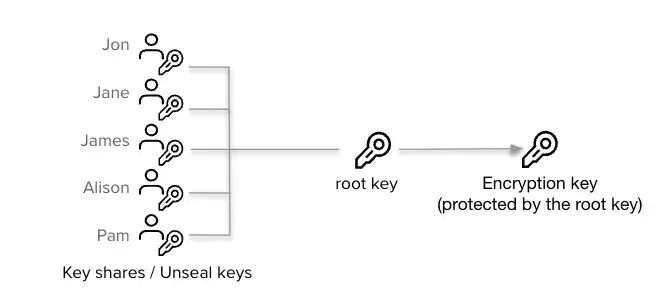
Vault 서버를 시작하면 기본적으로 Sealed 상태로 시작합니다. 이 상태에서 Vault는 물리적 저장소에 접근할 수 있지만, 저장소에 있는 비밀 데이터를 읽거나 쓸 수 없습니다. Vault를 Unseal 상태로 전환하려면 Unseal Key가 필요합니다. Vault는 Shamir's Secret Sharing 알고리즘을 사용하여 Unseal Key를 여러 조각으로 나누고, 이 중 일정 수 이상의 조각을 모아야만 Vault를 Unseal할 수 있습니다.
1
2
3
4
5
6
7
8
9
10
11
12
13
14
15
16
17
18
19
20
21
22
23
24
25
26
27
28
29
30
31
32
33
34
35
36
37
38
39
40
41
42
43
44
45
46
47
48
49
50
51
52
53
54
55
##############################################################
# Initialize vault-0 with one key share and one key threshold.
##############################################################
kubectl exec vault-0 -n vault -- vault operator init \
    -key-shares=1 \
    -key-threshold=1 \
    -format=json > cluster-keys.json

##############################################################
# cluster-keys.json 파일 확인
##############################################################
cat cluster-keys.json| jq
# {
#   "unseal_keys_b64": [
#     "<VAULT_UNSEAL_KEY_B64_REDACTED>"
#   ],
#   ...
#   "root_token": "<VAULT_ROOT_TOKEN_REDACTED>"
# }

##############################################################
# Display the unseal key found in cluster-keys.json.
##############################################################
jq -r ".unseal_keys_b64[]" cluster-keys.json
# <VAULT_UNSEAL_KEY_B64_REDACTED>

##############################################################
# Create a variable named VAULT_UNSEAL_KEY to capture the Vault unseal key.
##############################################################
VAULT_UNSEAL_KEY=$(jq -r ".unseal_keys_b64[]" cluster-keys.json)

##############################################################
# Unseal Vault running on the vault-0 pod : The Vault server is initialized and unsealed.
##############################################################
kubectl exec vault-0 -n vault -- vault operator unseal $VAULT_UNSEAL_KEY
# Key             Value
# ---             -----
# Seal Type       shamir
# Initialized     true
# Sealed          false
# ...

##############################################################
# vault-0 파드 확인 : Readiness Probe 체크 성공!
##############################################################
## (참고) Readiness:      exec [/bin/sh -ec vault status -tls-skip-verify]
kubectl get pod -n vault
# NAME      READY   STATUS    RESTARTS   AGE
# vault-0   1/1     Running   0          17m

##############################################################
# Display the root token found in cluster-keys.json.
##############################################################
jq -r ".root_token" cluster-keys.json
# <VAULT_ROOT_TOKEN_REDACTED>
1.3. Vault login with CLI
1
2
3
4
5
6
7
8
9
10
11
12
13
14
15
16
17
18
19
20
21
22
23
24
25
26
27
28
29
30
31
32
33
34
35
36
37
38
39
40
41
42
43
44
45
46
47
48
49
##############################################################
# 설치 (macOS)
##############################################################
brew tap hashicorp/tap
brew install hashicorp/tap/vault
vault --version  # 설치 확인

##############################################################
# NodePort로 공개한 30004 NodePort로 설정
##############################################################
export VAULT_ADDR='http://localhost:30004'

##############################################################
# vault 상태확인
##############################################################
vault status
# Key             Value
# ---             -----
# Seal Type       shamir
# Initialized     true
# Sealed          false
# Total Shares    1
# Threshold       1
# Version         1.20.4
# Build Date      2025-09-23T13:22:38Z
# Storage Type    file
# Cluster Name    vault-cluster-ea683ddb
# Cluster ID      6485df5f-4851-71a6-183f-6549d614ce0f
# HA Enabled      false

##############################################################
# Root Token으로 로그인
##############################################################
vault login
# Token (will be hidden): <VAULT_ROOT_TOKEN_REDACTED>
# Success! You are now authenticated. The token information displayed below
# is already stored in the token helper. You do NOT need to run "vault login"
# again. Future Vault requests will automatically use this token.

# Key                  Value
# ---                  -----
# token                <VAULT_ROOT_TOKEN_REDACTED>
# token_accessor       <VAULT_TOKEN_ACCESSOR_REDACTED>
# token_duration       ∞
# token_renewable      false
# token_policies       ["root"]
# identity_policies    []
# policies             ["root"]
...
1.4. Vault UI Access : 로그인 Method(Token), Token(위 Root Token 입력) 후 Sign in
1
2
3
4
5
6
7
8
9
10
11
12
13
14
##############################################################
# Vault Service(NodePort) 확인
##############################################################
kubectl get svc,ep -n vault vault
# NAME            TYPE       CLUSTER-IP      EXTERNAL-IP   PORT(S)                         AGE
# service/vault   NodePort   10.43.214.177   <none>        8200:30004/TCP,8201:31493/TCP   29m

# NAME              ENDPOINTS                       AGE
# endpoints/vault   10.42.0.6:8201,10.42.0.6:8200   29m

##############################################################
# Vault UI 접속
##############################################################
open http://127.0.0.1:30004
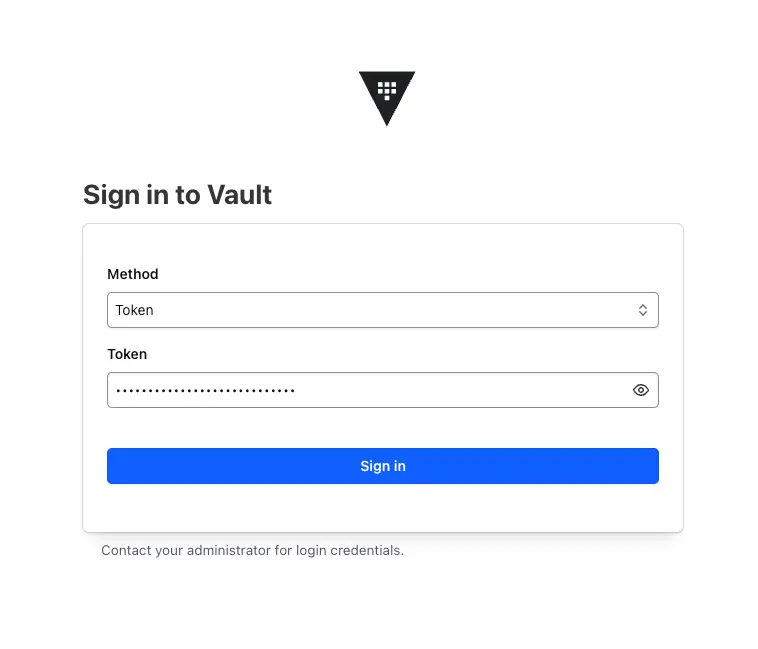
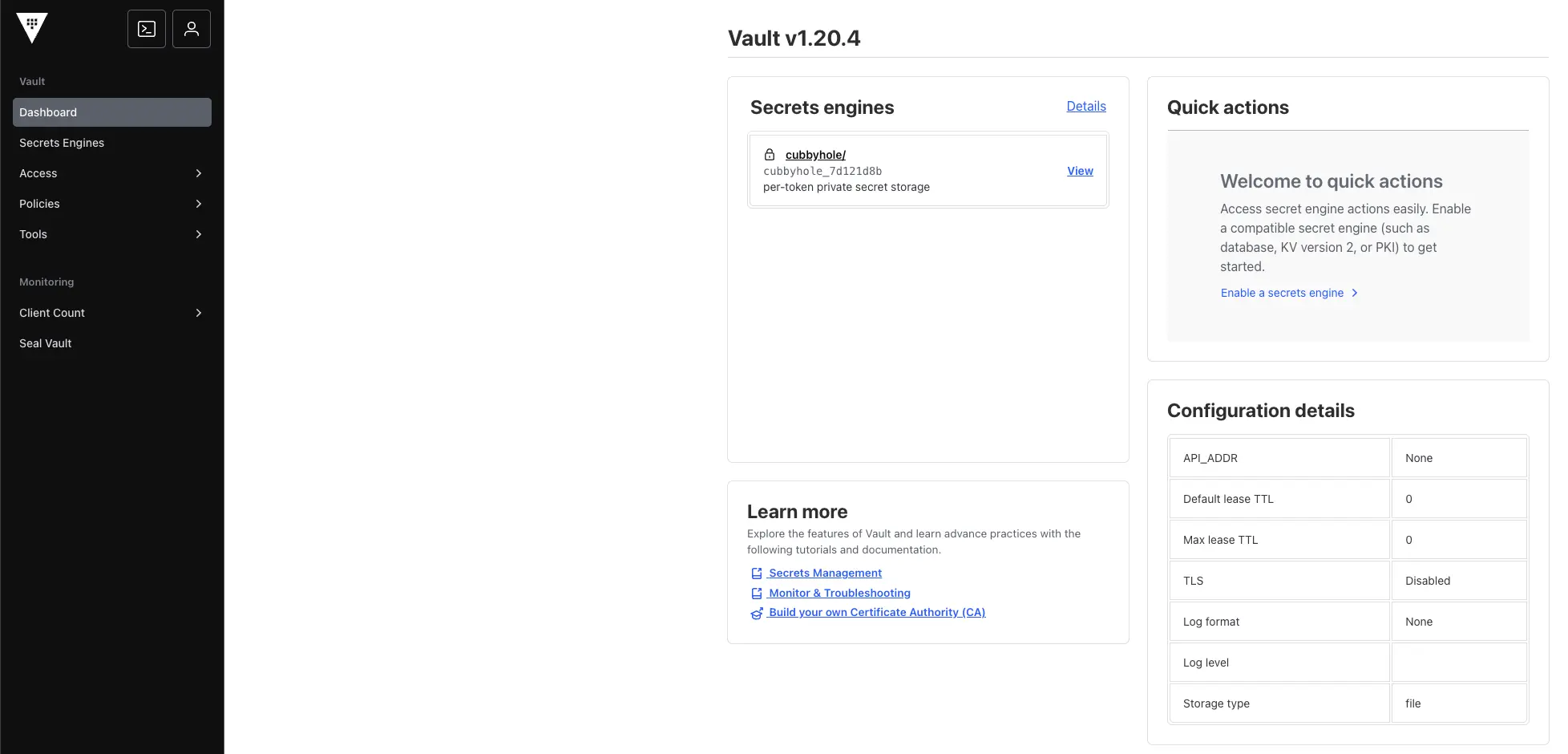
1.5. Vault Audit Log : file 설정 - Vault Docs - File audit device
- Vault Audit devices는 최소 2개 이상을 활성화 하는 것을 권장 : ex) File 과 Syslog , File 과 Socket 등 - Vault Docs - Enable at least two audit devices
- PVC 디스크가 가득 찰 경우 Vault는 Audit Log만 동작하는 것이 아닌, Vault 자체 동작의 수행을 막음.
1
2
3
4
5
6
7
8
9
10
11
12
13
14
15
16
17
18
19
20
21
22
##############################################################
# audit 용 pvc 확인 : /vault/logs 마운트 설정되어 있음
##############################################################
kubectl get pvc -n vault
# NAME            STATUS   VOLUME                                     CAPACITY   ACCESS MODES   STORAGECLASS   VOLUMEATTRIBUTESCLASS   AGE
# audit-vault-0   Bound    pvc-9078a095-449a-4775-9f00-763863642949   10Gi       RWO            local-path     <unset>                 45m
# data-vault-0    Bound    pvc-75edf60a-82df-4efb-b56c-fb98bc5f02e4   10Gi       RWO            local-path     <unset>                 45m

##############################################################
# audit 용 pv(pvc) 에 저장될 수 있게 file audit log 설정
##############################################################
vault audit enable file file_path=/vault/logs/audit.log
vault audit list -detailed
# Path     Type    Description    Replication    Options
# ----     ----    -----------    -----------    -------
# file/    file    n/a            replicated     file_path=/vault/logs/audit.log

##############################################################
# 확인
##############################################################
kubectl exec -it vault-0 -n vault -- tail -f /vault/logs/audit.log
# ...
2. 사전 지식
3. Using Vault on Kubernetes
이번에는 Vault에 시크릿을 생성하고, 이를 Kubernetes에서 사용하는 방법에 대해 알아보겠습니다. 이를 위해 Vault Secrets Operator (VSO)를 사용합니다. VSO는 Kubernetes 환경에서 Vault 시크릿을 쉽게 관리할 수 있도록 도와주는 오픈소스 프로젝트입니다. - docmoa - Vault Secrets Operator 개요
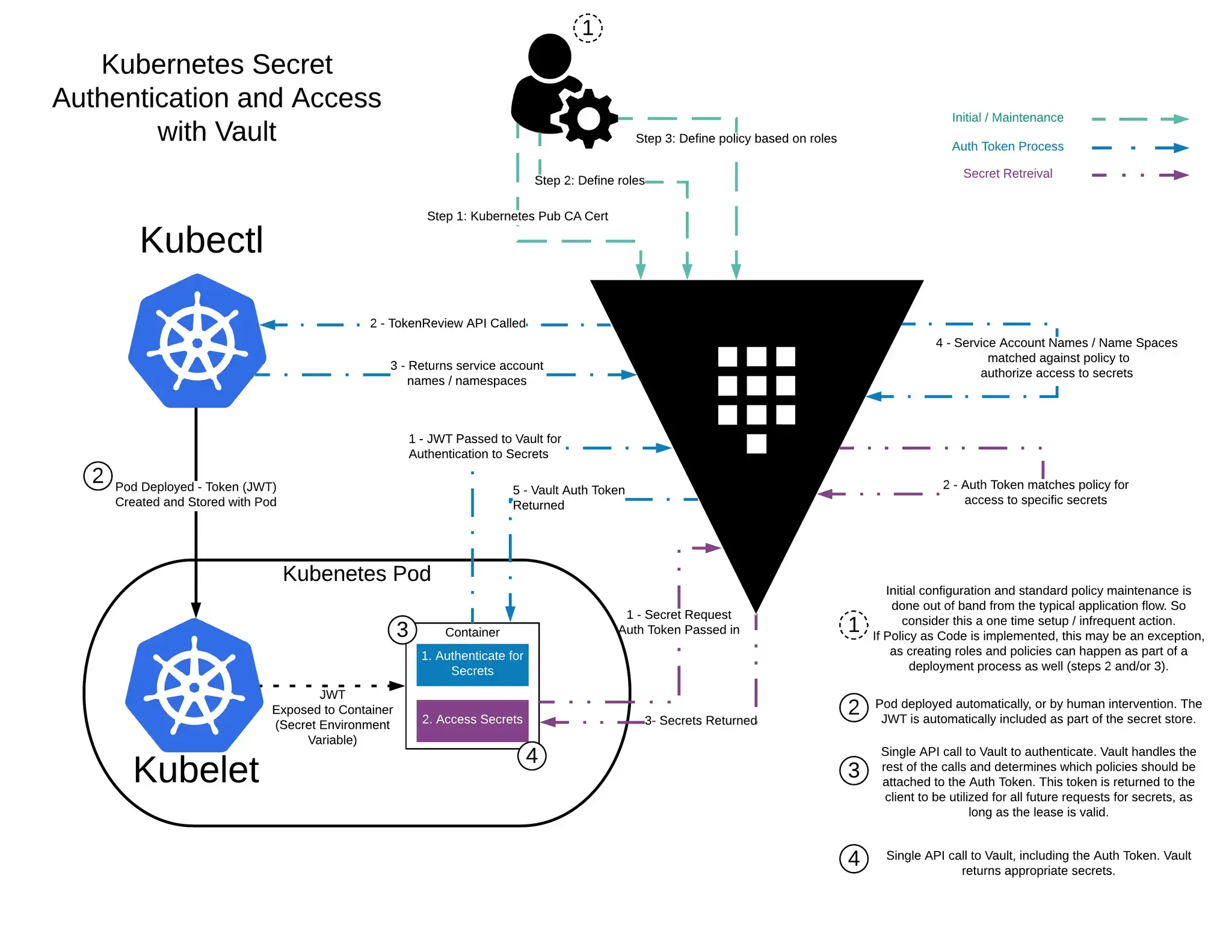
https://developer.hashicorp.com/vault/tutorials/kubernetes/agent-kubernetes
3.1. Vault Kubernetes 인증 및 시크릿 접근 흐름 설명
위 그림은 Kubernetes 환경에서 애플리케이션(Pod)이 Vault를 통해 시크릿에 접근하는 전체 흐름을 단계별로 나타낸 다이어그램입니다. Vault는 Kubernetes의 Service Account 기반 인증을 사용하여, 특정 Pod만 허용된 시크릿에 접근할 수 있도록 제어합니다.
이 과정은 크게 사전 설정 -> 인증 -> 시크릿 접근으로 이어지며, 이를 아래와 같이 4단계로 정리할 수 있습니다.
3.1.1. Vault 사전 설정 단계 (Role / Policy 정의)
먼저 운영자는 Vault에 시크릿 접근을 제어하기 위한 사전 설정을 수행합니다.
- Vault에 Kubernetes Auth Method를 활성화
- Kubernetes API Server의 CA 인증서를 Vault에 등록
- Service Account 이름과 Namespace를 기준으로 Vault Role 정의
- Role에 접근 가능한 Vault Policy 매핑
이 단계는 애플리케이션 실행 흐름과는 분리된 운영자(Admin) 영역으로, 일반적으로 초기 설정 시 1회 또는 정책 변경 시에만 수행됩니다.
3.1.2. Pod 생성 및 Service Account JWT 발급
Pod가 생성되면 Kubernetes는 해당 Pod에 대해 자동으로 Service Account JWT 토큰을 발급합니다.
- Service Account JWT 토큰을 자동으로 생성
- Pod 내부에 파일 형태로 마운트
이 JWT는 Kubernetes가 보증하는 워크로드의 신원(ID) 역할을 하며, 애플리케이션은 별도의 인증 정보를 직접 관리할 필요가 없습니다.
3.1.3. 파드의 애플리케이션이 Vault 에 로그인 과정
Pod 내부의 애플리케이션은 Vault에 로그인하기 위해 다음 과정을 거칩니다.
- 애플리케이션은 Pod에 주입된 Service Account JWT를 사용해 Vault에 로그인 요청
- Vault는 JWT의 유효성을 검증하기 위해 Kubernetes API Server에 TokenReview API를 호출
- Kubernetes API Server는 JWT에 포함된 Service Account 이름과 Namespace를 반환
- Vault는 반환된 정보가 사전에 정의된 Vault Role 조건과 일치하는지 확인
- 조건이 일치하면, Vault는 해당 Role에 매핑된 Policy가 포함된 Vault Auth Token을 발급
이 단계의 결과로 애플리케이션은 Vault에 접근할 수 있는 인증 토큰(Auth Token)을 획득하게 됩니다.
3.1.4. 파드의 애플리케이션이 Vault 에 Secret 요청 과정
마지막으로 애플리케이션은 발급받은 Vault Auth Token을 사용해 시크릿을 요청합니다.
- 애플리케이션은 Auth Token을 포함해 Vault에 시크릿 조회 요청
- Vault는 Auth Token에 연결된 Policy를 기준으로 접근 권한을 검증
- 권한이 허용된 경우에만 해당 시크릿 정보를 반환
이 단계에서만 실제 시크릿 데이터가 애플리케이션으로 전달되며, Vault는 최소 권한 원칙(Least Privilege)을 기반으로 접근을 제어합니다.
3.2. Set a Secret in Vault - Vault Docs - Set a secret in Vault
1
2
3
4
5
6
7
8
9
10
11
12
13
14
15
16
17
18
19
20
21
22
23
24
25
26
27
28
29
30
31
32
33
34
35
36
37
38
39
40
41
42
43
44
45
46
47
48
49
50
51
52
53
54
55
56
57
58
59
60
61
62
63
64
65
66
67
68
69
70
71
72
73
74
75
76
77
78
79
80
81
82
83
84
85
86
87
88
##############################################################
# Enable an instance of the kv-v2 secrets engine at the path secret.
##############################################################
export VAULT_ADDR='http://localhost:30004'
vault secrets enable -path=secret kv-v2
# Success! Enabled the kv-v2 secrets engine at: secret/

##############################################################
# 확인
##############################################################
vault secrets list -detailed
vault secrets list
# Path          Type         Accessor              Description
# ----          ----         --------              -----------
# cubbyhole/    cubbyhole    cubbyhole_7d121d8b    per-token private secret storage
# identity/     identity     identity_3d5d3cf4     identity store
# secret/       kv           kv_16482c29           n/a
# sys/          system       system_31d04145       system endpoints used for control, policy and debugging

##############################################################
# Create a secret at path secret/webapp/config with a username and password.
##############################################################
vault kv put secret/webapp/config username="static-user" password="static-password"
# ====== Secret Path ======
# secret/data/webapp/config

# ======= Metadata =======
# Key                Value
# ---                -----
# created_time       2025-12-13T14:53:52.896906979Z
# custom_metadata    <nil>
# deletion_time      n/a
# destroyed          false
# version            1

##############################################################
# Verify that the secret is defined at the path secret/webapp/config.
##############################################################
vault kv get secret/webapp/config
# ====== Secret Path ======
# secret/data/webapp/config

# ======= Metadata =======
# Key                Value
# ---                -----
# created_time       2025-12-13T14:53:52.896906979Z
# custom_metadata    <nil>
# deletion_time      n/a
# destroyed          false
# version            1

# ====== Data ======
# Key         Value
# ---         -----
# password    static-password
# username    static-user

##############################################################
# Verify that the secret is defined at the path secret/webapp/config.
##############################################################
export VAULT_ROOT_TOKEN=<VAULT_ROOT_TOKEN_REDACTED>

curl -s --header "X-Vault-Token: $VAULT_ROOT_TOKEN" --request GET \
  http://127.0.0.1:30004/v1/secret/data/webapp/config | jq

# {
#   "request_id": "44b1e256-99e2-8b6e-e818-83d8538d59e5",
#   "lease_id": "",
#   "renewable": false,
#   "lease_duration": 0,
#   "data": {
#     "data": {
#       "password": "static-password",
#       "username": "static-user"
#     },
#     "metadata": {
#       "created_time": "2025-12-13T14:53:52.896906979Z",
#       "custom_metadata": null,
#       "deletion_time": "",
#       "destroyed": false,
#       "version": 1
#     }
#   },
#   "wrap_info": null,
#   "warnings": null,
#   "auth": null,
#   "mount_type": "kv"
# }
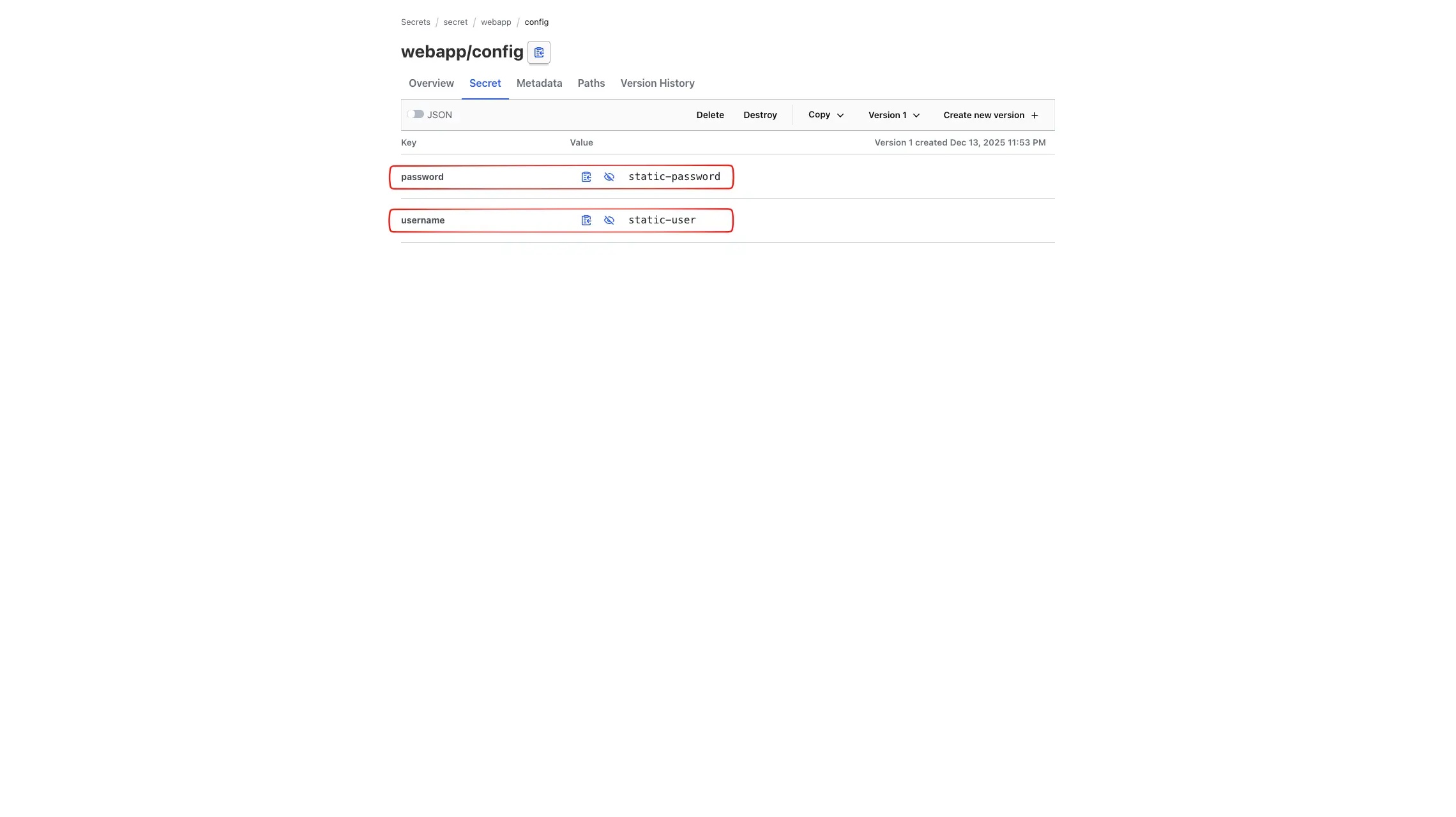
3.2.1. Web UI 에서 생성한 Secret 정보 확인
3.3. Configure Kubernetes Authentication in Vault - Vault Docs - Configure Kubernetes authentication
이번 단계에서는 Kubernetes Auth Method를 Vault에 설정하고, Kubernetes Service Account 기반으로 특정 시크릿에만 접근할 수 있도록 Role과 Policy를 구성합니다.
Vault 설정 관계도
[Auth Role]k8s/webapp
-> [Policy]webapp
-> [Secret Path]secret/data/webapp/config(read)
-> [Secret]username,password
3.4. Vault Kubernetes Authentication 개요
Vault는 Kubernetes 환경에서 애플리케이션이 Service Account Token(JWT)을 사용해 인증할 수 있도록 Vault Docs - Kubernetes auth method를 제공합니다.
이 방식의 핵심은 다음과 같습니다.
- Vault는 Kubernetes Service Account Token을 인증 수단으로 사용
- Kubernetes API Server를 통해 토큰의 유효성을 검증
- 검증된 Service Account와 Namespace를 기준으로 Vault Policy를 매핑
- 인증 성공 시, 해당 Policy가 포함된 Vault Auth Token 발급
이를 통해 애플리케이션은 정적 자격 증명 없이 Vault 시크릿에 접근할 수 있습니다.
3.5. Vault가 Kubernetes Token을 검증할 수 있는 이유 (RBAC)
Vault가 Kubernetes Service Account Token을 검증하려면 Kubernetes API Server의 TokenReview API를 호출할 수 있어야 합니다.
이를 위해 Vault 서버는 다음 권한을 가집니다.
1
2
3
4
5
6
7
8
9
10
11
12
13
##############################################################
# Vault ServiceAccount가 가진 RBAC 확인
##############################################################
kubectl rbac-tool lookup vault
# SUBJECT | SUBJECT TYPE   | SCOPE       | ROLE                  | BINDING
# vault   | ServiceAccount| ClusterRole | system:auth-delegator | vault-server-binding

kubectl rolesum vault -n vault
# ...
# • [CRB] */vault-server-binding ⟶  [CR] */system:auth-delegator
#   Resource                                   Name  Exclude  Verbs  G L W C U P D DC
#   subjectaccessreviews.authorization.k8s.io  [*]     [-]     [-]   ✖ ✖ ✖ ✔ ✖ ✖ ✖ ✖
#   tokenreviews.authentication.k8s.io         [*]     [-]     [-]   ✖ ✖ ✖ ✔ ✖ ✖ ✖ ✖
tokenreviews.authentication.k8s.io-> 허용subjectaccessreviews.authorization.k8s.io-> 허용
즉, Vault는 Kubernetes API Server를 통해 JWT의 진위 여부만 검증하며, Kubernetes의 권한 결정을 대신하지는 않습니다.
3.6. Kubernetes Auth Method 활성화
먼저 Vault에서 Kubernetes 인증 메서드를 활성화합니다.
1
2
3
4
5
6
7
8
9
10
11
12
13
##############################################################
# Enable the Kubernetes authentication method.
##############################################################
vault auth enable kubernetes

##############################################################
# 확인 (kubernetes가 추가됨)
##############################################################
vault auth list
# Path           Type          Accessor                    Description                Version
# ----           ----          --------                    -----------                -------
# kubernetes/    kubernetes    auth_kubernetes_9822b0d8    n/a                        n/a
# token/         token         auth_token_fe87e973         token based credentials    n/a
3.7. Kubernetes API Server 정보 설정
Vault가 TokenReview API를 호출할 수 있도록 Kubernetes API Server 주소를 설정합니다. Vault가 Kubernetes 클러스터 내부에 배포되어 있으므로, 서비스 DNS를 그대로 사용할 수 있습니다.
1
2
3
4
5
6
7
8
9
10
11
12
13
14
15
16
17
18
19
20
##############################################################
# Kubernetes API 서버 정보 설정 : 현재 Vault가 Kubernetes에 설치되어 있으므로, 아래처럼 서비스명 주소 입력 가능
##############################################################
vault write auth/kubernetes/config \
  kubernetes_host="https://kubernetes.default.svc"

##############################################################
# 설정 정보 확인
##############################################################
vault read auth/kubernetes/config
# Key                                  Value
# ---                                  -----
# disable_iss_validation               true
# disable_local_ca_jwt                 false
# issuer                               n/a
# kubernetes_ca_cert                   n/a
# kubernetes_host                      https://kubernetes.default.svc
# pem_keys                             []
# token_reviewer_jwt_set               false
# use_annotations_as_alias_metadata    false
3.8. Vault Policy 설정 (Secret 접근 권한 정의)
이제 애플리케이션이 접근할 시크릿 경로에 대한 Policy를 정의합니다. 아래 Policy는 secret/data/webapp/config 경로에 대해 읽기(read) 권한만 허용합니다.
1
2
3
4
5
vault policy write webapp - <<EOF
path "secret/data/webapp/config" {
  capabilities = ["read"]
}
EOF
3.9. Kubernetes Auth Role 생성
마지막으로 Kubernetes Service Account와 Vault Policy를 연결하는 Role을 생성합니다. Role은 Policy와 Environment Parameter를 결합하여 Web Application의 로그인을 생성합니다.
1
2
3
4
5
6
7
8
9
10
11
##############################################################
# Create a Kubernetes authentication role, named webapp, that connects the Kubernetes service account name and webapp policy.
##############################################################
vault write auth/kubernetes/role/webapp \
  bound_service_account_names=vault \
  bound_service_account_namespaces=default \
  policies=webapp \
  ttl=24h \
  audience="https://kubernetes.default.svc.cluster.local"

# Success! Data written to: auth/kubernetes/role/webapp
위에서 생성한 Role은 Kubernetes Service Account vault와 네임스페이스 default를 Vault Policy인 webapp과 연결됩니다. 인증 후 반환되는 토큰은 24시간 동안 유효합니다.
3.10. Launch a web application - Vault Docs - Launch a web application
Vault Docs - Retrieve secrets for Kubernetes workloads with Vault Agent
Vault Docs - Manage Kubernetes service tokens
이제 Kubernetes에 Web Application을 배포하고, Vault에서 시크릿을 가져오는 과정을 살펴보겠습니다. 해당 Application은 HTTP 요청을 Listening하는 단일 기능을 수행하며 요청 시 Kubernetes Service Account Token을 읽고 Vault에 로그인 후 시크릿을 조회합니다.
3.10.1. Web Application Deployment
1
2
3
4
5
6
7
8
9
10
11
12
13
14
15
16
17
18
19
20
21
22
23
24
25
26
27
28
29
30
31
32
33
34
35
36
37
38
39
40
41
42
43
44
45
46
47
48
49
50
51
52
53
54
55
56
57
58
59
60
61
62
63
64
65
66
67
68
69
70
71
72
73
74
75
76
77
78
79
80
81
82
83
84
85
86
87
88
89
90
91
92
93
94
95
96
97
98
99
100
101
102
103
104
##############################################################
# vault 서비스 어카운트 생성
##############################################################
kubectl create sa vault

##############################################################
# 웹 애플리케이션 디플로이먼트 + 서비스(NodePort) 배포
##############################################################
# JWT_PATH sets the path of the JSON web token (JWT) issued by Kubernetes. This token is used by the web application to authenticate with Vault.
# VAULT_ADDR sets the address of the Vault service. The Helm chart defined a Kubernetes service named vault that forwards requests to its endpoints (i.e. The pods named vault-0, vault-1, and vault-2).
# SERVICE_PORT sets the port that the service listens for incoming HTTP requests.
cat <<EOF | kubectl apply -f -
apiVersion: apps/v1
kind: Deployment
metadata:
  name: webapp
  labels:
    app: webapp
spec:
  replicas: 1
  selector:
    matchLabels:
      app: webapp
  template:
    metadata:
      labels:
        app: webapp
    spec:
      serviceAccountName: vault
      containers:
        - name: app
          image: hashieducation/simple-vault-client:latest
          imagePullPolicy: Always
          env:
            - name: VAULT_ADDR
              value: 'http://vault.vault.svc:8200'
            - name: JWT_PATH
              value: '/var/run/secrets/kubernetes.io/serviceaccount/token'
            - name: SERVICE_PORT
              value: '8080'
          volumeMounts:
          - name: sa-token
            mountPath: /var/run/secrets/kubernetes.io/serviceaccount
            readOnly: true
      volumes:
      - name: sa-token
        projected:
          sources:
          - serviceAccountToken:
              path: token
              expirationSeconds: 600 # 10분 만료 , It defaults to 1 hour and must be at least 10 minutes (600 seconds)
---
apiVersion: v1
kind: Service
metadata:
  name: webapp
spec:
  selector:
    app: webapp
  type: NodePort
  ports:
  - port: 80
    targetPort: 8080
    protocol: TCP
    nodePort: 30005
EOF

##############################################################
# 배포 확인
##############################################################
kubectl get pod -l app=webapp
NAME                     READY   STATUS    RESTARTS   AGE
webapp-9484c6fd7-pqfkg   2/2     Running   0          19s

##############################################################
# (참고) 코드 정보 확인
##############################################################
kubectl exec -it deploy/webapp -- cat /app/main.go
kubectl exec -it deploy/webapp -- cat /app/types.go

##############################################################
# 서비스 어카운트 토큰 확인 : 600초(10분)마다 갱신됨
##############################################################
kubectl exec -it deploy/webapp -- cat /var/run/secrets/kubernetes.io/serviceaccount/token
# <KUBERNETES_SERVICEACCOUNT_JWT_REDACTED>

kubectl exec -it deploy/webapp -- cat /var/run/secrets/kubernetes.io/serviceaccount/token | cut -d '.' -f2 | base64 -d ; echo "\"}"
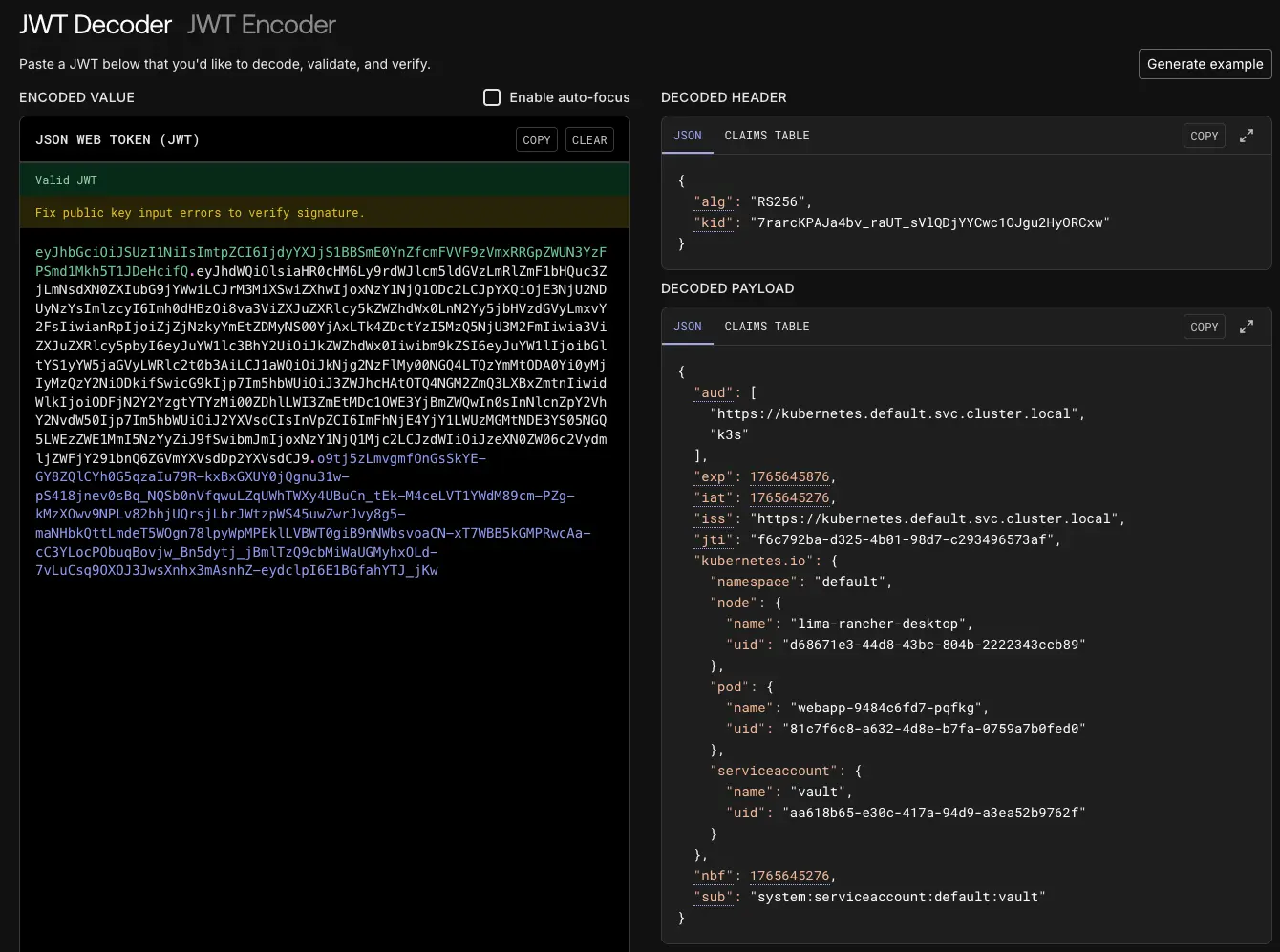
# {"aud":["https://kubernetes.default.svc.cluster.local","k3s"],"exp":1765645876,"iat":1765645276,"iss":"https://kubernetes.default.svc.cluster.local","jti":"f6c792ba-d325-4b01-98d7-c293496573af","kubernetes.io":{"namespace":"default","node":{"name":"lima-rancher-desktop","uid":"d68671e3-44d8-43bc-804b-2222343ccb89"},"pod":{"name":"webapp-9484c6fd7-pqfkg","uid":"81c7f6c8-a632-4d8e-b7fa-0759a7b0fed0"},"serviceaccount":{"name":"vault","uid":"aa618b65-e30c-417a-94d9-a3ea52b9762f"}},"nbf":1765645276,"sub":"system:serviceaccount:default:vault"}"}


##############################################################
# 웹 애플리케이션 접속 동작 확인 : 접속 시 토큰 정보를 확인 후 vault 서버에 로그인 후 시크릿 정보 가져와서 http 출력
##############################################################
curl 127.0.0.1:30005
# password:static-password username:static-user

##############################################################
# webapp 파드 로그 확인 : 서비스 어카운트 토큰(JWT) 정보 확인 후 vault 로그인 후 token 발급 확인
##############################################################
kubectl logs -l app=webapp -f
# 2025/12/13 17:08:34 Received Request - Port forwarding is working.
# Read JWT: <KUBERNETES_SERVICEACCOUNT_JWT_REDACTED>
# Retrieved token: <VAULT_SERVICE_TOKEN_REDACTED>
# ...
JWT Token 의 경우 jwt.io 에서 디코딩하여 내용을 확인할 수 있습니다.
3.10.2. Vault 에서 Secret 업데이트 후 변경 반영 확인
1
2
3
4
5
6
7
8
9
10
11
12
13
14
15
16
17
18
19
20
21
22
23
24
25
26
##############################################################
# Vault 에서 시크릿 정보 변경
##############################################################
vault kv put secret/webapp/config username="changed-user" password="changed-password"
# ====== Secret Path ======
# secret/data/webapp/config

# ======= Metadata =======
# Key                Value
# ---                -----
# created_time       2025-04-15T15:14:59.37055476Z
# custom_metadata    <nil>
# deletion_time      n/a
# destroyed          false
# version            2

##############################################################
# 확인
##############################################################
vault kv get secret/webapp/config

##############################################################
# 변경된 정보 확인
##############################################################
curl 127.0.0.1:30005
# password:changed-password username:changed-user
3.10.3. webapp -> vault Audit Log 확인
1
kubectl exec -it vault-0 -n vault -- tail -f /vault/logs/audit.log
요청 : vault 인증
1
2
3
4
5
6
7
8
9
10
11
12
13
14
15
16
17
18
19
20
21
22
23
24
25
26
27
28
29
30
31
32
33
34
{
    "auth": {
        "policy_results": {
            "allowed": true
        },
        "token_type": "default"
    },
    "request": {
        "data": {
            "jwt": "hmac-sha256:ef7ef69ada78306a869b639647c1a4e647ab7cd448ed42137ef528a1c9244575",
            "role": "hmac-sha256:00d7e66d7673210eeb1434c40d7a56b53d583857c1d1dd5fcb32a4abfb3ffa12"
        },
        "headers": {
            "user-agent": [
                "Go-http-client/1.1"
            ]
        },
        "id": "087dcbfb-3065-5fe5-227a-9d4853f558f3",
        "mount_accessor": "auth_kubernetes_b944d443",
        "mount_class": "auth",
        "mount_point": "auth/kubernetes/",
        "mount_running_version": "v0.21.0+builtin",
        "mount_type": "kubernetes",
        "namespace": {
            "id": "root"
        },
        "operation": "update",
        "path": "auth/kubernetes/login",
        "remote_address": "10.244.0.35",
        "remote_port": 58634
    },
    "time": "2025-04-16T08:43:21.057004259Z",
    "type": "request"
}
응답 : 토큰 수신
1
2
3
4
5
6
7
8
9
10
11
12
13
14
15
16
17
18
19
20
21
22
23
24
25
26
27
28
29
30
31
32
33
34
35
36
37
38
39
40
41
42
43
44
45
46
47
48
49
50
51
52
53
54
55
56
57
58
59
60
61
62
63
64
65
66
67
68
69
70
71
72
73
74
75
76
77
78
79
80
81
{
    "auth": {
        "accessor": "hmac-sha256:d4f4e30a932a0580a83e4486a38f7682364c59af0103c8775f78de603ef175c5",
        "client_token": "hmac-sha256:041a17e266dc6d22b5119df83745c22e91e38d14f36b0942ffbe9abe2298ebf3",
        "display_name": "kubernetes-default-vault",
        "entity_id": "481c4eec-74be-2fd5-2c78-ce8108a69fef",
        "metadata": {
            "role": "webapp",
            "service_account_name": "vault",
            "service_account_namespace": "default",
            "service_account_secret_name": "",
            "service_account_uid": "7683a434-3db0-42a2-8f29-316d74275d2b"
        },
        "policies": [
            "default",
            "webapp"
        ],
        "token_policies": [
            "default",
            "webapp"
        ],
        "token_ttl": 86400,
        "token_type": "service"
    },
    "request": {
        "data": {
            "jwt": "hmac-sha256:ef7ef69ada78306a869b639647c1a4e647ab7cd448ed42137ef528a1c9244575",
            "role": "hmac-sha256:00d7e66d7673210eeb1434c40d7a56b53d583857c1d1dd5fcb32a4abfb3ffa12"
        },
        "headers": {
            "user-agent": [
                "Go-http-client/1.1"
            ]
        },
        "id": "087dcbfb-3065-5fe5-227a-9d4853f558f3",
        "mount_accessor": "auth_kubernetes_b944d443",
        "mount_class": "auth",
        "mount_point": "auth/kubernetes/",
        "mount_running_version": "v0.21.0+builtin",
        "mount_type": "kubernetes",
        "namespace": {
            "id": "root"
        },
        "operation": "update",
        "path": "auth/kubernetes/login",
        "remote_address": "10.244.0.35",
        "remote_port": 58634
    },
    "response": {
        "auth": {
            "accessor": "hmac-sha256:d4f4e30a932a0580a83e4486a38f7682364c59af0103c8775f78de603ef175c5",
            "client_token": "hmac-sha256:041a17e266dc6d22b5119df83745c22e91e38d14f36b0942ffbe9abe2298ebf3",
            "display_name": "kubernetes-default-vault",
            "entity_id": "481c4eec-74be-2fd5-2c78-ce8108a69fef",
            "metadata": {
                "role": "webapp",
                "service_account_name": "vault",
                "service_account_namespace": "default",
                "service_account_secret_name": "",
                "service_account_uid": "7683a434-3db0-42a2-8f29-316d74275d2b"
            },
            "policies": [
                "default",
                "webapp"
            ],
            "token_policies": [
                "default",
                "webapp"
            ],
            "token_ttl": 86400,
            "token_type": "service"
        },
        "mount_accessor": "auth_kubernetes_b944d443",
        "mount_class": "auth",
        "mount_point": "auth/kubernetes/",
        "mount_running_plugin_version": "v0.21.0+builtin",
        "mount_type": "kubernetes"
    },
    "time": "2025-04-16T08:43:21.060132801Z",
    "type": "response"
}
요청 : 발급 받은 토큰으로 secret 요청
1
2
3
4
5
6
7
8
9
10
11
12
13
14
15
16
17
18
19
20
21
22
23
24
25
26
27
28
29
30
31
32
33
34
35
36
37
38
39
40
41
42
43
44
45
46
47
48
49
50
51
52
53
54
55
56
57
58
59
60
61
62
63
{
    "auth": {
        "accessor": "hmac-sha256:d4f4e30a932a0580a83e4486a38f7682364c59af0103c8775f78de603ef175c5",
        "client_token": "hmac-sha256:041a17e266dc6d22b5119df83745c22e91e38d14f36b0942ffbe9abe2298ebf3",
        "display_name": "kubernetes-default-vault",
        "entity_id": "481c4eec-74be-2fd5-2c78-ce8108a69fef",
        "metadata": {
            "role": "webapp",
            "service_account_name": "vault",
            "service_account_namespace": "default",
            "service_account_secret_name": "",
            "service_account_uid": "7683a434-3db0-42a2-8f29-316d74275d2b"
        },
        "policies": [
            "default",
            "webapp"
        ],
        "policy_results": {
            "allowed": true,
            "granting_policies": [
                {
                    "type": ""
                },
                {
                    "name": "webapp",
                    "namespace_id": "root",
                    "type": "acl"
                }
            ]
        },
        "token_policies": [
            "default",
            "webapp"
        ],
        "token_issue_time": "2025-04-16T08:43:21Z",
        "token_ttl": 86400,
        "token_type": "service"
    },
    "request": {
        "client_id": "481c4eec-74be-2fd5-2c78-ce8108a69fef",
        "client_token": "hmac-sha256:81e4d35d947f4dc6786cd349da166303875cdbd64b13318e71fe94071b454d32",
        "client_token_accessor": "hmac-sha256:d4f4e30a932a0580a83e4486a38f7682364c59af0103c8775f78de603ef175c5",
        "headers": {
            "user-agent": [
                "Go-http-client/1.1"
            ]
        },
        "id": "f58cfeeb-cbec-cc3c-4b14-7391d0b341ee",
        "mount_class": "secret",
        "mount_point": "secret/",
        "mount_running_version": "v0.21.0+builtin",
        "mount_type": "kv",
        "namespace": {
            "id": "root"
        },
        "operation": "read",
        "path": "secret/data/webapp/config",
        "remote_address": "10.244.0.35",
        "remote_port": 58634
    },
    "time": "2025-04-16T08:43:21.061388593Z",
    "type": "request"
}
응답 : 시크릿 정보 수신
1
2
3
4
5
6
7
8
9
10
11
12
13
14
15
16
17
18
19
20
21
22
23
24
25
26
27
28
29
30
31
32
33
34
35
36
37
38
39
40
41
42
43
44
45
46
47
48
49
50
51
52
53
54
55
56
57
58
59
60
61
62
63
64
65
66
67
68
69
70
71
72
73
74
75
76
77
78
79
80
81
82
83
84
{
    "auth": {
        "accessor": "hmac-sha256:d4f4e30a932a0580a83e4486a38f7682364c59af0103c8775f78de603ef175c5",
        "client_token": "hmac-sha256:041a17e266dc6d22b5119df83745c22e91e38d14f36b0942ffbe9abe2298ebf3",
        "display_name": "kubernetes-default-vault",
        "entity_id": "481c4eec-74be-2fd5-2c78-ce8108a69fef",
        "metadata": {
            "role": "webapp",
            "service_account_name": "vault",
            "service_account_namespace": "default",
            "service_account_secret_name": "",
            "service_account_uid": "7683a434-3db0-42a2-8f29-316d74275d2b"
        },
        "policies": [
            "default",
            "webapp"
        ],
        "policy_results": {
            "allowed": true,
            "granting_policies": [
                {
                    "type": ""
                },
                {
                    "name": "webapp",
                    "namespace_id": "root",
                    "type": "acl"
                }
            ]
        },
        "token_policies": [
            "default",
            "webapp"
        ],
        "token_issue_time": "2025-04-16T08:43:21Z",
        "token_ttl": 86400,
        "token_type": "service"
    },
    "request": {
        "client_id": "481c4eec-74be-2fd5-2c78-ce8108a69fef",
        "client_token": "hmac-sha256:81e4d35d947f4dc6786cd349da166303875cdbd64b13318e71fe94071b454d32",
        "client_token_accessor": "hmac-sha256:d4f4e30a932a0580a83e4486a38f7682364c59af0103c8775f78de603ef175c5",
        "headers": {
            "user-agent": [
                "Go-http-client/1.1"
            ]
        },
        "id": "f58cfeeb-cbec-cc3c-4b14-7391d0b341ee",
        "mount_accessor": "kv_c002faad",
        "mount_class": "secret",
        "mount_point": "secret/",
        "mount_running_version": "v0.21.0+builtin",
        "mount_type": "kv",
        "namespace": {
            "id": "root"
        },
        "operation": "read",
        "path": "secret/data/webapp/config",
        "remote_address": "10.244.0.35",
        "remote_port": 58634
    },
    "response": {
        "data": {
            "data": {
                "password": "hmac-sha256:fdd33a2c65e563d1d0c2e026f3e71d7f457b66ed50c2efdb67d9d761a63a6a05",
                "username": "hmac-sha256:b74d0b553a23887a509ac85f5b71e91b184badcd1b76072d85d6cd7ce549b5db"
            },
            "metadata": {
                "created_time": "hmac-sha256:b17c0c831c5ce2d76ce9c177f0f95670aed260d8f21e4ee58715dd5acbb7df4a",
                "custom_metadata": null,
                "deletion_time": "hmac-sha256:a528e8995baee2920f8276eecbdfdb7f0dfa689c0ac51c604ff4715de5c60219",
                "destroyed": false,
                "version": 1
            }
        },
        "mount_accessor": "kv_c002faad",
        "mount_class": "secret",
        "mount_point": "secret/",
        "mount_running_plugin_version": "v0.21.0+builtin",
        "mount_type": "kv"
    },
    "time": "2025-04-16T08:43:21.061646884Z",
    "type": "response"
}
3.11. 정리
1
2
3
kubectl delete deployment webapp
kubectl delete sa vault
helm uninstall vault -n vault
4. Vault Secrets Operator (VSO) - Vault Docs - Manage Kubernetes native secrets with the Vault Secrets Operator
VSO는 Kubernetes 네이티브 시크릿 리소스를 Vault 시크릿과 동기화하는 오픈소스 프로젝트입니다. 이를 통해 Kubernetes 네이티브 시크릿을 사용하는 애플리케이션이 Vault 시크릿을 안전하게 사용할 수 있고, 개발자가 Vault 도구를 따로 학습하지 않아도 됩니다.

- 기존에 Vault를 사용하기 위해 애플리케이션에서 직접 구현해야 했던 Vault Login, Vault Secret Read 등의 동작을 VSO가 대신 수행합니다.
- VSO는 Vault에 저장된 Secret을 Kubernetes Native Secret으로 동기화합니다.
- Deployment, ReplicaSet, StatefulSet, Argo Rollout 등 Kubernetes 리소스 유형에 대해 Rollout 방식으로 자동 시크릿 교체를 적용할 수 있습니다.
- Rollout을 수행하지 않고도, 애플리케이션에서 변경된 값을 반영하도록 구성할 수 있습니다.
- VSO는
kv-v1,kv-v2기반의 Secret과 PKI 기반 TLS 인증서를 지원하며, 고정(Static) 및 동적(Dynamic) Secret을 모두 사용할 수 있습니다.

4.1. Vault 설치 : dev 모드로 설치
1
2
3
4
5
6
7
8
9
10
11
12
13
14
15
16
17
18
19
20
21
22
23
24
25
26
27
28
29
30
31
32
33
34
35
36
37
38
39
40
41
42
43
44
45
46
47
48
49
50
51
52
53
54
55
56
57
##############################################################
# 공식 문서 버전 정보
##############################################################
helm search repo hashicorp/vault
# NAME                                    CHART VERSION   APP VERSION     DESCRIPTION
# hashicorp/vault                         0.31.0          1.20.4          Official HashiCorp Vault Chart
# hashicorp/vault-secrets-gateway         0.0.2           0.1.0           A Helm chart for Kubernetes
# hashicorp/vault-secrets-operator        1.1.0           1.1.0           Official Vault Secrets Operator Chart

##############################################################
# Clone the repository
##############################################################
git clone https://github.com/hashicorp-education/learn-vault-secrets-operator
cd learn-vault-secrets-operator

##############################################################
# 테스트 용도(server.dev.enabled=true) 설정 파일 작성 : 직접 Unseal 하지 않아도됨. RootToken 직접 설정
##############################################################
cat <<EOF > vault-values.yaml
server:
  image:
    repository: "hashicorp/vault"
    tag: "1.19.0"

  dev:
    enabled: true
    devRootToken: "root"

  logLevel: debug

  service:
    enabled: true
    type: ClusterIP
    port: 8200
    targetPort: 8200

ui:
  enabled: true
  serviceType: "NodePort"
  externalPort: 8200
  serviceNodePort: 30005

injector:
  enabled: "false"
EOF

##############################################################
# vault 설치
##############################################################
helm install vault hashicorp/vault -n vault --create-namespace --values vault-values.yaml --version 0.30.0

##############################################################
# 확인
##############################################################
kubectl get pods -n vault
# NAME      READY   STATUS    RESTARTS   AGE
# vault-0   1/1     Running   0          41s
4.2. Vault 설정
1
2
3
4
5
6
7
8
9
10
11
12
13
14
15
16
17
18
19
20
21
22
23
24
25
26
27
28
29
30
31
32
33
34
35
36
37
38
39
40
41
42
43
44
45
46
47
48
49
50
51
52
53
54
55
56
57
58
59
60
61
62
63
##############################################################
# Vault 로그인 : 토큰(root)
##############################################################
export VAULT_ADDR='http://localhost:30005'
vault login
# Token (will be hidden): root
# ...

##############################################################
# kubernetes 인증 활성화
##############################################################
vault auth enable -path demo-auth-mount kubernetes
# Success! Enabled kubernetes auth method at: demo-auth-mount/

##############################################################
# API 서버 주소 설정 (Vault의 Kubernetes Auth Method가 Kubernetes API 서버와 통신할 수 있도록 설정)
##############################################################
vault write auth/demo-auth-mount/config kubernetes_host="https://kubernetes.default.svc"

##############################################################
# 시크릿(엔진v2) 활성화
##############################################################
vault secrets enable -path=kvv2 kv-v2
# Success! Enabled the kv-v2 secrets engine at: kvv2/

##############################################################
# Create a JSON file with a Vault policy.
##############################################################
tee webapp.json <<EOF
path "kvv2/data/webapp/config" {
   capabilities = ["read", "list"]
}
EOF
vault policy write webapp webapp.json

##############################################################
# Create a role in Vault to enable access to secrets within the kv v2 secrets engine.
##############################################################
## Notice that the bound_service_account_namespaces is app, limiting which namespace the secret is synced to.
vault write auth/demo-auth-mount/role/role1 \
   bound_service_account_names=demo-static-app \
   bound_service_account_namespaces=app \
   policies=webapp \
   audience=vault \
   ttl=24h

# Success! Data written to: auth/demo-auth-mount/role/role1

##############################################################
# Create a secret.
##############################################################
vault kv put kvv2/webapp/config username="static-user" password="static-password"
# ===== Secret Path =====
# kvv2/data/webapp/config

# ======= Metadata =======
# Key                Value
# ---                -----
# created_time       2025-12-13T18:07:01.593020255Z
# custom_metadata    <nil>
# deletion_time      n/a
# destroyed          false
# version            1
5. Vault Secrets Operator 소개 - docmoa - Vault Secrets Operator 개요
VSO(Vault Secrets Operator)는 Kubernetes에서 Vault의 시크릿(정적 시크릿, 동적 자격 증명 등)을 안전하게 가져와 Kubernetes Secret 리소스에 자동으로 반영하는 Operator입니다.

VSO의 동작 방식은 다음과 같습니다.
- Kubernetes Controller 형태로 동작합니다.
- 사용자 정의 리소스(CR, Custom Resource)를 감시합니다.
VaultAuthVaultStaticSecretVaultDynamicSecretVaultPKISecret
- 변경을 감지하면 Vault API를 호출해 자격 증명(Credentials) 또는 시크릿(Secret)을 조회하고, Kubernetes
Secret을 생성 또는 갱신합니다.
- VaultAuth (CRD)
- Kubernetes에서 Vault 인증 방식(Kubernetes Auth, AppRole Auth, JWT Auth 등)을 정의하는 리소스입니다.
- 예시로 다음 정보를 포함할 수 있습니다.
auth method: kubernetes, approle, jwtmount: auth pathrole: Vault rolenamespace: Vault namespace
- VSO는 VaultAuth 객체를 통해 Vault에 로그인하고, 토큰을 캐싱해 재사용합니다.
- Secret Syncing Controller
VaultStaticSecret,VaultDynamicSecret,VaultPKISecretCRD를 감시하여 KubernetesSecret을 동기화합니다.- Static Secrets: 지정 경로의 시크릿을 주기적으로 읽어 Kubernetes
Secret에 반영합니다. - Dynamic Secrets: (예: DB/AWS Credentials) rotate에 따라 새 자격 증명을 발급받고 Kubernetes
Secret을 업데이트합니다. - PKI Certificates: 인증서를 발급하고, 만료 전에 자동으로 갱신합니다.
- Kubernetes API Server
- VSO가 생성/갱신하는 Kubernetes
Secret을 저장하는 역할을 합니다.
- VSO가 생성/갱신하는 Kubernetes
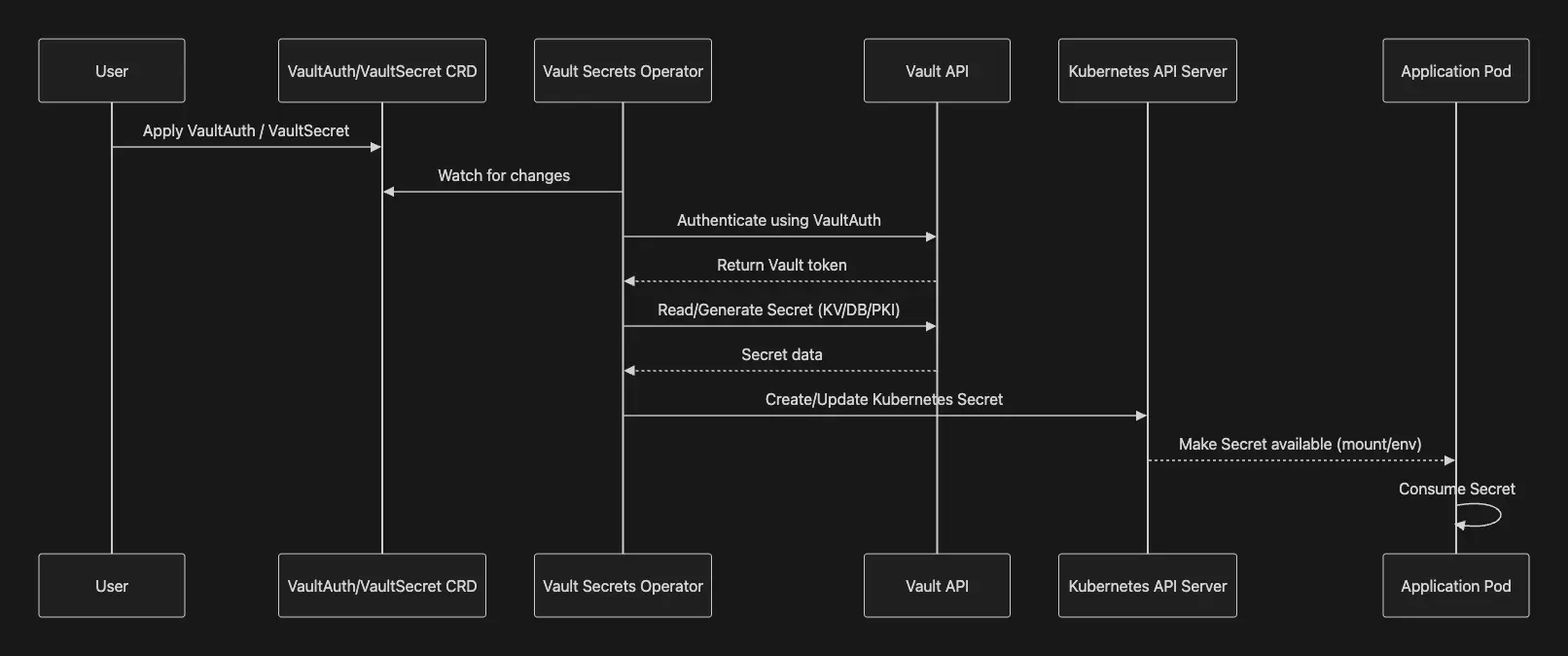
- 전체 동작 흐름 요약
- 사용자가 VaultAuth, VaultStaticSecret 등의 CRD 생성
- VSO가 CRD를 감시하여 필요 시 Vault에 인증
- Vault에서 secret/dynamic credentials/pki cert 가져옴
- Kubernetes Secret 객체로 생성/업데이트
- 애플리케이션 Pod는 일반 Secret처럼 mount/inject 하여 사용
5.1. Vault Secrets Operator(VSO) 설치 - HelmChart
1
2
3
4
5
6
7
8
9
10
11
12
13
14
15
16
17
18
19
20
21
22
23
24
25
26
27
28
29
30
31
32
33
34
35
36
37
38
39
40
41
42
43
44
45
46
47
48
49
50
51
52
53
54
55
56
57
58
59
60
61
62
63
64
65
66
67
68
69
70
71
72
73
74
75
76
77
78
79
80
81
82
83
84
85
86
87
88
89
90
91
92
93
94
95
96
97
98
99
100
101
102
103
104
105
106
107
108
109
110
111
112
113
114
115
116
117
118
119
120
121
122
123
124
125
126
127
128
129
130
131
132
133
134
135
136
137
138
139
140
141
142
143
144
145
146
147
148
149
150
151
152
153
154
155
156
157
158
159
160
161
162
163
164
165
166
167
168
169
170
##############################################################
# 공식 문서 버전 정보
##############################################################
helm search repo hashicorp/vault
# NAME                                    CHART VERSION   APP VERSION     DESCRIPTION
# hashicorp/vault                         0.28.1          1.17.2          Official HashiCorp Vault Chart
# hashicorp/vault-secrets-operator        0.7.1           0.8.0           Official Vault Secrets Operator Chart

##############################################################
# VSO 설치 : Helm v4 버전에서는 namespace에 null 값 오류로 실패함 (Helm v3 으로 설치 필요)
##############################################################
cat << EOF > vault-operator-values.yaml
defaultVaultConnection:
  enabled: true
  address: "http://vault.vault.svc.cluster.local:8200"
  skipTLSVerify: false
controller:
  manager:
    clientCache:
      persistenceModel: direct-encrypted
      storageEncryption:
        enabled: true
        mount: k8s-auth-mount
        keyName: vso-client-cache
        transitMount: demo-transit
        kubernetes:
          role: auth-role-operator
          serviceAccount: vault-secrets-operator-controller-manager
          tokenAudiences: ["vault"]
EOF

helm install vault-secrets-operator hashicorp/vault-secrets-operator -n vault-secrets-operator-system --create-namespace --values vault-operator-values.yaml --version 0.10.0
helm list -A

##############################################################
# 설치 확인
##############################################################
kubectl get-all -n vault-secrets-operator-system
kubectl get crd | grep secrets.hashicorp.com
# ...
# secrettransformations.secrets.hashicorp.com   2025-04-16T12:10:53Z
# vaultauthglobals.secrets.hashicorp.com        2025-04-16T12:10:53Z
# vaultauths.secrets.hashicorp.com              2025-04-16T12:10:53Z
# vaultconnections.secrets.hashicorp.com        2025-04-16T12:10:53Z
# vaultdynamicsecrets.secrets.hashicorp.com     2025-04-16T12:10:53Z
# vaultpkisecrets.secrets.hashicorp.com         2025-04-16T12:10:53Z
# vaultstaticsecrets.secrets.hashicorp.com      2025-04-16T12:10:53Z

##############################################################
# vso 파드 상세 정보 확인 : 2개의 컨테이너로 구성
##############################################################
kubectl describe pod -n vault-secrets-operator-system
...
Service Account:  vault-secrets-operator-controller-manager
...
Containers:
  kube-rbac-proxy:
    Container ID:  containerd://db3eae7b836fb4f1b4236c494c8fa96ada94769a6c602e1a150c75293a6a4162
    Image:         quay.io/brancz/kube-rbac-proxy:v0.18.1
  ...
  manager:
    Container ID:  containerd://1ab1545fb4bd86ac52d6c7609a3e962cd2d1a81daa9bbd9c82f79d9a0d8b6466
    Image:         hashicorp/vault-secrets-operator:0.10.0
...

##############################################################
# CRD 확인
##############################################################
kubectl get vaultconnections,vaultauths -n vault-secrets-operator-system
# NAME                                            AGE
# vaultconnection.secrets.hashicorp.com/default   12m

# NAME                                                                          AGE
# vaultauth.secrets.hashicorp.com/vault-secrets-operator-default-transit-auth   12m

##############################################################
# vaultauth CRD 확인
##############################################################
kubectl get vaultauth -n vault-secrets-operator-system vault-secrets-operator-default-transit-auth -o jsonpath='{.spec}' | jq
# {
#   "kubernetes": {
#     "audiences": [
#       "vault"
#     ],
#     "role": "auth-role-operator",
#     "serviceAccount": "vault-secrets-operator-controller-manager",
#     "tokenExpirationSeconds": 600
#   },
#   "method": "kubernetes",
#   "mount": "demo-auth-mount",
#   "storageEncryption": {
#     "keyName": "vso-client-cache",
#     "mount": "demo-transit"
#   },
#   "vaultConnectionRef": "default"
# }

##############################################################
# vaultconnection CRD 확인
##############################################################
kubectl get vaultconnection -n vault-secrets-operator-system default -o jsonpath='{.spec}' | jq
# {
#   "address": "http://vault.vault.svc.cluster.local:8200",
#   "skipTLSVerify": false
# }

##############################################################
# VSO 파드에 서비스 어카운트가 사용 가능한 Role 확인
##############################################################
kubectl rbac-tool lookup vault-secrets-operator-controller-manager
#   SUBJECT                                   | SUBJECT TYPE   | SCOPE       | NAMESPACE                     | ROLE                                        | BINDING
# --------------------------------------------+----------------+-------------+-------------------------------+---------------------------------------------+-----------------------------------------------------
#   vault-secrets-operator-controller-manager | ServiceAccount | ClusterRole |                               | vault-secrets-operator-manager-role         | vault-secrets-operator-manager-rolebinding
#   vault-secrets-operator-controller-manager | ServiceAccount | ClusterRole |                               | vault-secrets-operator-proxy-role           | vault-secrets-operator-proxy-rolebinding
#   vault-secrets-operator-controller-manager | ServiceAccount | Role        | vault-secrets-operator-system | vault-secrets-operator-leader-election-role | vault-secrets-operator-leader-election-rolebinding

##############################################################
# VSO는 deployment 등에 Secret 적용을 위한 rollout(G W P U) 필요, 특히 vault 서버로 부터 암호 값을 가져와서 secret 에 업데이트 및 관리 필요함.
##############################################################
## kubectl rollout restart(GET, PATCH), rollout status(GET, WATCH), rollout undo(GET, UPDATE)
## G (Get), L(List), W(Watch), P(Patch), C(Create), U(Update), D(Delete), DC(DeleteCollection)
kubectl rolesum -n vault-secrets-operator-system vault-secrets-operator-controller-manager
# ServiceAccount: vault-secrets-operator-system/vault-secrets-operator-controller-manager
# Secrets:

# Policies:
# • [RB] vault-secrets-operator-system/vault-secrets-operator-leader-election-rolebinding ⟶  [R] vault-secrets-operator-system/vault-secrets-operator-leader-election-role
#   Resource                    Name  Exclude  Verbs  G L W C U P D DC
#   configmaps                  [*]     [-]     [-]   ✔ ✔ ✔ ✔ ✔ ✔ ✔ ✖
#   events                      [*]     [-]     [-]   ✖ ✖ ✖ ✔ ✖ ✔ ✖ ✖
#   leases.coordination.k8s.io  [*]     [-]     [-]   ✔ ✔ ✔ ✔ ✔ ✔ ✔ ✖

# • [CRB] */vault-secrets-operator-manager-rolebinding ⟶  [CR] */vault-secrets-operator-manager-role
#   Resource                                                Name  Exclude  Verbs  G L W C U P D DC
#   configmaps                                              [*]     [-]     [-]   ✔ ✔ ✔ ✖ ✖ ✖ ✖ ✖
#   daemonsets.apps                                         [*]     [-]     [-]   ✔ ✔ ✔ ✖ ✖ ✔ ✖ ✖
#   deployments.apps                                        [*]     [-]     [-]   ✔ ✔ ✔ ✖ ✖ ✔ ✖ ✖
#   events                                                  [*]     [-]     [-]   ✖ ✖ ✖ ✔ ✖ ✔ ✖ ✖
#   ...
#   rollouts.argoproj.io                                    [*]     [-]     [-]   ✔ ✔ ✔ ✖ ✖ ✔ ✖ ✖
#   secrets                                                 [*]     [-]     [-]   ✔ ✔ ✔ ✔ ✔ ✔ ✔ ✔
#   secrettransformations.secrets.hashicorp.com             [*]     [-]     [-]   ✔ ✔ ✔ ✔ ✔ ✔ ✔ ✖
#   secrettransformations.secrets.hashicorp.com/finalizers  [*]     [-]     [-]   ✖ ✖ ✖ ✖ ✔ ✖ ✖ ✖
#   secrettransformations.secrets.hashicorp.com/status      [*]     [-]     [-]   ✔ ✖ ✖ ✖ ✔ ✔ ✖ ✖
#   serviceaccounts                                         [*]     [-]     [-]   ✔ ✔ ✔ ✖ ✖ ✖ ✖ ✖
#   serviceaccounts/token                                   [*]     [-]     [-]   ✔ ✔ ✔ ✔ ✖ ✖ ✖ ✖
#   statefulsets.apps                                       [*]     [-]     [-]   ✔ ✔ ✔ ✖ ✖ ✔ ✖ ✖
#   vaultauthglobals.secrets.hashicorp.com                  [*]     [-]     [-]   ✔ ✔ ✔ ✔ ✔ ✔ ✔ ✖
#   vaultauthglobals.secrets.hashicorp.com/finalizers       [*]     [-]     [-]   ✖ ✖ ✖ ✖ ✔ ✖ ✖ ✖
#   vaultauthglobals.secrets.hashicorp.com/status           [*]     [-]     [-]   ✔ ✖ ✖ ✖ ✔ ✔ ✖ ✖
#   vaultauths.secrets.hashicorp.com                        [*]     [-]     [-]   ✔ ✔ ✔ ✔ ✔ ✔ ✔ ✖
#   vaultauths.secrets.hashicorp.com/finalizers             [*]     [-]     [-]   ✖ ✖ ✖ ✖ ✔ ✖ ✖ ✖
#   vaultauths.secrets.hashicorp.com/status                 [*]     [-]     [-]   ✔ ✖ ✖ ✖ ✔ ✔ ✖ ✖
#   vaultconnections.secrets.hashicorp.com                  [*]     [-]     [-]   ✔ ✔ ✔ ✔ ✔ ✔ ✔ ✖
#   vaultconnections.secrets.hashicorp.com/finalizers       [*]     [-]     [-]   ✖ ✖ ✖ ✖ ✔ ✖ ✖ ✖
#   vaultconnections.secrets.hashicorp.com/status           [*]     [-]     [-]   ✔ ✖ ✖ ✖ ✔ ✔ ✖ ✖
#   vaultdynamicsecrets.secrets.hashicorp.com               [*]     [-]     [-]   ✔ ✔ ✔ ✔ ✔ ✔ ✔ ✖
#   vaultdynamicsecrets.secrets.hashicorp.com/finalizers    [*]     [-]     [-]   ✖ ✖ ✖ ✖ ✔ ✖ ✖ ✖
#   vaultdynamicsecrets.secrets.hashicorp.com/status        [*]     [-]     [-]   ✔ ✖ ✖ ✖ ✔ ✔ ✖ ✖
#   vaultpkisecrets.secrets.hashicorp.com                   [*]     [-]     [-]   ✔ ✔ ✔ ✔ ✔ ✔ ✔ ✖
#   vaultpkisecrets.secrets.hashicorp.com/finalizers        [*]     [-]     [-]   ✖ ✖ ✖ ✖ ✔ ✖ ✖ ✖
#   vaultpkisecrets.secrets.hashicorp.com/status            [*]     [-]     [-]   ✔ ✖ ✖ ✖ ✔ ✔ ✖ ✖
#   vaultstaticsecrets.secrets.hashicorp.com                [*]     [-]     [-]   ✔ ✔ ✔ ✔ ✔ ✔ ✔ ✖
#   vaultstaticsecrets.secrets.hashicorp.com/finalizers     [*]     [-]     [-]   ✖ ✖ ✖ ✖ ✔ ✖ ✖ ✖
#   vaultstaticsecrets.secrets.hashicorp.com/status         [*]     [-]     [-]   ✔ ✖ ✖ ✖ ✔ ✔ ✖ ✖

# • [CRB] */vault-secrets-operator-proxy-rolebinding ⟶  [CR] */vault-secrets-operator-proxy-role
#   Resource                                   Name  Exclude  Verbs  G L W C U P D DC
#   subjectaccessreviews.authorization.k8s.io  [*]     [-]     [-]   ✖ ✖ ✖ ✔ ✖ ✖ ✖ ✖
#   tokenreviews.authentication.k8s.io         [*]     [-]     [-]   ✖ ✖ ✖ ✔ ✖ ✖ ✖ ✖
6. References
- docmoa - Vault Secrets Operator 개요
- Vault Docs - Vault on Kubernetes deployment guide
- Vault Docs - agent-kubernetes
- Vault Docs - Seal/Unseal
- Vault Docs - File audit device
- Vault Docs - Enable at least two audit devices
- Vault Docs - Set a secret in Vault
- Vault Docs - Configure Kubernetes authentication
- Vault Docs - Kubernetes auth method
- Vault Docs - Launch a web application
- Vault Docs - Retrieve secrets for Kubernetes workloads with Vault Agent
- Vault Docs - Manage Kubernetes service tokens
- Vault Docs - Manage Kubernetes native secrets with the Vault Secrets Operator
7. Static Secret(고정 암호) 실습
Static Secret(고정 암호) 실습 시나리오는 다음과 같습니다.
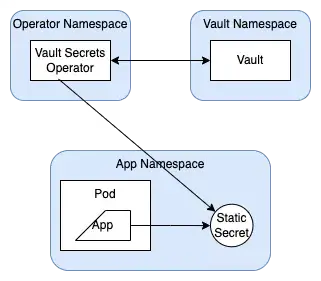
- Vault에 시크릿(Secret)과 접근을 위한 Policy/Role을 생성합니다.
- VSO는
VaultAuthCRD 설정을 기반으로 Vault에 로그인하고 토큰(Token)을 발급받습니다.- Kubernetes Auth를 사용하는 경우, Vault는 Kubernetes API Server의 TokenReview API를 호출해 ServiceAccount 토큰을 검증합니다.
- VSO는 발급받은 토큰으로 Vault에서 시크릿을 조회합니다.
- 이 과정은
VaultStaticSecretCRD를 통해 동작합니다.
- 이 과정은
- VSO는 조회한 값을 Kubernetes
Secret에 생성 또는 갱신합니다. - VSO는 설정한 주기(현재 설정은 30초)로 Vault 시크릿을 재조회하고, Kubernetes
Secret을 최신 상태로 유지합니다.
7.1. Deploy and sync a secret
1
2
3
4
5
6
7
8
9
10
11
12
13
14
15
16
17
18
19
20
21
22
23
24
25
26
27
28
29
30
31
32
33
34
35
36
37
38
39
40
41
42
43
44
45
46
47
48
49
50
51
52
53
54
55
56
57
58
59
60
61
62
63
64
65
66
67
68
69
70
71
72
73
74
75
76
77
78
79
80
81
82
83
84
85
86
87
88
89
90
91
92
93
94
95
96
97
98
99
100
101
102
##############################################################
# 애플리케이션용 네임스페이스 생성
##############################################################
kubectl create ns app

##############################################################
# CRD 확인 : vaultauths
##############################################################
kubectl explain vaultauths
kubectl explain vaultauths.spec

##############################################################
# Set up Kubernetes authentication for the secret.
##############################################################
cat vault/vault-auth-static.yaml
# apiVersion: v1
# kind: ServiceAccount
# metadata:
#   # SA bound to the VSO namespace for transit engine auth
#   namespace: vault-secrets-operator-system
#   name: demo-operator
# ---
# apiVersion: v1
# kind: ServiceAccount
# metadata:
#   namespace: app
#   name: demo-static-app
# ---
# apiVersion: secrets.hashicorp.com/v1beta1
# kind: VaultAuth
# metadata:
#   name: static-auth
#   namespace: app
# spec:
#   method: kubernetes
#   mount: demo-auth-mount
#   kubernetes:
#     role: role1
#     serviceAccount: demo-static-app
#     audiences:
#       - vault

kubectl apply -f vault/vault-auth-static.yaml

##############################################################
# sa, vaultauth 확인
##############################################################
kubectl get sa,vaultauth -n app
# NAME                             SECRETS   AGE
# serviceaccount/default           0         38s
# serviceaccount/demo-static-app   0         17s

# NAME                                          AGE
# vaultauth.secrets.hashicorp.com/static-auth   17s


##############################################################
# CRD 확인 : vaultstaticsecrets
##############################################################
kubectl explain vaultstaticsecrets
kubectl explain vaultstaticsecrets.spec

##############################################################
# Create the secret names secretkv in the app namespace.
##############################################################
cat vault/static-secret.yaml
# apiVersion: secrets.hashicorp.com/v1beta1
# kind: VaultStaticSecret
# metadata:
#   name: vault-kv-app
#   namespace: app
# spec:
#   type: kv-v2

#   # mount path
#   mount: kvv2

#   # path of the secret
#   path: webapp/config

#   # dest k8s secret
#   destination:
#     name: secretkv
#     create: true

#   # static secret refresh interval 시크릿 리프레시 주기
#   refreshAfter: 30s

#   # Name of the CRD to authenticate to Vault
#   vaultAuthRef: static-auth

##############################################################
# Create the VaultStaticSecret resource.
##############################################################
kubectl apply -f vault/static-secret.yaml

##############################################################
# vaultstaticsecret 확인
##############################################################
kubectl get vaultstaticsecret -n app
# NAME           AGE
# vault-kv-app   34s
7.2. Rotate the static secret
1
2
3
4
5
6
7
8
9
10
11
12
13
14
15
16
17
18
19
20
21
22
23
24
25
26
27
28
29
30
31
32
33
34
35
36
37
38
39
40
41
42
43
44
45
46
47
##############################################################
# Kubernetes Secret 확인
##############################################################
kubectl get secret -n app
# NAME       TYPE     DATA   AGE
# secretkv   Opaque   3      5m35s

##############################################################
# Kubernetes Secret 값 확인
##############################################################
kubectl krew install view-secret
kubectl view-secret -n app secretkv --all
# _raw='{"data":{"password":"static-password","username":"static-user"},"metadata":{"created_time":"2025-12-13T18:07:01.593020255Z","custom_metadata":null,"deletion_time":"","destroyed":false,"version":1}}'
# password='static-password'
# username='static-user'

##############################################################
# 시크릿 업데이트 Rotate the secret.
##############################################################
export VAULT_ADDR='http://localhost:30005'
vault kv put kvv2/webapp/config username="static-user2" password="static-password2"
# ===== Secret Path =====
# kvv2/data/webapp/config

# ======= Metadata =======
# Key                Value
# ---                -----
# created_time       2025-12-13T18:56:42.285009468Z
# custom_metadata    <nil>
# deletion_time      n/a
# destroyed          false
# version            2

##############################################################
# Kubernetes Secret 값 확인 >> 이후 VSO 는 설정된 주기(현재 30초) 마다 Vault 서버에 GET 요청으로 시크릿 값을 받음
##############################################################
kubectl view-secret -n app secretkv --all
# _raw='{"data":{"password":"static-password2","username":"static-user2"},"metadata":{"created_time":"2025-12-13T18:56:42.285009468Z","custom_metadata":null,"deletion_time":"","destroyed":false,"version":2}}'
# password='static-password2'
# username='static-user2'

##############################################################
# secretkv 리소스의 AGE를 보면 재성성되지 않았고, 리소스 data 의 값만 바꿈
##############################################################
kubectl get secret -n app
NAME       TYPE     DATA   AGE
secretkv   Opaque   3      8m
8. Dynamic Secret(동적 암호) 실습
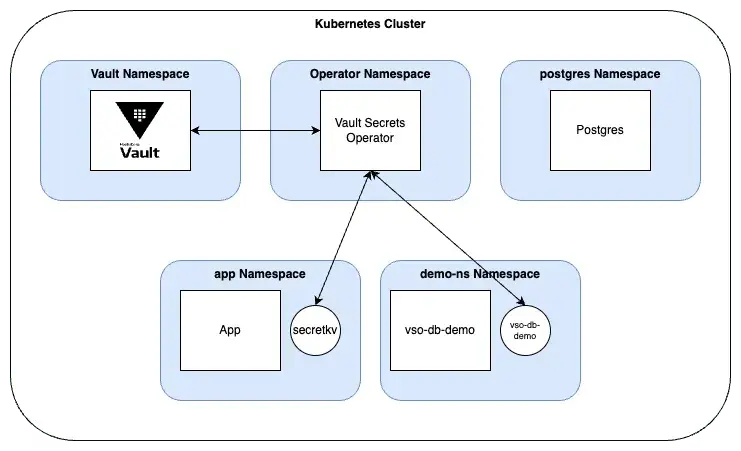
- 동적 암호 주기 관리는 Vault 가 자동으로 암호를 갱신(삭제/재생성)하고, VSO가 해당 암호를 Kubernetes Secret 에 동기화
- Dynamic secrets lifecycle is managed by Vault and will be automatically rotated
- The lifecycle management includes deleting and recreating the secret
- 주요 사용 CRD
- VSO가 Vault 에 로그인 과정은 VaultAuth CRD를 통해서 작동
- VSO가 Vault 에 Dynamic Secret 요청 과정은 VaultDynamicSecret CRD를 통해서 작동
8.1. PostgreSQL 파드 배포 및 Vault Database Secret Engine 설정 - Vault Docs - Vault client cache, Vault Docs - Persist and encrypt the Vault client cache
1
2
3
4
5
6
7
8
9
10
11
12
13
14
15
16
17
18
19
20
21
22
23
24
25
26
27
28
##############################################################
# PostgreSQL 배포
##############################################################
kubectl create ns postgres

##############################################################
# Add the Bitnami repository to your local Helm.
##############################################################
helm repo add bitnami https://charts.bitnami.com/bitnami

##############################################################
# Install PostgreSQL : 암호 secret-pass
##############################################################
helm upgrade --install postgres bitnami/postgresql --namespace postgres --set auth.audit.logConnections=true  --set auth.postgresPassword=secret-pass

##############################################################
# 확인
##############################################################
kubectl get sts,pod,svc,ep,pvc,secret -n postgres
kubectl view-secret -n postgres postgres-postgresql --all
# postgres-password='secret-pass'

##############################################################
# psql 로그인 확인
##############################################################
kubectl exec -it -n postgres postgres-postgresql-0 -- sh -c 'PGPASSWORD=secret-pass psql -U postgres -h localhost'
kubectl exec -it -n postgres postgres-postgresql-0 -- sh -c "PGPASSWORD=secret-pass psql -U postgres -h localhost -c '\l'"
# q 빠져나오기
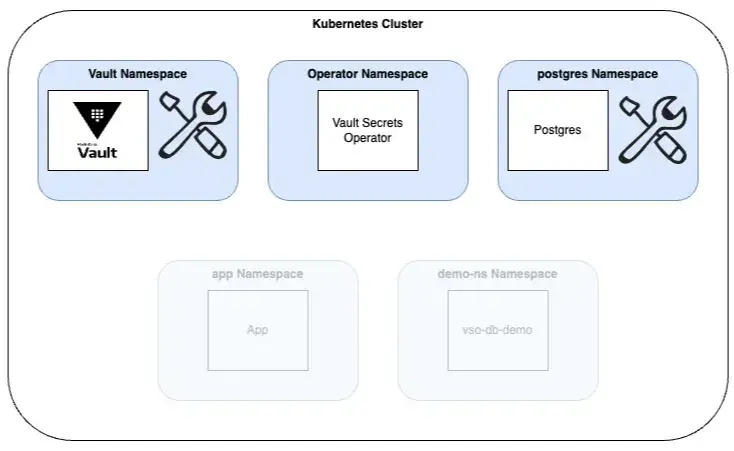
8.1.1. PostgreSQL 관련 Vault 설정
1
2
3
4
5
6
7
8
9
10
11
12
13
14
15
16
17
18
19
20
21
22
23
24
25
26
27
28
29
30
31
32
33
34
35
36
37
38
39
40
41
42
43
44
45
46
47
48
49
50
51
52
53
54
55
56
57
58
59
60
61
62
63
64
65
66
67
68
69
70
71
72
73
74
75
76
77
78
79
80
81
82
83
84
85
##############################################################
# Enable an instance of the Database Secrets Engine
##############################################################
vault secrets enable -path=demo-db database
Success! Enabled the database secrets engine at: demo-db/

##############################################################
# Configure the Database Secrets Engine : vault 에 DB에 대한 정보 설정 (DB 사용자 이름, 암호)
##############################################################
vault write demo-db/config/demo-db \
   plugin_name=postgresql-database-plugin \
   allowed_roles="dev-postgres" \
   connection_url="postgresql://:@postgres-postgresql.postgres.svc.cluster.local:5432/postgres?sslmode=disable" \
   username="postgres" \
   password="secret-pass"
# Success! Data written to: demo-db/config/demo-db

##############################################################
# 확인 : user,pw는 조금 더 안전하게 변수 처리
##############################################################
vault read demo-db/config/demo-db
# Key                                   Value
# ---                                   -----
# allowed_roles                         [dev-postgres]
# connection_details                    map[connection_url:postgresql://:@postgres-postgresql.postgres.svc.cluster.local:5432/postgres?sslmode=disable username:postgres]
# disable_automated_rotation            false
# password_policy                       n/a
# plugin_name                           postgresql-database-plugin
# plugin_version                        n/a
# root_credentials_rotate_statements    []
# rotation_period                       0s
# rotation_schedule                     n/a
# rotation_window                       0
# skip_static_role_import_rotation      false
# verify_connection                     true

# DB 사용자 동적 생성 Role 등록
# Create a role for the PostgreSQL pod : default_ttl="10m"(인증 생성 후 10분 유효), max_ttl="10m"(연장 요청 해도 20분 못넘음)
vault write demo-db/roles/dev-postgres \
   db_name=demo-db \
   creation_statements="CREATE ROLE \"\" WITH LOGIN PASSWORD '' VALID UNTIL ''; \
      GRANT ALL PRIVILEGES ON DATABASE postgres TO \"\";" \
   revocation_statements="REVOKE ALL ON DATABASE postgres FROM  \"\";" \
   backend=demo-db \
   name=dev-postgres \
   default_ttl="10m" \
   max_ttl="20m"

# creation_statements="..." : Vault가 동적으로 사용자 생성 시 실행할 SQL 문을 정의
## , , 은 Vault가 자동으로 치환하는 템플릿 변수
## 새로운 PostgreSQL 사용자 생성 (CREATE ROLE) , 비밀번호와 만료시간 설정 , 해당 사용자에게 postgres DB에 대한 모든 권한 부여

# revocation_statements="..." : Vault가 사용자 자격을 취소(revoke)할 때 실행할 SQL
## 해당 사용자로부터 postgres DB의 모든 권한을 제거합니다.
## 사용자를 아예 DROP하지 않는 경우도 많음 -> 보안 정책에 따라 추가 가능.

##############################################################
# 확인
##############################################################
vault read demo-db/roles/dev-postgres
Key                      Value
---                      -----
creation_statements      [CREATE ROLE "" WITH LOGIN PASSWORD '' VALID UNTIL '';       GRANT ALL PRIVILEGES ON DATABASE postgres TO "";]
credential_type          password
db_name                  demo-db
default_ttl              10m
max_ttl                  20m
renew_statements         []
revocation_statements    [REVOKE ALL ON DATABASE postgres FROM  "";]
rollback_statements      []

##############################################################
# Create the demo-auth-policy-db policy.
##############################################################
vault policy write demo-auth-policy-db - <<EOF
path "demo-db/creds/dev-postgres" {
   capabilities = ["read"]
}
EOF
# Success! Uploaded policy: demo-auth-policy-db

##############################################################
# psql 확인
##############################################################
kubectl exec -it -n postgres postgres-postgresql-0 -- sh -c "PGPASSWORD=secret-pass psql -U postgres -h localhost -c '\du'"
8.2. 동적 시크릿 설정 : PostgreSQL에 대한 임시 클라이언트 자격 증명을 생성하기 위해 Vault의 동적 시크릿 엔진 사용
1
2
3
4
5
6
7
8
9
10
11
12
13
14
15
16
17
18
19
20
21
22
23
24
25
26
27
28
29
# Create a new role for the dynamic secret.
vault write auth/demo-auth-mount/role/auth-role \
   bound_service_account_names=demo-dynamic-app \
   bound_service_account_namespaces=demo-ns \
   token_ttl=0 \
   token_period=120 \
   token_policies=demo-auth-policy-db \
   audience=vault

##############################################################
# 확인
##############################################################
vault read auth/demo-auth-mount/role/auth-role
# Key                                         Value
# ---                                         -----
# alias_name_source                           serviceaccount_uid
# audience                                    vault
# bound_service_account_names                 [demo-dynamic-app]
# bound_service_account_namespace_selector    n/a
# bound_service_account_namespaces            [demo-ns]
# token_bound_cidrs                           []
# token_explicit_max_ttl                      0s
# token_max_ttl                               0s
# token_no_default_policy                     false
# token_num_uses                              0
# token_period                                2m
# token_policies                              [demo-auth-policy-db]
# token_ttl                                   0s
# token_type                                  default
8.3. Create the application : demo-ns 네임스페이스에 vso-db-demo 파드가 동적 암호를 사용할 수 있도록 설정
1
2
3
4
5
6
7
8
9
10
11
12
13
14
15
16
17
18
19
20
21
22
23
24
25
26
27
28
29
30
31
32
33
34
35
36
37
38
39
40
41
42
43
44
45
46
47
48
49
50
51
52
53
54
55
56
57
58
59
60
61
62
63
64
65
66
67
68
69
70
71
72
73
74
75
76
77
78
79
80
81
82
83
84
85
86
87
88
89
90
91
92
93
94
95
96
97
98
99
100
101
102
103
104
105
106
107
108
109
110
111
112
113
114
115
116
117
118
119
120
121
122
123
124
125
126
127
##############################################################
# 네임스페이스 생성
##############################################################
kubectl create ns demo-ns

##############################################################
# Create the app, Vault connection, authentication, service account and corresponding secrets.
##############################################################
ls dynamic-secrets/.
# app-deployment.yaml              vault-auth-dynamic.yaml          vault-dynamic-secret.yaml
# app-secret.yaml                  vault-auth-operator.yaml         vault-operator-sa.yaml
# postgres                         vault-dynamic-secret-create.yaml

kubectl apply -f dynamic-secrets/.
# deployment.apps/vso-db-demo created
# secret/vso-db-demo created
# serviceaccount/demo-dynamic-app created
# vaultauth.secrets.hashicorp.com/dynamic-auth created
# vaultdynamicsecret.secrets.hashicorp.com/vso-db-demo-create created
# vaultdynamicsecret.secrets.hashicorp.com/vso-db-demo created
# serviceaccount/demo-operator unchanged

##############################################################
# 확인
##############################################################
kubectl get pod -n demo-ns
# NAME                           READY   STATUS    RESTARTS   AGE
# vso-db-demo-54f876db88-2n5qp   1/1     Running   0          6m22s
# vso-db-demo-54f876db88-fbxfp   1/1     Running   0          6m22s
# vso-db-demo-54f876db88-nxcv9   1/1     Running   0          6m11s

##############################################################
# 파드에 /etc/secrets 마운트는 Kubernetes Secret vso-db-demo 를 사용
##############################################################
kubectl describe pod -n demo-ns
# ...
#     Mounts:
#       /etc/secrets from secrets (ro)
#       /var/run/secrets/kubernetes.io/serviceaccount from kube-api-access-wldh6 (ro)
# ...
# Volumes:
#   secrets:
#     Type:        Secret (a volume populated by a Secret)
#     SecretName:  vso-db-demo
#     Optional:    false

##############################################################
# 파드에 /etc/secrets 정보 확인
##############################################################
kubectl exec -it deploy/vso-db-demo -n demo-ns -- ls -al /etc/secrets
# total 8
# drwxrwxrwt 3 root root  140 Apr 17 02:38 .
# drwxr-xr-x 1 root root 4096 Apr 17 02:38 ..
# drwxr-xr-x 2 root root  100 Apr 17 02:38 ..2025_04_17_02_38_40.2226178615
# lrwxrwxrwx 1 root root   32 Apr 17 02:38 ..data -> ..2025_04_17_02_38_40.2226178615
# lrwxrwxrwx 1 root root   11 Apr 17 02:38 _raw -> ..data/_raw
# lrwxrwxrwx 1 root root   15 Apr 17 02:38 password -> ..data/password
# lrwxrwxrwx 1 root root   15 Apr 17 02:38 username -> ..data/username

kubectl exec -it deploy/vso-db-demo -n demo-ns -- cat /etc/secrets/username ; echo
# v-demo-aut-dev-post-D8Nzb3VluenoFtl2rrSv-1744857520

kubectl exec -it deploy/vso-db-demo -n demo-ns -- cat /etc/secrets/password ; echo
# IozcZE6XtLp-UmfC0xCw

##############################################################
# Kubernetes Secret 확인
##############################################################
kubectl get secret -n demo-ns
# NAME                  TYPE     DATA   AGE
# vso-db-demo           Opaque   3      4m44s
# vso-db-demo-created   Opaque   3      4m44s

kubectl view-secret -n demo-ns vso-db-demo --all
# _raw='{"password":"IozcZE6XtLp-UmfC0xCw","username":"v-demo-aut-dev-post-D8Nzb3VluenoFtl2rrSv-1744857520"}'
# password='IozcZE6XtLp-UmfC0xCw'
# username='v-demo-aut-dev-post-D8Nzb3VluenoFtl2rrSv-1744857520'


##############################################################
# VaultAuth 확인
##############################################################
kubectl get vaultauth -n demo-ns dynamic-auth -o yaml
# ...
# spec:
#   kubernetes:
#     audiences:
#     - vault
#     role: auth-role
#     serviceAccount: demo-dynamic-app
#     tokenExpirationSeconds: 600
#   method: kubernetes

##############################################################
# VaultDynamicSecret 확인 : vso-db-demo
##############################################################
kubectl get vaultdynamicsecret -n demo-ns vso-db-demo -o yaml
# ...
# spec:
#   destination:
#     create: false
#     name: vso-db-demo
#     overwrite: false
#     transformation: {}
#   mount: demo-db
#   path: creds/dev-postgres
#   renewalPercent: 67
#   rolloutRestartTargets:
#   - kind: Deployment
#     name: vso-db-demo
#   vaultAuthRef: dynamic-auth
# status:
#   lastGeneration: 2
#   lastRenewalTime: 1744857520
#   lastRuntimePodUID: 0e50c745-d0cf-4958-a90d-f115abe3642f
#   secretLease:
#     duration: 600
#     id: demo-db/creds/dev-postgres/MdFbTqBUEANpSJKvj4mw13Oj
#     renewable: true
#     requestID: dc318dd9-2028-87fd-fffa-fa059a1fa4d2
#   staticCredsMetaData:
#     lastVaultRotation: 0
#     rotationPeriod: 0
#     ttl: 0
#   vaultClientMeta:
#     cacheKey: kubernetes-f12ec83aa75d21ece5a0e9
#     id: 618c2ba8875fef7f43289dad00c4a742ddd273ee812539bc51376961b9a08a3e
8.4. Vault 가 Psql 암호를 동적으로 변경하고 VSO가 해당 암호를 Kubernetes Secret 동기화 관련 상세 확인
1
2
3
4
5
6
7
8
9
10
11
12
13
14
15
16
17
18
19
20
21
22
23
24
25
26
27
28
29
30
31
32
33
34
35
36
37
38
39
40
41
42
43
44
45
46
47
48
49
50
51
52
53
54
55
56
57
58
59
60
61
62
63
64
65
66
67
68
69
70
71
72
73
74
75
76
77
78
79
80
81
82
83
84
85
86
87
88
89
90
91
92
93
94
95
96
97
98
99
100
101
102
103
104
105
106
107
108
109
110
111
112
113
114
115
116
117
118
119
120
121
122
123
124
125
126
127
128
129
130
131
132
133
134
135
136
137
138
139
140
##############################################################
# psql 확인
##############################################################
kubectl exec -it -n postgres postgres-postgresql-0 -- sh -c "PGPASSWORD=secret-pass psql -U postgres -h localhost -c '\du'"

##############################################################
# 1차 Kubernetes Secret 확인
##############################################################
kubectl get secret -n demo-ns
# NAME                  TYPE     DATA   AGE
# vso-db-demo           Opaque   3      4m44s
# vso-db-demo-created   Opaque   3      4m44s

kubectl view-secret -n demo-ns vso-db-demo --all
# _raw='{"password":"IozcZE6XtLp-UmfC0xCw","username":"v-demo-aut-dev-post-D8Nzb3VluenoFtl2rrSv-1744857520"}'
# password='IozcZE6XtLp-UmfC0xCw'
# username='v-demo-aut-dev-post-D8Nzb3VluenoFtl2rrSv-1744857520'


##############################################################
# (10분 정도 이후) 2차 Kubernetes Secret 확인
##############################################################
# secret 리소스가 재생성되지는 않았고, Data 값만 바뀌었다
kubectl get secret -n demo-ns
# NAME                  TYPE     DATA   AGE
# vso-db-demo           Opaque   3      18m
# vso-db-demo-created   Opaque   3      18m

kubectl view-secret -n demo-ns vso-db-demo --all
# _raw='{"password":"1TBYsIThp71-c8zHc3ka","username":"v-demo-aut-dev-post-E36N51q8c12D8mQvb34I-1744858374"}'
# password='1TBYsIThp71-c8zHc3ka'
# username='v-demo-aut-dev-post-E36N51q8c12D8mQvb34I-1744858374'

##############################################################
# AGE를 보면 파드가 rollout 되었음을 알 수 있다
##############################################################
kubectl get pod -n demo-ns
# NAME                           READY   STATUS    RESTARTS   AGE
# vso-db-demo-5d8cff64db-6jb6k   1/1     Running   0          7m9s
# vso-db-demo-5d8cff64db-6mbvf   1/1     Running   0          7m12s
# vso-db-demo-5d8cff64db-jf7nf   1/1     Running   0          7m12s

##############################################################
# deployment Events 확인 : 10분 간격으로 파드를 비중에 따라 Rollout 동작
##############################################################
## vaultdynamicsecret 에 'renewalPercent: 67' 설정으로 secret's TTL(10분)의 67% 정도에 신규 시크릿을 생성 후 rolloutRestartTargets 에 의해 동작
## RenewalPercent is the percent out of 100 of a dynamic secret's TTL when new secrets are generated. Defaults to 67 percent plus up to 10% jitter.
kubectl describe deploy -n demo-ns
# ...
# Events:
#   Type    Reason             Age                    From                   Message
#   ----    ------             ----                   ----                   -------
#   Normal  ScalingReplicaSet  22m                    deployment-controller  Scaled up replica set vso-db-demo-69848c8d56 from 0 to 3
#   Normal  ScalingReplicaSet  22m                    deployment-controller  Scaled up replica set vso-db-demo-54f876db88 from 0 to 1
#   Normal  ScalingReplicaSet  22m                    deployment-controller  Scaled down replica set vso-db-demo-69848c8d56 from 3 to 2
#   Normal  ScalingReplicaSet  22m                    deployment-controller  Scaled up replica set vso-db-demo-54f876db88 from 1 to 2
#   Normal  ScalingReplicaSet  22m                    deployment-controller  Scaled down replica set vso-db-demo-69848c8d56 from 2 to 1
#   Normal  ScalingReplicaSet  22m                    deployment-controller  Scaled up replica set vso-db-demo-54f876db88 from 2 to 3
#   Normal  ScalingReplicaSet  22m                    deployment-controller  Scaled down replica set vso-db-demo-69848c8d56 from 1 to 0
#   Normal  ScalingReplicaSet  8m17s                  deployment-controller  Scaled up replica set vso-db-demo-57f754644c from 0 to 1
#   Normal  ScalingReplicaSet  8m17s                  deployment-controller  Scaled down replica set vso-db-demo-54f876db88 from 3 to 2
#   Normal  ScalingReplicaSet  8m17s                  deployment-controller  Scaled up replica set vso-db-demo-57f754644c from 1 to 2
#   Normal  ScalingReplicaSet  8m15s                  deployment-controller  Scaled down replica set vso-db-demo-54f876db88 from 2 to 1
#   Normal  ScalingReplicaSet  8m15s                  deployment-controller  Scaled up replica set vso-db-demo-57f754644c from 2 to 3
#   Normal  ScalingReplicaSet  8m13s                  deployment-controller  Scaled down replica set vso-db-demo-54f876db88 from 1 to 0
#   Normal  ScalingReplicaSet  7m55s                  deployment-controller  Scaled up replica set vso-db-demo-5d8cff64db from 0 to 1
#   Normal  ScalingReplicaSet  7m55s                  deployment-controller  Scaled down replica set vso-db-demo-57f754644c from 3 to 2
#   Normal  ScalingReplicaSet  7m55s                  deployment-controller  Scaled up replica set vso-db-demo-5d8cff64db from 1 to 2
#   Normal  ScalingReplicaSet  7m51s (x3 over 7m52s)  deployment-controller  (combined from similar events): Scaled down replica set vso-db-demo-57f754644c from 1 to 0
# ...

##############################################################
# 실제 postgresql 에 사용자 정보 확인 : 계속 추가되고 있음..
##############################################################
kubectl exec -it -n postgres postgres-postgresql-0 -- sh -c "PGPASSWORD=secret-pass psql -U postgres -h localhost -c '\du'"
#                                                   List of roles
#                       Role name                      |                         Attributes
# -----------------------------------------------------+------------------------------------------------------------
#  postgres                                            | Superuser, Create role, Create DB, Replication, Bypass RLS
#  v-demo-aut-dev-post-D8Nzb3VluenoFtl2rrSv-1744857520 | Password valid until 2025-04-17 02:58:45+00
#  v-demo-aut-dev-post-DMBI2eYE7BisYFxig0aB-1744857520 | Password valid until 2025-04-17 02:58:45+00
#  v-demo-aut-dev-post-E36N51q8c12D8mQvb34I-1744858374 | Password valid until 2025-04-17 03:10:34+00
#  v-demo-aut-dev-post-euabp4xcPL4oxb0BqbNm-1744857520 | Password valid until 2025-04-17 02:48:45+00
#  v-demo-aut-dev-post-vF7SvLrP0DvQcIo5bVCL-1744858396 | Password valid until 2025-04-17 03:10:05+00
#  v-demo-aut-dev-post-vxG8D8SF8SN3wgYyPnOz-1744857520 | Password valid until 2025-04-17 02:48:45+00
#  ...

##############################################################
# vault 에서 lease 조회
##############################################################
vault list sys/leases/lookup/demo-db/creds/dev-postgres

##############################################################
# 특정 lease 삭제(Revoke)
##############################################################
# revocation_statements="REVOKE ALL ON DATABASE postgres FROM  \"\";" \
vault lease revoke demo-db/creds/dev-postgres/<LEASE_ID>
vault list sys/leases/lookup/demo-db/creds/dev-postgres
kubectl exec -it -n postgres postgres-postgresql-0 -- sh -c "PGPASSWORD=secret-pass psql -U postgres -h localhost -c '\du'"

##############################################################
# 동적 계정 생성 : Authentication Methods(token)
##############################################################
## creation_statements="CREATE ROLE \"\" WITH LOGIN PASSWORD '' VALID UNTIL ''; \
##   GRANT ALL PRIVILEGES ON DATABASE postgres TO \"\";" \
vault read demo-db/creds/dev-postgres
kubectl exec -it -n postgres postgres-postgresql-0 -- sh -c "PGPASSWORD=secret-pass psql -U postgres -h localhost -c '\du'"


##############################################################
# vault 로그
##############################################################
kubectl stern -n vault -l app.kubernetes.io/name=vault
# vault-0 vault 2025-04-17T02:58:40.195Z [INFO]  expiration: revoked lease: lease_id=demo-db/creds/dev-postgres/MdFbTqBUEANpSJKvj4mw13Oj
# vault-0 vault 2025-04-17T02:58:40.318Z [INFO]  expiration: revoked lease: lease_id=demo-db/creds/dev-postgres/VTmJNRC7lRBjPzVnoQTQFcOx
# ...


# (Skip) vault-secrets-operator 가 clientCachePersistenceModel 설정 적용 정보 확인
kubectl stern -n vault-secrets-operator-system -l app.kubernetes.io/name=vault-secrets-operator
...
vault-secrets-operator-controller-manager-7f67cd89fd-d2t2k manager {"level":"info","ts":"2025-04-10T06:50:14Z","logger":"initCachingClientFactory","msg":"Initializing the CachingClientFactory"}
vault-secrets-operator-controller-manager-7f67cd89fd-d2t2k manager {"level":"info","ts":"2025-04-10T06:50:14Z","logger":"setup","msg":"Starting manager","gitVersion":"0.10.0","gitCommit":"aebf0c1c59485059a9ea6c58340fd406afe4cbef","gitTreeState":"clean","buildDate":"2025-03-04T22:22:24+0000","goVersion":"go1.23.6","platform":"linux/arm64","clientCachePersistenceModel":"direct-encrypted","clientCacheSize":10000,"backoffMultiplier":1.5,"backoffMaxInterval":60,"backoffMaxElapsedTime":0,"backoffInitialInterval":5,"backoffRandomizationFactor":0.5,"globalTransformationOptions":"","globalVaultAuthOptions":"allow-default-globals"}
...
vault-secrets-operator-controller-manager-7f67cd89fd-d2t2k manager {"level":"info","ts":"2025-04-10T08:11:00Z","logger":"lifetimeWatcher","msg":"Starting","id":"aee67272-40e9-41ba-a380-b9f948acea7e","entityID":"77fb779f-c79e-567e-1c72-e83c0a0552a7","clientID":"024b5ed8d389816c9a4a99f2968ffc4ba66282d7f39d34b465aba1ebe3a8bb67","cacheKey":"kubernetes-5530fb1481fb1695773196"}
...

# (Skip) 암호화된 캐시 저장소 확인 : vso-cc-<auth method>
kubectl get secret -n vault-secrets-operator-system
kubectl get secret -n vault-secrets-operator-system -l app.kubernetes.io/component=client-cache-storage
NAME                                       TYPE     DATA   AGE
vso-cc-kubernetes-5530fb1481fb1695773196   Opaque   2      5m21s

kubectl get secret -n vault-secrets-operator-system -l app.kubernetes.io/component=client-cache-storage -o yaml
...
  data:
    messageMAC: AZ2WpecD1Ecc4fu6TQY8qtqrIGuZEBfBIIecuOrLMgY=
    secret: <ENCRYPTED_CACHE_VALUE_REDACTED>
  immutable: true
...
궁금하신 점이나 추가해야 할 부분은 댓글이나 아래의 링크를 통해 문의해주세요.
Written with KKamJi