EKS Max-Pods Limit과 Prefix Mode PoC
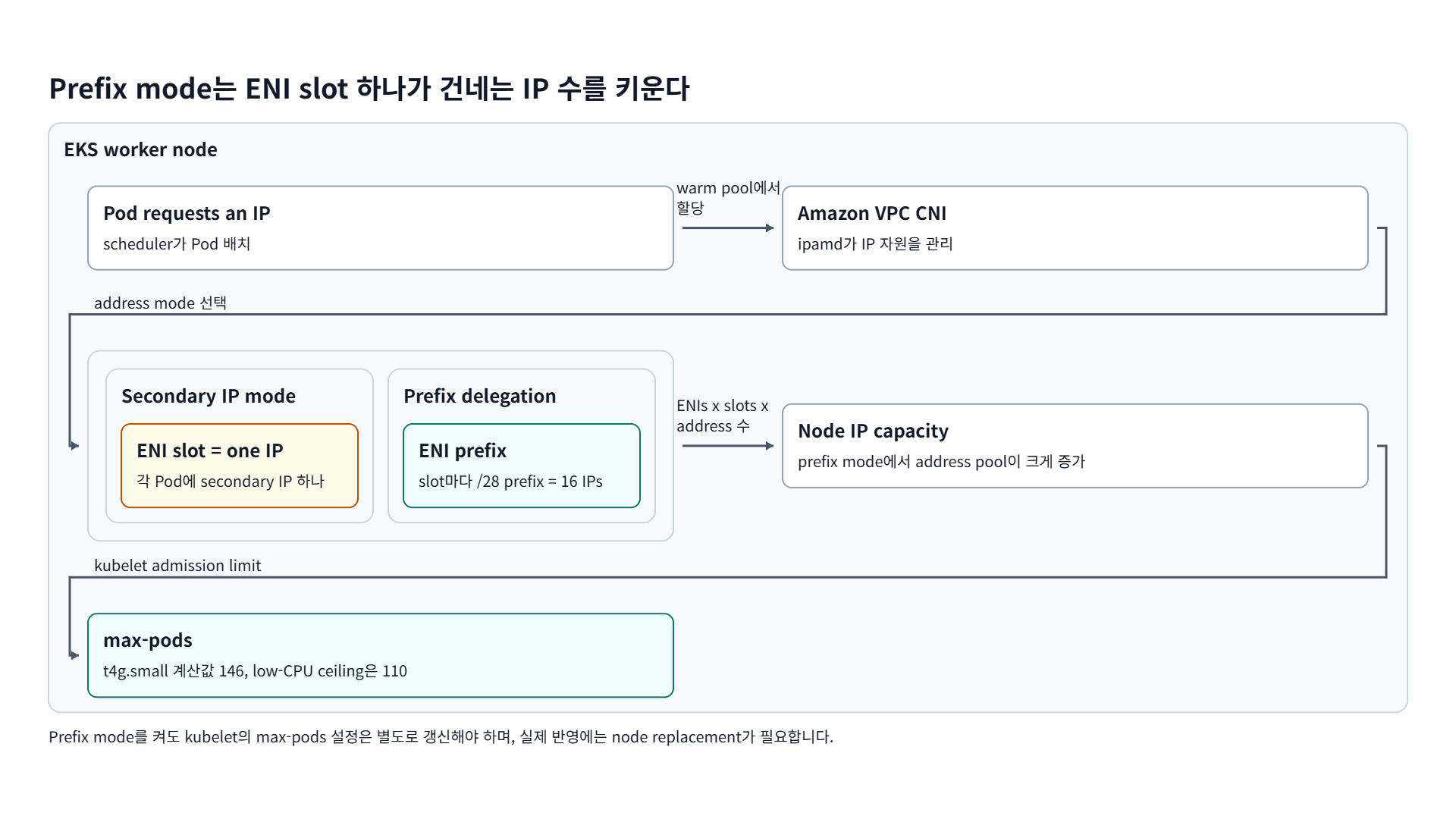
Prefix mode를 켜도 kubelet의 max-pods 설정은 별도로 갱신해야 하며, 실제 반영에는 node replacement가 필요합니다.
AWS EKS를 사용하다 보면 아래와 같이 종종 노드의 CPU, Memory에는 여유가 있지만 max-pods limit 때문에 pod가 더 이상 프로비저닝되지 않는 문제를 만나게 됩니다.
1
2
3
4
5
6
7
8
9
10
11
12
13
14
15
16
17
18
19
20
21
22
23
24
25
26
❯ kubectl get po
NAME                                                READY   STATUS    RESTARTS   AGE
external-secrets-6cddc7bb75-m5qzn                   0/1     Pending   0          33m
external-secrets-cert-controller-64f8978956-xtkqf   0/1     Pending   0          33m
external-secrets-webhook-868d7b5756-h24cj           0/1     Pending   0          29m

❯ kubectl describe po external-secrets-6cddc7bb75-m5qzn | grep "Events" -A10
Events:
  Type     Reason            Age                  From               Message
  ----     ------            ----                 ----               -------
  Warning  FailedScheduling  4m53s (x8 over 33m)  default-scheduler  0/1 nodes are available: 1 Too many pods. preemption: 0/1 nodes are available: 1 No preemption victims found for incoming pod.

## 현재 Running 상태인 파드 개수
❯ kubectl get po -A --no-headers | grep " Running" | wc -l
11

❯ kubectl top no
NAME                                            CPU(cores)   CPU(%)   MEMORY(bytes)   MEMORY(%)
ip-10-0-3-161.ap-northeast-2.compute.internal   42m          2%       799Mi           58%

❯ kubectl get no -o yaml | yq '... | path | join(".")' | grep -i instance-type
items.0.metadata.labels.beta.kubernetes.io/instance-type

❯ kubectl get nodes -o custom-columns=NAME:.metadata.name,CAPACITY_PODS:.status.capacity.pods,ALLOCATE_PODS:.status.allocatable.pods
NAME                                          CAPACITY_PODS   ALLOCATE_PODS
ip-10-0-1-5.ap-northeast-2.compute.internal   11              11
이 현상은 AWS EKS에서 한 노드에 생성할 수 있는 최대 Pod의 개수(max-pods)가 인스턴스 타입마다 달라지는 IP 주소 수에 비례해 결정되기 때문입니다.
TL;DR
- 노드의 CPU와 메모리에 여유가 있어도 Pod가 더 뜨지 않는 이유는 VPC CNI의 IP 할당 한계다. 기본 Secondary IP 모드에서는
maxPods = ENIs * (IPv4PerENI - 1) + 2로 상한이 정해진다.t4g.small은 ENI 3개에 ENI당 IPv4 4개라 상한이 11개다. Kubernetes 권장 상한인 110개보다 훨씬 낮다.- Prefix Mode를 켜면 IP 대신 /28 접두사를 할당해 상한이 올라간다.
aws-node환경변수와 kubelet의maxPods를 모두 바꾼 뒤 노드를 교체해야 실제로 반영된다.
1. EKS Max-Pods Limit이란?
Kubernetes 자체적으로도 한 노드 당 110개의 Pod를 권장 상한으로 두지만 EKS에서는 그보다 낮은 숫자로 노드의 Pod 수를 제한하는 경우가 많습니다. 이 max-pods 제한은 주로 네트워킹 자원, 특히 ENI(Elastic Network Interface)와 IP 주소 할당 한계 때문에 존재합니다.
EKS의 기본 CNI(Container Network Interface)인 Amazon VPC CNI는 각 노드(EC2 인스턴스)에 AWS VPC의 IP 주소들을 할당하여 Pod들이 VPC 네트워크 안에서 통신할 수 있게 합니다. 하지만 EC2 인스턴스마다 연결할 수 있는 ENI 개수와 ENI당 IP 주소 개수가 한정되어 있습니다. 각 ENI의 기본(primary) IP 주소는 노드 자체에 사용되고, 나머지 보조(secondary) IP 주소들만 Pod들에게 할당될 수 있습니다.
노드에 사용 가능한 IP 주소를 모두 소진하면 CPU나 메모리가 남아 있어도 새 Pod에 IP를 할당할 수 없고, 그래서 Pod를 추가로 스케줄링하지 못합니다.
2. Max-Pods Calculator
제가 테스트 환경에서 자주 사용하는 t4g.small(Graviton2, vCPU 2개) 타입의 EC2 노드를 기준으로 Prefix Mode를 사용하지 않았을 때 Max-Pods Limit은 다음과 같이 계산합니다.
maxPods = ENIs × (IPv4PerENI - 1) + 2
t4g.small: 최대 3개의 ENI, ENI 당 최대 4개의 IPv4 주소 사용 가능
=> 3 * (4 - 1) + 2 = 11
AWS에서 제공하는 Max-Pods 계산 툴을 사용하면 특정 인스턴스에 대한 권장 Max-Pods 값을 쉽게 확인할 수 있습니다.
https://github.com/awslabs/amazon-eks-ami/blob/main/templates/shared/runtime/eni-max-pods.txt
https://docs.aws.amazon.com/ko_kr/eks/latest/userguide/choosing-instance-type.html#determine-max-pods
1
2
3
4
5
6
❯ curl -O https://raw.githubusercontent.com/awslabs/amazon-eks-ami/master/templates/al2/runtime/max-pods-calculator.sh

❯ chmod +x max-pods-calculator.sh

❯ ./max-pods-calculator.sh --instance-type t4g.small --cni-version 1.9.0-eksbuild.1
11
3. VPC CNI와 Prefix Mode로 Max Pods Limit 완화하기
위와 같은 문제는 Max Pods Limit을 증가시켜 해결합니다. 바로 VPC CNI의 Prefix Mode 기능을 활성화하는 것입니다.
VPC CNI는 각 노드에서 Pod에 네트워크를 제공하기 위해 노드의 VPC Subnet에서 ENI를 추가로 할당하고, 보조 IP들을 미리 확보(warm pool)하여 관리합니다. 기본 모드에서는 Pod 하나당 VPC의 IP 주소 한 개를 할당하는데, 이 동작 방식을 Secondary IP 모드라고 부릅니다. Secondary IP 모드에서는 앞서 설명한 대로 인스턴스 유형별 ENI 개수 및 ENI당 IP 수의 한계가 곧 Pod 수 제한이 됩니다. 때문에 작은 인스턴스에서는 수십 개 수준으로, 큰 인스턴스도 일반적으로 Kubernetes 권장치인 110개 이하로 제한됩니다.
이 한계를 완화하기 위해 나온 기술이 바로 Prefix Mode(Prefix Delegation)입니다. Prefix Mode는 ENI에 개별 IP 대신 한 번에 IP Block(Prefix)을 통째로 할당하는 방식입니다. IPv4에서 /28 Prefix 하나는 IP 주소 16개를 담고, 이 Prefix 하나가 ENI 하나에 붙습니다. 기존에 ENI 하나에 보조 IP 1개를 붙이던 자리에 /28 네트워크 블록 1개를 붙여서 16개의 IP를 한번에 확보하는 셈입니다. 같은 ENI에서 확보할 수 있는 Pod용 IP 개수는 그만큼 늘어납니다.
위에서 사용한 max-pods-calculator 스크립트로 Prefix Mode를 켰을 때 t4g.small 인스턴스의 Max-Pod Limit을 다시 확인합니다.
maxPods = ENIs × ((IPv4PerENI - 1) × 16) + 2
=> 3 * ((4 - 1) * 16) + 2 = 146
1
2
3
4
5
6
7
8
9
10
11
12
13
14
15
16
17
18
19
20
❯ ./max-pods-calculator.sh --instance-type t4g.small --cni-version 1.9.0-eksbuild.1 --cni-prefix-delegation-enabled
110

# CPU 개수가 2개 밖에 되지 않음으로 110 리턴 (아래 스크립트 참고)

# Limit the total number of pods that can be launched on any instance type based on the vCPUs on that instance type.
MAX_POD_CEILING_FOR_LOW_CPU=110
MAX_POD_CEILING_FOR_HIGH_CPU=250
CPU_COUNT=$(echo $DESCRIBE_INSTANCES_RESULT | jq -r '.CpuCount')

if [ "$SHOW_MAX_ALLOWED" = true ]; then
  echo $max_pods
  exit 0
fi

if [ "$CPU_COUNT" -gt 30 ]; then
  echo $(min_number $MAX_POD_CEILING_FOR_HIGH_CPU $max_pods)
else
  echo $(min_number $MAX_POD_CEILING_FOR_LOW_CPU $max_pods)
fi
3.1. 현재 max-pods 확인
노드의 max-pods는 Kubelet (노드의 Kubernetes 에이전트)이 관리하는 설정으로, 노드가 Kubernetes에 등록될 때 그 값이 함께 설정됩니다. 노드 객체의 status를 보면 capacity에 pods 항목으로 이 최대 Pod 수를 확인할 수 있습니다.
1
2
3
❯ kubectl get nodes -o custom-columns=NAME:.metadata.name,CAPACITY_PODS:.status.capacity.pods,ALLOCATE_PODS:.status.allocatable.pods
NAME                                            CAPACITY_PODS   ALLOCATE_PODS
ip-10-0-1-201.ap-northeast-2.compute.internal   11              11
4. Prefix Mode Enable & Max-Pod Limit 상향 조정
4.1. vpc-cni(aws-node) DaemonSet ENV 수정
1
❯ kubectl set env daemonset aws-node -n kube-system ENABLE_PREFIX_DELEGATION=true
4.2. kubelet max-pods 설정
1
2
3
4
5
6
7
8
9
10
11
12
13
14
15
16
17
18
19
# AL2 => /etc/eks/bootstrap.sh 에 extra-args 추가
/etc/eks/bootstrap.sh <cluster-name> \
  --use-max-pods false \
  --kubelet-extra-args '--max-pods=110'

# AL2023 => cloud‑init User Data에 maxPods 추가 (.spec.kubelet.config.maxPods)
# cloud-init User Data에 Content-Type: application/node.eks.aws로 포함
apiVersion: node.eks.aws/v1alpha1
kind: NodeConfig
spec:
  cluster:
    name: my-cluster
    apiServerEndpoint: https://<endpoint>
    certificateAuthority: <Base64-CA>
  kubelet:
    config:
      maxPods: 110
    flags:
      - --node-labels=role=backend
4.3. Node Rolling Update
aws-node 환경변수와 kubelet maxPods 값을 모두 바꿨다면 새로운 AMI / Launch Template 로 노드를 교체해 주어야 실제 한계치가 반영됩니다. 방법은 두 가지입니다.
EKS Managed Node Group
Launch Template 버전을 올리거나aws eks update-nodegroup-version명령(혹은 Terraform apply)을 실행하면 클러스터가 자동으로 Drain -> Provisioning New Instance -> Delete Old Instance 순서로 롤링 업데이트를 수행합니다.EKS Self Managed Node Group
콘솔에서 Auto Scaling Group -> Instance Refresh -> Start 버튼을 누르거나, aws cli를 통해 노드를 교체합니다.1 2 3
aws autoscaling start-instance-refresh \ --auto-scaling-group-name <YOUR_NODE_GROUP_NAME> \ --preferences '{"MinHealthyPercentage":75,"InstanceWarmup":300}'
4.4. 결과 확인
1
2
3
4
5
6
7
8
9
10
11
12
13
14
15
❯ kubectl get nodes -o custom-columns=NAME:.metadata.name,CAPACITY_PODS:.status.capacity.pods,ALLOCATE_PODS:.status.allocatable.pods
NAME                                            CAPACITY_PODS   ALLOCATE_PODS
ip-10-0-2-201.ap-northeast-2.compute.internal   110             110

## 전체 Pod 개수
❯ kubectl get po -A --no-headers | wc -l
13

## Running 상태인 Pod 개수
❯ kubectl get po -A --no-headers | grep " Running" | wc -l
13

## Running 상태가 아닌 Pod 개수
❯ kubectl get po -A --no-headers | grep -iv " Running" | wc -l
0
5. 결론
EKS의 max-pods 제한은 ENI 개수와 ENI당 IP 주소 한계에서 나옵니다.
VPC CNI의 Prefix Mode를 활성화하면 이 상한이 올라가고, 한 노드에 더 많은 Pod를 띄울 수 있습니다.
실무에 적용할 때는 AWS 공식 문서와 Best Practice를 먼저 확인하시기 바랍니다.
6. 참고자료
접두사를 사용하여 Amazon EKS 노드에 추가 IP 주소 할당 - https://docs.aws.amazon.com/ko_kr/eks/latest/userguide/cni-increase-ip-addresses.html
Amazon EKS 노드에 대해 사용 가능한 IP 주소 증가 - https://docs.aws.amazon.com/ko_kr/eks/latest/userguide/cni-increase-ip-addresses-procedure.html
최적의 Amazon EC2 노드 인스턴스 유형 선택 - https://docs.aws.amazon.com/ko_kr/eks/latest/userguide/choosing-instance-type.html#determine-max-pods
Linux용 접두사 모드 - https://docs.aws.amazon.com/eks/latest/best-practices/prefix-mode-linux.html
Amazon VPC CNI - https://docs.aws.amazon.com/eks/latest/best-practices/vpc-cni.html
7. Reference
- github.com - eni max pods.txt
- docs.aws.amazon.com - choosing instance type
- raw.githubusercontent.com - max pods calculator.sh
- docs.aws.amazon.com - cni increase ip addresses
- docs.aws.amazon.com - cni increase ip addresses procedure
- docs.aws.amazon.com - prefix mode linux
- docs.aws.amazon.com - vpc cni
궁금하신 점이나 추가해야 할 부분은 댓글이나 아래의 링크를 통해 문의해주세요.
Written with KKamJi